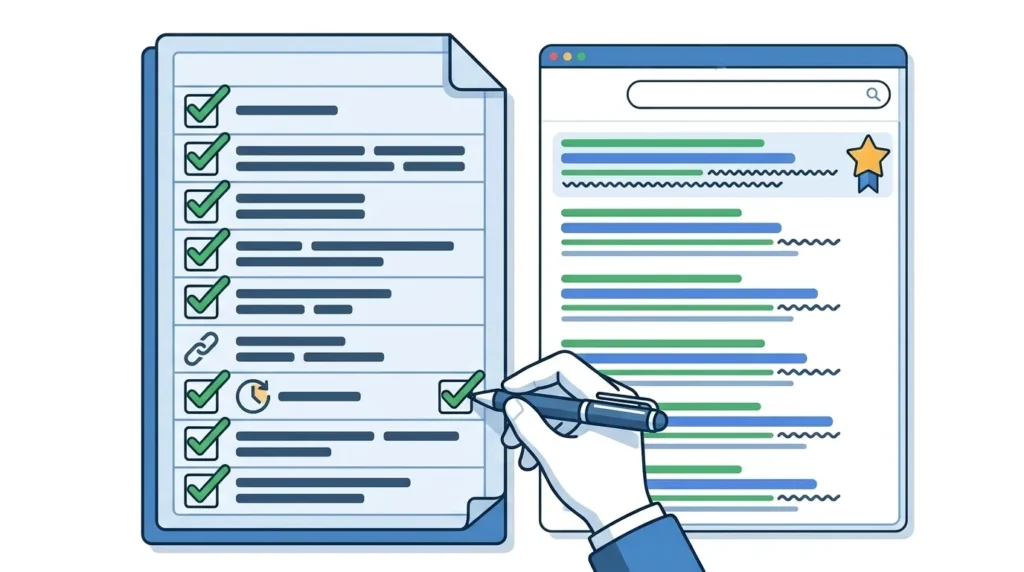
An on page SEO checklist is a structured, step-by-step list of every optimization task that needs to be completed on an individual web page before and after publication to maximize its chances of ranking prominently in Google search results. It is the practical implementation companion to understanding on page SEO theory — translating knowledge into a repeatable, actionable workflow that ensures no optimization opportunity is missed on any page you publish.
Every page on your website — every blog post, every service page, every location page, every product page — should go through a consistent on page SEO checklist before it goes live. Without a checklist, on page optimization becomes inconsistent. Some pages get careful attention while others are published with missing title tags, unoptimized images, and no internal links — leaving significant ranking potential on the table.
This on page SEO checklist covers every element systematically — from keyword research and search intent verification before you write a single word, through title tag and meta description optimization, content quality checks, image optimization, internal linking, page speed verification, schema markup implementation, and post-publication tracking setup. Follow it for every page you publish and your on page SEO will be consistently strong across your entire website.
This checklist is the direct companion to our previous guide on how to do on page SEO — which explains the reasoning and strategy behind every item in this checklist in full detail. Read that guide first if you want to understand the why behind each step. Use this checklist when you want the practical what — the exact actions to take, in the right order, every time.
If you are ready to have professional SEO specialists implement all of this for your Pakistani business, explore our SEO Services to see how SiteNova Agency handles complete on page optimization — and every other dimension of SEO — for clients across Lahore, Karachi, Islamabad, and beyond.
Table of Contents
- What Is an On Page SEO Checklist?
- Before You Start — Pre-Optimization Setup
- Keyword and Search Intent Checklist
- Title Tag Checklist
- Meta Description Checklist
- URL Structure Checklist
- Heading Tags Checklist (H1, H2, H3)
- Content Optimization Checklist
- Image Optimization Checklist
- Internal Linking Checklist
- Page Speed Checklist
- Mobile Optimization Checklist
- Schema Markup Checklist
- User Experience Checklist
- Post-Publication Checklist
- Frequently Asked Questions
- Conclusion
Before You Start — Pre-Optimization Setup
Before optimizing any individual page, ensure these foundational tools and settings are in place. Without them, your on page SEO checklist has no measurement system and no baseline.
Google Search Console Setup
- ☐ Website verified in Google Search Console
- ☐ XML sitemap submitted to Google Search Console
- ☐ Coverage report reviewed — no critical crawl errors present
- ☐ Core Web Vitals report reviewed — current scores noted as baseline
Google Analytics Setup
- ☐ Google Analytics 4 installed and tracking correctly
- ☐ Conversion goals configured — contact form submissions, calls, purchases
- ☐ Search Console linked to Google Analytics account
SEO Plugin Setup (WordPress)
- ☐ Rank Math or Yoast SEO plugin installed and activated
- ☐ Plugin connected to Google Search Console
- ☐ Default schema type configured for your website type
Keyword Research Completed
- ☐ Primary keyword identified through keyword research
- ☐ Search volume verified — keyword has meaningful monthly searches
- ☐ Keyword difficulty assessed — realistic for your domain authority
- ☐ No existing page already targeting this primary keyword (no cannibalization)
- ☐ Focus keyphrase entered in Rank Math or Yoast SEO panel
For a complete keyword research workflow before completing this checklist, our guide on how to do keyword research for SEO covers every step from seed keywords to final keyword map.
Keyword and Search Intent Checklist
Search intent alignment is the single most important on page SEO factor. Before writing any content, verify that your planned approach matches what Google already knows users want for your target keyword.
Search Intent Verification
- ☐ Primary keyword searched in Google — top 5 results analyzed
- ☐ Content type confirmed — blog post, service page, product page, landing page, or guide
- ☐ Content format confirmed — how-to guide, listicle, comparison, definition, checklist
- ☐ Content depth confirmed — approximate word count of top-ranking pages noted
- ☐ Subtopics covered by top-ranking pages identified and noted for inclusion
Keyword Placement Planning
- ☐ Primary keyword planned for first 150 words of content
- ☐ Primary keyword planned for H1 heading
- ☐ Primary keyword planned for at least 2 H2 subheadings
- ☐ Primary keyword planned for meta title
- ☐ Primary keyword planned for meta description
- ☐ Primary keyword planned for URL slug
- ☐ Primary keyword planned for at least one image alt text
Secondary and Semantic Keywords
- ☐ 3 to 5 secondary keywords identified — related terms with separate search intent
- ☐ LSI keywords listed — contextually associated terms that naturally appear in quality content on this topic
- ☐ NLP terms listed — industry-specific entities and concepts Google associates with this topic
- ☐ Question keywords identified — People Also Ask terms to address within content or FAQ section
- ☐ Keyword variants noted — synonyms and natural language variations to use throughout content
4. Title Tag Checklist
Your title tag is the single most important on page SEO element — the clickable headline in Google search results and Google’s primary signal about your page’s topic.
- ☐ Title tag written — not left as WordPress default
- ☐ Primary keyword appears within first 3 words of title
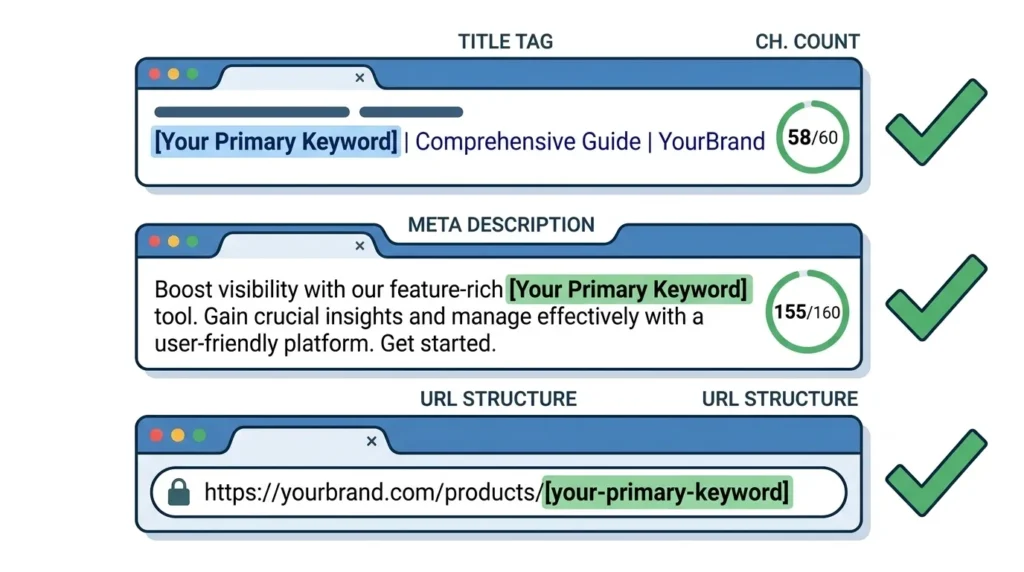
- ☐ Title tag is between 50 and 60 characters — verified with character counter
- ☐ Title is compelling to human readers — includes value signal, number, or power word
- ☐ Brand name included at end — “| SiteNova Agency”
- ☐ Title is unique — not duplicated from any other page on the website
- ☐ Title matches the page’s actual content — no misleading clickbait
- ☐ Title previewed in Rank Math or Yoast snippet preview — looks correct in search result format
- ☐ No keyword stuffing in title — reads naturally as a complete phrase
Good example: On Page SEO Checklist 2026 | SiteNova Agency Pakistan Bad example: SEO Checklist On Page SEO On Page Optimization SEO Guide
Meta Description Checklist
Your meta description does not directly influence rankings but powerfully influences click-through rate — which does influence rankings indirectly. Every page needs a unique, compelling meta description.
- ☐ Meta description written — not left blank or auto-generated
- ☐ Primary keyword appears naturally in meta description — ideally near the beginning
- ☐ Meta description is between 150 and 158 characters — verified with character counter
- ☐ Meta description clearly communicates what the user will gain by clicking
- ☐ Brand name included — “SiteNova Agency explains” or similar
- ☐ Soft call to action included — “Learn how,” “Discover,” “Get the complete guide”
- ☐ Meta description is unique — not duplicated from any other page
- ☐ Meta description previewed in snippet preview — not truncated
- ☐ No keyword stuffing — reads naturally and persuasively
Good example: Complete on page SEO checklist 2026 by SiteNova Agency. Every optimization step for title tags, headings, content, images & speed — ranked & actionable.
URL Structure Checklist
Your URL is an on page SEO signal that communicates page topic to both Google and users before any content is loaded.
- ☐ URL slug manually set — not left as auto-generated WordPress default
- ☐ Primary keyword included in URL slug
- ☐ URL is short — ideally 3 to 5 words, maximum 60 characters
- ☐ Words separated by hyphens — not underscores or spaces
- ☐ URL is all lowercase — no uppercase letters
- ☐ Stop words removed — “a,” “an,” “the,” “and,” “or,” “for” removed where not needed
- ☐ No dates in URL — unless date is essential to the content purpose
- ☐ URL matches page topic — consistent with title tag and H1
- ☐ URL is unique — not duplicated from any other page
Good example: /on-page-seo-checklist Bad example: /2026/07/22/the-complete-guide-to-on-page-seo-checklist-for-beginners/
Heading Tags Checklist (H1, H2, H3)
Heading tags create the structural hierarchy of your page content — telling both readers and Google how your content is organized and which topics are most important.
H1 Checklist
- ☐ Exactly one H1 tag on the page — not zero, not two or more
- ☐ H1 includes primary keyword — ideally near the beginning
- ☐ H1 appears at the very top of page content
- ☐ H1 is unique — different from title tag but closely aligned in meaning
- ☐ H1 clearly communicates what the page is about
- ☐ H1 is written for human readers — not a keyword string
H2 Checklist
- ☐ Content divided into clear sections with H2 headings
- ☐ At least 2 to 3 H2 headings include primary keyword or close synonym
- ☐ H2 headings follow logical flow — each section builds on the previous
- ☐ H2 headings are descriptive — tell readers what each section covers
- ☐ Secondary keywords and semantic terms included naturally in H2 headings
- ☐ No heading levels skipped — H2 comes after H1, H3 comes after H2
H3 Checklist
- ☐ H3 headings used for subsections within H2 sections where needed
- ☐ H3 headings include semantic variations and LSI keywords where natural
- ☐ H3 headings used for genuine content hierarchy — not just visual formatting
Content Optimization Checklist
Content quality is the most important on page SEO factor. This checklist ensures your content satisfies both user needs and Google’s quality evaluation systems.
Content Foundation
- ☐ Primary keyword appears within first 150 words of content
- ☐ Introduction confirms to reader they are in the right place — answers “is this for me?”
- ☐ Content type matches search intent — blog post for informational, service page for transactional
- ☐ Content depth matches or exceeds top-ranking competitor pages
- ☐ All subtopics covered by top-ranking pages are addressed
- ☐ No content gaps — every meaningful aspect of the topic covered
- ☐ Table of contents included for content over 1,500 words
Keyword Usage
- ☐ Primary keyword appears in first 150 words
- ☐ Primary keyword used naturally throughout body content
- ☐ Keyword variants and synonyms used — no robotic exact-match repetition
- ☐ LSI keywords included naturally — contextually associated terms present
- ☐ NLP terms and semantic entities included — signals comprehensive topical coverage
- ☐ No keyword stuffing — content reads naturally for human readers
- ☐ Secondary keywords incorporated naturally in relevant sections
Content Quality
- ☐ Content is original — not copied or closely rewritten from other sources
- ☐ All factual claims are accurate and verifiable
- ☐ First-hand experience or expertise demonstrated — E-E-A-T signals present
- ☐ Author name and bio included — with genuine credentials
- ☐ Content is comprehensive — user has no reason to return to Google for follow-up
- ☐ Paragraphs are short — maximum 3 to 4 sentences each
- ☐ Readability is strong — clear language, active voice, concrete examples
- ☐ FAQ section included — targeting People Also Ask questions for your keyword
- ☐ External link to authoritative source included — naturally placed, relevant to content
Content Length
- ☐ Word count matches or exceeds average of top-ranking pages for this keyword
- ☐ Content length justified by genuine depth — no padding or filler
- ☐ Every section adds genuine value — no repetitive or redundant content
Image Optimization Checklist
Every image on your page is an on page SEO opportunity. This checklist ensures every image contributes to rankings rather than merely adding page weight.
- ☐ All images compressed before upload — file size under 150KB where possible
- ☐ Images converted to WebP format — smaller file size, same visual quality
- ☐ Image dimensions specified in HTML — prevents CLS layout shift
- ☐ Hero image preloaded — reduces LCP load time for above-the-fold image
- ☐ All images have alt text — descriptive, accurate, not keyword-stuffed
- ☐ At least one image alt text includes primary keyword naturally
- ☐ All image file names are descriptive — keyword-containing where natural
- ☐ No generic file names — “IMG_4829.jpg” replaced with “on-page-seo-checklist.jpg”
- ☐ All images are relevant to surrounding content — no decorative stock photos
- ☐ Images are high quality — not pixelated or stretched
- ☐ Lazy loading enabled — images below the fold load only when needed
- ☐ Images include caption where it adds context — optional but valuable
Internal Linking Checklist
Internal links distribute page authority, help Google discover your content, and keep readers engaged with related content. This checklist ensures every page is connected to the rest of your website strategically.
- ☐ Minimum 3 internal links added to the page
- ☐ All internal links use descriptive anchor text — not “click here” or “read more”
- ☐ Anchor text describes the destination page’s content accurately
- ☐ Internal links are contextually placed — where they are genuinely useful to readers
- ☐ No internal links use exact-match anchor text for competitive keywords — keep anchor text varied and natural
- ☐ All internal link destinations are working pages — no broken links
- ☐ This new page is linked to from at least 2 to 3 existing relevant pages — not only outgoing links
- ☐ Most important pages on your site receive the most internal links
- ☐ No orphan pages — every page has at least one internal link pointing to it
- ☐ Internal links open in same tab — do not force external-style opens for internal content
Page Speed Checklist
Page speed directly influences both user experience and Google rankings through Core Web Vitals. This checklist ensures your page meets Google’s performance standards.
Core Web Vitals Targets
- ☐ LCP (Largest Contentful Paint) under 2.5 seconds — verified in PageSpeed Insights
- ☐ INP (Interaction to Next Paint) under 200 milliseconds — verified in PageSpeed Insights
- ☐ CLS (Cumulative Layout Shift) under 0.1 — verified in PageSpeed Insights
- ☐ Overall PageSpeed score above 70 on mobile — verified in PageSpeed Insights
- ☐ Overall PageSpeed score above 85 on desktop — verified in PageSpeed Insights
Speed Optimization Actions
- ☐ Images compressed and in WebP format — covered in image checklist above
- ☐ Browser caching enabled — via hosting settings or caching plugin
- ☐ Gzip or Brotli compression enabled on server — reduces file transfer size
- ☐ CSS and JavaScript minified — unnecessary characters removed from code files
- ☐ Render-blocking resources addressed — non-critical JS deferred or loaded asynchronously
- ☐ CDN implemented — static files served from geographically distributed servers
- ☐ Unnecessary plugins deactivated and deleted — each plugin adds load overhead
- ☐ Database optimized — revisions, spam, and transient data cleared
- ☐ Server response time under 200 milliseconds — hosting quality verified
Test page speed using Google’s free PageSpeed Insights tool at pagespeed.web.dev — it provides specific, prioritized recommendations for every speed issue detected on your specific pages.
12. Mobile Optimization Checklist
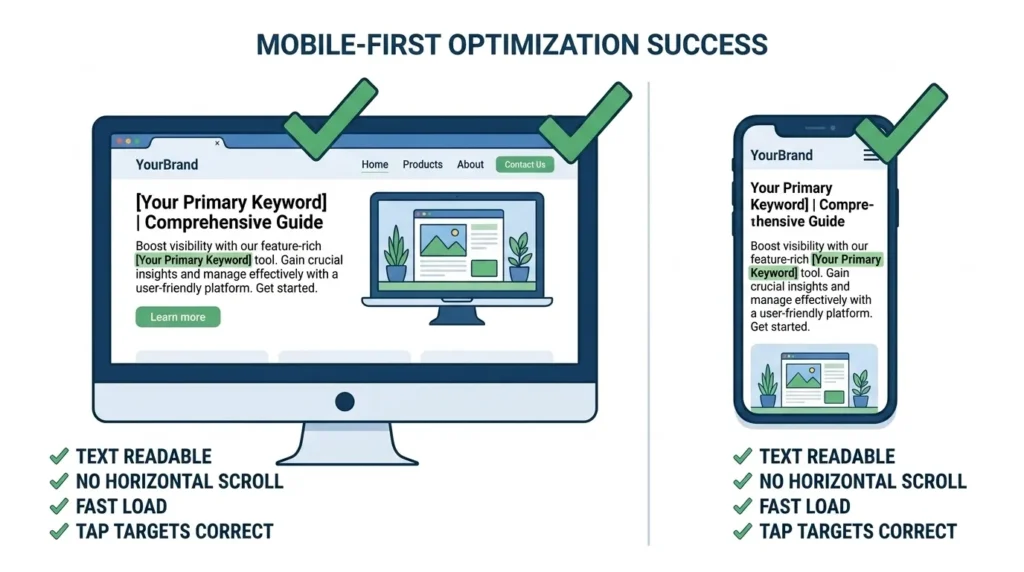
Google uses mobile-first indexing — meaning your mobile experience determines your rankings. Every on page SEO checklist must include thorough mobile verification.
- ☐ Page displays correctly on mobile — verified in browser developer tools or real device
- ☐ Text readable without zooming — minimum 16px font size on mobile
- ☐ No horizontal scrolling required — all content fits within viewport width
- ☐ Tap targets appropriately sized — buttons and links minimum 48×48 pixels
- ☐ Viewport meta tag present —
<meta name="viewport" content="width=device-width, initial-scale=1"> - ☐ Images scale correctly on mobile — no overflow or distortion
- ☐ Navigation works correctly on mobile — menus open and close properly
- ☐ Forms function correctly on mobile — all input fields accessible and submittable
- ☐ Page speed acceptable on mobile — PageSpeed mobile score above 70
- ☐ No intrusive interstitials — pop-ups that cover content on mobile penalized by Google
- ☐ Mobile content identical to desktop content — no elements hidden on mobile that appear on desktop
Schema Markup Checklist
Schema markup tells Google explicitly what your content means — enabling rich results that increase visibility and click-through rates in search results.
General Schema
- ☐ Schema type selected — Article, HowTo, FAQPage, LocalBusiness, Product, or Service
- ☐ Schema implemented via Rank Math schema panel or manual JSON-LD code
- ☐ Schema tested in Google’s Rich Results Test — no errors or warnings
- ☐ Schema validated — all required fields completed
Article Schema (for blog posts)
- ☐ Article headline matches H1
- ☐ Author name and profile URL included
- ☐ Date published and date modified included
- ☐ Featured image specified in schema
FAQPage Schema (for pages with FAQ sections)
- ☐ All FAQ questions and answers included in FAQPage schema
- ☐ Questions match exactly what appears in visible FAQ section
- ☐ Answers are complete — no truncated or partial answers in schema
LocalBusiness Schema (for location pages)
- ☐ Business name matches Google Business Profile exactly
- ☐ Address matches Google Business Profile exactly — NAP consistency
- ☐ Phone number matches Google Business Profile exactly
- ☐ Business hours included
- ☐ Geographic coordinates included
BreadcrumbList Schema
- ☐ Breadcrumb navigation present on page
- ☐ BreadcrumbList schema implemented — shows page hierarchy in search results
User Experience Checklist
User experience signals — how users behave on your page — influence rankings through Google’s quality assessment systems. This checklist ensures your page delivers an experience that keeps users engaged.
- ☐ Introduction immediately confirms the page answers the user’s query
- ☐ Content has clear visual hierarchy — headings, paragraphs, and lists are visually distinct
- ☐ Table of contents present for long-form content — allows navigation to specific sections
- ☐ No intrusive pop-ups on page load — particularly on mobile
- ☐ Call to action present — clear next step for user to take after consuming content
- ☐ Related content links present — guides users to additional relevant resources
- ☐ Contact information accessible — visible without requiring navigation away from page
- ☐ No broken elements — all images load, all buttons work, all forms submit
- ☐ No distracting auto-play media — videos do not play automatically with sound
- ☐ Reading experience is comfortable — appropriate line spacing, contrast, and font size
- ☐ Content delivers on the promise of the title — no clickbait that disappoints
Post-Publication Checklist
On page SEO does not end when you hit publish. These post-publication steps ensure Google discovers your page quickly and your optimization is tracked accurately.
Immediate Post-Publication Actions
- ☐ Page URL submitted to Google Search Console — Request Indexing
- ☐ Page shared on LinkedIn, Twitter/X, and Facebook — social signals support faster indexing
- ☐ New page linked from at least 2 existing relevant pages on your website
- ☐ Google Business Profile post published linking to new content — if locally relevant
- ☐ Page checked live — title tag, meta description, and content displaying correctly
Within First Week
- ☐ Page appearing in Google Search Console impressions — confirming indexation
- ☐ Any crawl errors appearing in Coverage report — addressed immediately
- ☐ Rich results appearing in Rich Results Test — schema working correctly
- ☐ Page speed tested live — verifying production environment speed matches pre-publication tests
Monthly Review
- ☐ Keyword rankings tracked — primary keyword position noted in Search Console
- ☐ Click-through rate reviewed — title and meta description performing adequately
- ☐ Organic traffic to page tracked in Google Analytics
- ☐ User engagement reviewed — time on page, bounce rate, scroll depth
- ☐ Content freshness assessed — statistics, dates, or information requiring updates identified
- ☐ New internal linking opportunities identified — any new pages published that should link here
Quarterly Review
- ☐ Competitor content re-analyzed — any new competitor content outranking this page
- ☐ Content gaps reassessed — new subtopics to add based on search intent evolution
- ☐ Title tag and meta description A/B test — testing alternative versions if CTR is below benchmark
- ☐ Core Web Vitals scores re-verified — any degradation addressed
- ☐ Backlink opportunities identified — any new high-authority sources to approach for links
Frequently Asked Questions About On Page SEO Checklist
Q: How long does it take to complete an on page SEO checklist for one page?
For a new page being created from scratch, completing a thorough on page SEO checklist typically takes 2 to 4 hours — including keyword research, content writing, image optimization, internal linking, schema setup, and speed verification. For optimizing an existing page, the process is typically 45 to 90 minutes depending on how many items need improvement. The investment is consistently worthwhile — a properly optimized page produces compounding organic traffic returns that far exceed the time invested.
Q: Do I need to complete the entire on page SEO checklist for every page?
Yes — every page that you want to rank in Google search results should go through a complete on page SEO checklist. Higher-priority pages — your most important service pages, your most competitive target keywords, and your highest-traffic blog posts — deserve particularly thorough attention. Lower-priority pages still benefit from at minimum completing the core checklist items: title tag, meta description, URL, H1, keyword placement, and image alt text.
Q: What is the most important item on the on page SEO checklist?
Search intent verification — ensuring your content type and depth matches what Google already knows users want for your target keyword — is the most important item because mismatched intent causes failure regardless of how well every other element is optimized. After intent, title tag optimization produces the highest individual impact because it directly influences both Google’s topical understanding and users’ click decision. For the complete explanation of why each checklist item matters, our detailed guide on how to do on page SEO covers every element thoroughly.
Q: How do I know if my on page SEO is working?
Track your primary keyword position in Google Search Console monthly. Look for upward movement in average position, increasing impressions, and improving click-through rates. In Google Analytics, monitor organic traffic to optimized pages and engagement metrics — time on page, bounce rate, and scroll depth. Initial movement typically appears within 2 to 4 weeks of on page optimization. Significant ranking improvements for competitive keywords take 2 to 3 months of consistent optimization and content quality.
Q: Should I use Rank Math or Yoast SEO for my on page SEO checklist?
Both plugins provide excellent on page SEO checklist functionality within WordPress. Rank Math’s free version is generally more comprehensive — offering schema markup implementation, keyword rank tracking integration, and more detailed analysis without requiring a paid upgrade. Yoast SEO’s free version covers the core checklist items well and has a longer track record. For most Pakistani WordPress websites, Rank Math is the recommended choice for its superior free tier features.
Q: How often should I revisit my on page SEO checklist for published pages?
Published pages should be reviewed monthly for quick metric checks and quarterly for comprehensive content audits. Any page that drops in rankings, experiences declining click-through rates, or falls behind competitor content in comprehensiveness should be immediately reassessed and re-optimized. Content freshness — updating statistics, expanding thin sections, and adding new examples — is an ongoing on page SEO responsibility that the post-publication checklist section above covers systematically.
Conclusion — Your On Page SEO Checklist Is Your Ranking Foundation
An on page SEO checklist is not a one-time tool — it is a discipline. The businesses that achieve and maintain strong Google rankings are those that apply consistent, thorough on page optimization to every page they publish — not those that optimize carefully once and then neglect the process for subsequent content.
Every item on this checklist exists because Google uses it as a signal when evaluating whether your page deserves to rank. Skip title tag optimization and Google lacks a clear primary signal of your topic. Publish uncompressed images and your Core Web Vitals scores suffer. Leave alt text blank and you miss both accessibility and relevance signals. Fail to verify search intent and your entire content investment may be misaligned with what users actually want.
The checklist approach transforms on page SEO from an art that depends on remembering every optimization — to a system that produces consistently strong results regardless of who executes it or how many pages need optimization. Build this checklist into your content publication workflow and your on page SEO will be stronger, more consistent, and more effective than the vast majority of your competitors.
For Pakistani businesses building their online presence — whether in Lahore, Karachi, Islamabad, or beyond — consistent on page SEO execution is one of the highest-leverage activities available. Most local competitors publish content without completing even the basic checklist items. Businesses that do complete thorough on page optimization for every page consistently outrank those that do not — often without any additional link building or technical SEO investment.
At SiteNova Agency, our SEO team applies this complete on page SEO checklist to every page we optimize for clients — ensuring consistent, thorough optimization that builds the organic ranking foundation every business needs. If you would like professional SEO specialists to handle your complete on page optimization strategy, visit our SEO Services page to learn how we help businesses across Pakistan achieve first-page Google rankings through expert SEO execution.