
Technical SEO is the process of optimizing your website’s infrastructure — the underlying code, architecture, speed, security, and crawlability — so that search engines can efficiently find, access, understand, and index your content. While on page SEO focuses on what is on your pages and off page SEO focuses on what happens outside your website, technical SEO addresses the foundation that everything else sits on.
Think of technical SEO as the plumbing and electrical systems of your website. Visitors never see them — but without them working correctly, nothing else functions. The most brilliantly written content, the most perfectly optimized title tags, and the strongest backlink profile in your industry cannot produce strong Google rankings if search engine crawlers cannot access your pages, if your website loads in eight seconds, or if critical indexation errors are preventing Google from understanding your content structure.
This technical SEO checklist covers every dimension of technical optimization — from crawlability and indexability through HTTPS security, Core Web Vitals, mobile responsiveness, XML sitemaps, structured data, and duplicate content management. It is designed as a practical audit tool — work through each section systematically to identify and fix every technical issue holding your website back from its ranking potential.
This checklist is the companion to our on page SEO series at SiteNova Agency. For the complete on page optimization workflow, read our guide on how to do on page SEO and our on page SEO checklist. Technical SEO and on page SEO work together as complementary foundations — both must be strong for your website to achieve its full ranking potential.
If you would prefer professional SEO specialists to conduct your complete technical SEO audit and implement every fix, explore our SEO Services — our team handles full technical audits for businesses across Pakistan and internationally.
Table of Contents
- What Is Technical SEO and Why Does This Checklist Matter?
- Crawlability Checklist
- Indexability Checklist
- Site Architecture Checklist
- HTTPS and Security Checklist
- Page Speed and Core Web Vitals Checklist
- Mobile Optimization Checklist
- XML Sitemap Checklist
- Robots.txt Checklist
- Structured Data and Schema Markup Checklist
- Duplicate Content Checklist
- URL Structure Checklist
- Redirect Checklist
- Internal Linking Checklist
- International SEO Checklist
- Technical SEO Tools Checklist
- Post-Audit Action Checklist
- Frequently Asked Questions
- Conclusion
Crawlability Checklist
Crawlability refers to how easily search engine bots — particularly Googlebot — can access and navigate your website. If Google cannot crawl your pages, it cannot index them. If it cannot index them, they cannot rank. Crawlability issues are often invisible to human visitors but silently devastating to search performance.
Googlebot Access
- ☐ Website accessible to Googlebot — no server-level IP blocks affecting crawlers
- ☐ Google Search Console Coverage report reviewed — crawl errors identified
- ☐ Crawl errors in Search Console addressed — server errors (5xx), not found errors (404), redirect errors resolved
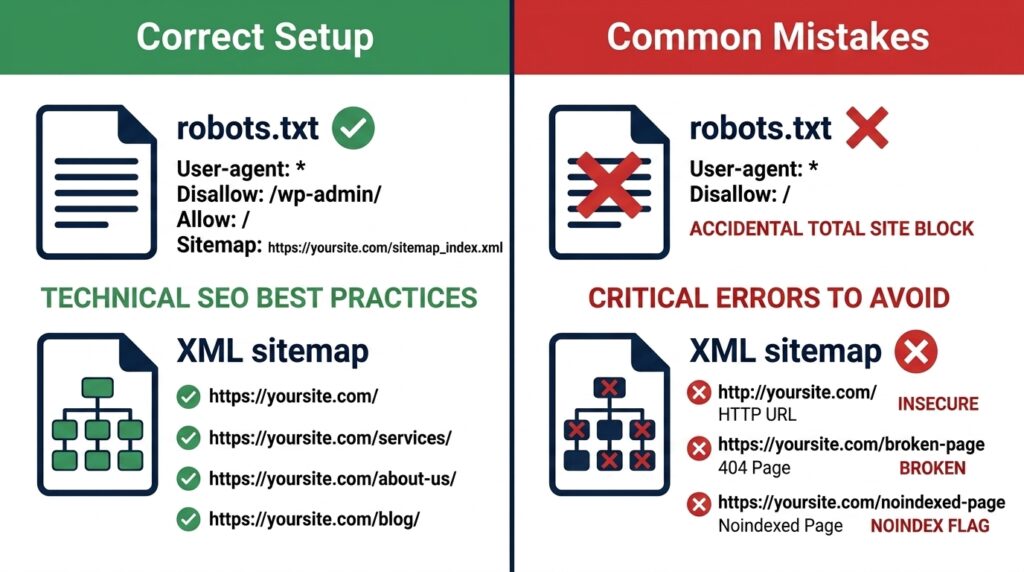
- ☐ No accidental “Disallow: /” in robots.txt — blocking entire website from crawling
- ☐ Login walls or authentication not blocking important content pages
- ☐ No JavaScript-dependent content that Googlebot cannot render — critical content in HTML
Crawl Budget Optimization
- ☐ Crawl budget not wasted on low-value pages — faceted navigation, filtered URLs, session IDs excluded
- ☐ Duplicate URLs consolidated — URL parameters handled via Google Search Console parameter settings
- ☐ Infinite scroll implemented with proper pagination for crawlability
- ☐ Paginated content properly structured — rel=”next” and rel=”prev” implemented or canonical to main page
- ☐ Low-value pages noindexed — tag pages, author archives, date archives not consuming crawl budget
Link Accessibility
- ☐ All important pages reachable within 3 clicks from homepage
- ☐ No orphan pages — every important page has at least one internal link pointing to it
- ☐ Navigation links in HTML — not exclusively in JavaScript that crawlers may miss
- ☐ Sitemap submitted to help Googlebot discover all important pages
Indexability Checklist
Indexability refers to whether Google is actually adding your crawled pages to its search index — the database from which search results are drawn. A page can be crawled but not indexed if it contains signals telling Google not to include it.
Index Status Verification
- ☐ Important pages confirmed as indexed — search Google for
site:yourdomain.comto see indexed pages - ☐ Google Search Console Index Coverage report reviewed — excluded pages analyzed
- ☐ No unintentional noindex tags on important pages — check meta robots tags on all key pages
- ☐ No unintentional noindex in X-Robots-Tag HTTP headers
- ☐ Important pages not blocked by robots.txt from crawling
Noindex Management
- ☐ Pages that should be noindexed correctly tagged — thank you pages, admin pages, duplicate pages
- ☐ Staging or development site blocked from indexing — if publicly accessible
- ☐ Thin or low-quality pages either improved or noindexed — prevents Helpful Content system downgrade
- ☐ Paginated pages beyond page 2 evaluated — noindex or canonical to page 1 where appropriate
Index Freshness
- ☐ Important new pages requested for indexing via Google Search Console URL Inspection
- ☐ Updated pages resubmitted for crawling after significant content changes
- ☐ XML sitemap updated automatically when new content published — plugin handles this in WordPress
Site Architecture Checklist
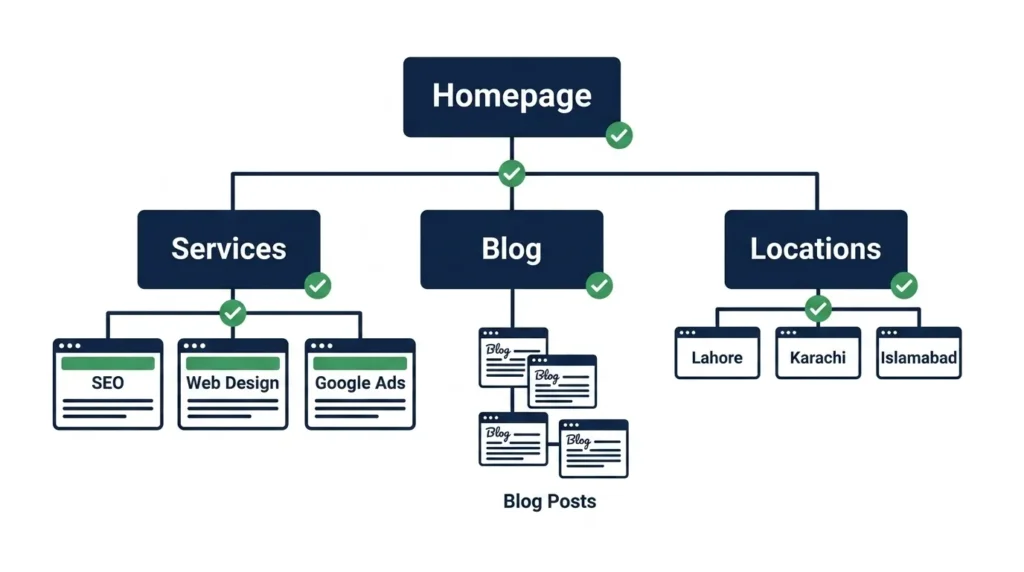
Site architecture — how your pages are organized and connected — affects both crawlability and the distribution of page authority across your website. Good architecture makes your most important pages easier for Google to find and evaluate.
Hierarchy and Depth
- ☐ Website follows clear hierarchy — Homepage → Categories → Individual pages
- ☐ No important page more than 3 clicks from homepage — deeper pages receive less crawl priority
- ☐ URL structure reflects site hierarchy —
/services/seo/is better than/page/?id=247 - ☐ Category and subcategory pages exist where appropriate — helping Google understand content groupings
Navigation Structure
- ☐ Main navigation includes all primary service and content categories
- ☐ Footer navigation includes important pages not in main navigation — location pages, key blog categories
- ☐ Breadcrumb navigation implemented — shows page hierarchy to users and Google
- ☐ Breadcrumb schema markup added — enables breadcrumb display in search results
Content Siloing
- ☐ Related content grouped in logical clusters — all SEO content in SEO category, all web design content together
- ☐ Internal links primarily connect topically related pages — SEO blog posts link to SEO service pages
- ☐ Pillar pages link to cluster pages — cluster pages link back to pillar pages
- ☐ No topical authority diluted by linking unrelated content clusters heavily to each other
HTTPS and Security Checklist
HTTPS — the secure version of HTTP — has been a Google ranking signal since 2014 and a basic trust requirement since 2018 when Chrome began marking non-HTTPS sites as “Not Secure.” Security issues go beyond rankings — they directly damage user trust and conversion rates.
SSL Certificate
- ☐ SSL certificate installed — website accessible via HTTPS
- ☐ SSL certificate valid — not expired (check expiry date and set renewal reminder 30 days before)
- ☐ SSL certificate covers all subdomains where needed — wildcard certificate if multiple subdomains used
- ☐ SSL certificate from trusted Certificate Authority — not self-signed
- ☐ No mixed content warnings — all page resources (images, scripts, stylesheets) loading via HTTPS not HTTP
HTTPS Configuration
- ☐ All HTTP URLs redirect to HTTPS — 301 permanent redirects in place
- ☐ www and non-www versions consistent — one version chosen as canonical, other redirects
- ☐ HTTPS version submitted in Google Search Console — not HTTP version
- ☐ HTTPS version in XML sitemap — all sitemap URLs using HTTPS
- ☐ Internal links all using HTTPS URLs — no internal links to HTTP versions
Security Headers
- ☐ HTTP Strict Transport Security (HSTS) header implemented — forces HTTPS for returning visitors
- ☐ Content Security Policy header configured — prevents cross-site scripting attacks
- ☐ X-Frame-Options header set — prevents clickjacking attacks
Page Speed and Core Web Vitals Checklist
Page speed is a direct Google ranking factor through Core Web Vitals — Google’s specific performance metrics that measure real-world user experience. This is one of the most impactful sections of your technical SEO checklist.
Core Web Vitals Measurement
- ☐ LCP (Largest Contentful Paint) measured — target under 2.5 seconds
- ☐ INP (Interaction to Next Paint) measured — target under 200 milliseconds
- ☐ CLS (Cumulative Layout Shift) measured — target under 0.1
- ☐ Measurements taken in PageSpeed Insights for both mobile and desktop
- ☐ Field data (real user data) reviewed in Search Console Core Web Vitals report
- ☐ URLs failing Core Web Vitals identified and prioritized for fixing
LCP Optimization
- ☐ Hero image identified as likely LCP element — preloaded using
<link rel="preload"> - ☐ Hero image compressed and in WebP format — reduces LCP load time
- ☐ Server response time under 200 milliseconds — fast hosting confirmed
- ☐ Render-blocking CSS eliminated or deferred — critical CSS inlined
- ☐ CDN implemented — static resources delivered from nearest server to user
INP Optimization
- ☐ Heavy JavaScript execution minimized — unnecessary scripts removed
- ☐ Third-party scripts audited — slow or unnecessary third-party scripts removed
- ☐ Event handlers optimized — no long-running JavaScript blocking user interactions
- ☐ Main thread not overloaded — JavaScript tasks broken into smaller chunks
CLS Optimization
- ☐ All images have explicit width and height attributes — prevents layout shift during load
- ☐ Ads and embeds have reserved space — dimensions defined before content loads
- ☐ Web fonts not causing layout shift — font-display: swap implemented
- ☐ Dynamically injected content not inserted above existing content
General Speed Optimization
- ☐ Images compressed — all images under 150KB where possible
- ☐ Images in WebP format — 25 to 35% smaller than JPEG equivalents
- ☐ Lazy loading enabled — below-fold images load only when needed
- ☐ Browser caching configured — static resources cached for returning visitors
- ☐ Gzip or Brotli compression enabled — reduces text file transfer sizes
- ☐ CSS and JavaScript minified — whitespace and comments removed from code files
- ☐ Unused CSS removed — stylesheet bloat eliminated
- ☐ Database optimized — WordPress revisions, spam, and transients cleared
- ☐ Unnecessary plugins deactivated and deleted — each plugin adds load overhead
Test every page with Google PageSpeed Insights — it provides specific, prioritized recommendations for your exact pages.
Mobile Optimization Checklist
Google uses mobile-first indexing — evaluating your mobile experience for ranking purposes. Mobile technical SEO failures directly damage rankings even for users on desktop.
Mobile Rendering
- ☐ Responsive design implemented — single HTML adapts to all screen sizes
- ☐ Viewport meta tag present on all pages —
<meta name="viewport" content="width=device-width, initial-scale=1"> - ☐ No separate mobile subdomain (m.domain.com) — responsive design preferred
- ☐ Mobile version contains identical content to desktop — no content hidden on mobile
Mobile Usability
- ☐ Text readable without zooming — minimum 16px font size
- ☐ No horizontal scrolling — all content within viewport width
- ☐ Tap targets minimum 48×48 pixels — buttons and links tappable without precision
- ☐ Sufficient spacing between tap targets — adjacent links not accidentally tapped
- ☐ No intrusive interstitials — full-screen pop-ups on mobile penalized by Google
- ☐ Forms functional on mobile — all input fields accessible and submittable
Mobile Speed
- ☐ Mobile PageSpeed score above 70 — verified in PageSpeed Insights
- ☐ Mobile-specific LCP under 2.5 seconds — mobile connections often slower than desktop
- ☐ Mobile CLS under 0.1 — mobile rendering verified separately from desktop
XML Sitemap Checklist
An XML sitemap is a file that lists all the important pages on your website, helping Google discover and prioritize crawling your content. A correctly configured sitemap is one of the most important technical SEO foundations.
Sitemap Existence and Accessibility
- ☐ XML sitemap exists — typically at yourdomain.com/sitemap.xml or yourdomain.com/sitemap_index.xml
- ☐ Sitemap accessible — returns 200 status code, not 404 or redirecting
- ☐ Sitemap submitted to Google Search Console — Sitemaps report shows no errors
- ☐ Sitemap URL referenced in robots.txt —
Sitemap: https://yourdomain.com/sitemap.xml
Sitemap Content Quality
- ☐ Sitemap contains only canonical URLs — no noindexed pages, no redirected URLs
- ☐ Sitemap contains only HTTPS URLs — no HTTP versions included
- ☐ Sitemap contains only indexable pages — no admin pages, login pages, or thank-you pages
- ☐ Sitemap does not contain 404 pages — all listed URLs return 200 status
- ☐ Last modified dates accurate — reflects actual date content was last updated
- ☐ Sitemap under 50,000 URLs — split into multiple sitemaps if larger
- ☐ Sitemap file size under 50MB uncompressed
WordPress Sitemap Management
- ☐ Rank Math or Yoast SEO generating sitemap automatically
- ☐ Specific post types excluded from sitemap — author pages, tag pages, date archives excluded
- ☐ Sitemap updates automatically when new content published
- ☐ Image sitemap included — helps Google discover and index images
Robots.txt Checklist
Your robots.txt file instructs search engine crawlers which pages and sections of your website they should and should not access. Errors in robots.txt can accidentally block your entire website from Google.
Robots.txt Basics
- ☐ Robots.txt file exists — accessible at yourdomain.com/robots.txt
- ☐ Robots.txt returns 200 status code — not 404 or server error
- ☐ No “Disallow: /” blocking all crawlers from entire website
- ☐ Sitemap URL referenced in robots.txt
- ☐ Robots.txt tested in Google Search Console Robots.txt Tester
What to Block in Robots.txt
- ☐ Admin pages blocked —
/wp-admin/disallowed (allow/wp-admin/admin-ajax.php) - ☐ Login pages blocked —
/wp-login.phpdisallowed - ☐ Search results pages blocked — internal search result URLs not crawled
- ☐ Cart and checkout pages blocked — for e-commerce sites
- ☐ Duplicate parameter URLs blocked — filtered and sorted URL variations excluded
- ☐ Staging subdirectories blocked — any development or test directories excluded
What NOT to Block in Robots.txt
- ☐ CSS and JavaScript files not blocked — Googlebot needs these to render pages correctly
- ☐ Image files not blocked — images need to be crawlable for image search rankings
- ☐ Important content pages not accidentally blocked — verify all service and blog pages accessible
10. Structured Data and Schema Markup Checklist
Structured data — schema markup — explicitly tells Google what your content means, enabling rich results that increase search visibility and click-through rates. It is one of the most underutilized technical SEO opportunities for Pakistani businesses.
Schema Implementation
- ☐ Schema markup implemented on all key page types — Article, Service, LocalBusiness, FAQPage, BreadcrumbList
- ☐ Schema implemented as JSON-LD — Google’s recommended format, placed in page
<head> - ☐ Schema tested in Google Rich Results Test — no errors or warnings
- ☐ Schema validated in Schema.org validator — all required properties included
- ☐ Rich results appearing in Search Console Enhancement reports — no issues flagged
Schema Types by Page
- ☐ Homepage — Organization or LocalBusiness schema with complete business information
- ☐ Blog posts — Article schema with headline, author, datePublished, dateModified, image
- ☐ Service pages — Service schema with service name, description, provider, area served
- ☐ FAQ sections — FAQPage schema matching visible FAQ content exactly
- ☐ How-to content — HowTo schema with individual step markup
- ☐ Location pages — LocalBusiness schema with NAP matching Google Business Profile exactly
- ☐ All pages — BreadcrumbList schema matching visible breadcrumb navigation
Schema Quality
- ☐ Schema content matches visible page content — no hidden schema different from visible text
- ☐ No misleading schema — schema accurately represents actual page content
- ☐ Author information in Article schema matches real author with genuine credentials
- ☐ LocalBusiness NAP in schema exactly matches Google Business Profile — critical for local SEO
Duplicate Content Checklist
Duplicate content — identical or very similar content appearing on multiple URLs — confuses Google about which version to index and rank, diluting ranking signals across multiple pages instead of concentrating them on one authoritative version.
Canonical Tags
- ☐ Canonical tag present on every page —
<link rel="canonical" href="https://yourdomain.com/page/"> - ☐ Canonical tags point to correct preferred URL — not self-referencing incorrectly
- ☐ No canonical tag conflicts — canonical not pointing to noindexed page
- ☐ Paginated pages handled — canonical to self (not page 1) for pages with unique content
- ☐ Syndicated content uses canonical pointing to original source
Common Duplicate Content Sources
- ☐ www vs non-www — one version chosen, other 301 redirects, canonical on preferred version
- ☐ HTTP vs HTTPS — HTTP redirects to HTTPS, canonical on HTTPS version
- ☐ Trailing slash consistency —
/page/and/pagetreated as same URL via redirect or canonical - ☐ URL parameters not creating duplicate pages — ?ref=, ?session=, ?sort= parameters excluded via canonical or Search Console
- ☐ Printer-friendly page versions excluded via noindex or canonical
- ☐ Tag and category archive pages — thin archives noindexed or given unique content
Content Duplication Across Pages
- ☐ No two pages targeting same primary keyword — keyword cannibalization check complete
- ☐ Location pages have unique content — not identical pages with only city name changed
- ☐ Service pages have unique content — not templated copies with service name swapped
- ☐ No content copied from other websites — all content original
- ☐ Meta descriptions unique across all pages — no duplicate meta descriptions
URL Structure Checklist
URL structure affects both crawlability and on page relevance signals. Clean, logical URLs help Google understand your site hierarchy and page topics.
- ☐ All URLs use HTTPS
- ☐ URLs are lowercase — no uppercase letters creating potential duplicates
- ☐ Words separated by hyphens — not underscores or spaces
- ☐ URLs are descriptive and keyword-rich — not numeric IDs or random strings
- ☐ URLs are concise — 3 to 5 words for most pages, under 60 characters
- ☐ URL structure reflects site hierarchy —
/services/seo/not/seo/ - ☐ No dates in URLs for evergreen content — dates create outdated appearance
- ☐ No special characters in URLs — parentheses, ampersands, question marks avoided
- ☐ Stop words removed from URLs where not needed — “a,” “the,” “and” removed
- ☐ No URL changes to existing pages without 301 redirects — never change a URL without redirecting old version
Redirect Checklist
Redirects — when one URL automatically sends users and crawlers to a different URL — are essential for maintaining SEO equity when pages move or are deleted. Incorrectly managed redirects waste authority and confuse both users and search engines.
Redirect Audit
- ☐ All 301 redirects verified — old URLs correctly redirecting to new URLs
- ☐ No redirect chains — A → B → C should be shortened to A → C directly
- ☐ No redirect loops — A → B → A causing infinite loops
- ☐ No 302 (temporary) redirects used for permanent moves — 302s do not pass full SEO equity
- ☐ Deleted pages redirect to most relevant existing page — not always homepage
- ☐ Old domain redirecting to new domain if domain change occurred — 301 on all pages
Common Redirect Issues
- ☐ Homepage redirect correct — non-www to www (or vice versa) working
- ☐ HTTP to HTTPS redirects working for all pages — not just homepage
- ☐ Trailing slash redirects consistent — /page and /page/ redirecting to one version
- ☐ Old blog post URLs from platform migration redirecting to new URLs
- ☐ 404 pages checked — important deleted pages redirected, unimportant ones left as proper 404
Internal Linking Checklist
Internal linking is both an on page SEO and technical SEO concern — it determines how Google’s crawlers navigate your website and how page authority flows between pages.
- ☐ No broken internal links — all internal links returning 200 status codes
- ☐ No internal links pointing to redirecting URLs — link directly to final destination URL
- ☐ No internal links to noindexed pages — passes authority to uncrawlable destinations
- ☐ Most important pages receive most internal links — homepage, main service pages, key blog posts
- ☐ Orphan pages eliminated — every page has at least one internal link pointing to it
- ☐ Anchor text descriptive and varied — not all exact-match, not all generic
- ☐ Deep pages linked from higher authority pages — new content linked from established pages
- ☐ Navigation links crawlable — not rendered exclusively by JavaScript
- ☐ Sidebar and footer links not over-optimized — varied anchor text, not repetitive keyword links
International SEO Checklist
For businesses targeting multiple countries or languages, international technical SEO ensures Google shows the correct version of your content to users in each target market.
- ☐ Hreflang tags implemented if multiple language versions exist — tells Google which language/region each page targets
- ☐ Hreflang tags reference all language versions including self-referential tag
- ☐ Hreflang tags consistent — every version of a page references every other version
- ☐ Country or language targeting set in Google Search Console — if targeting specific country
- ☐ ccTLD, subdomain, or subdirectory strategy chosen consistently — not mixed approaches
- ☐ Geotargeting not applied to content intended for global audiences
- ☐ Currency and contact information localized for each target market
Note: For SiteNova Agency targeting Pakistan and US markets, hreflang is not required as both markets use English. Country targeting for Pakistani pages can be set in Google Search Console.
Technical SEO Tools Checklist
Using the right tools makes technical SEO auditing systematic and comprehensive. These are the most important tools for completing your technical SEO checklist effectively.
Free Tools
- ☐ Google Search Console — crawl errors, indexation, Core Web Vitals, search performance, schema enhancements
- ☐ Google PageSpeed Insights (pagespeed.web.dev) — Core Web Vitals and speed recommendations
- ☐ Google Rich Results Test — validates schema markup
- ☐ Google Mobile-Friendly Test — confirms mobile rendering
- ☐ Bing Webmaster Tools — additional crawl data and SEO insights
- ☐ Robots.txt Tester in Search Console — validates robots.txt rules
Freemium Tools
- ☐ Screaming Frog SEO Spider (free up to 500 URLs) — comprehensive technical site crawl identifying broken links, duplicate content, missing meta tags, redirect chains, and more
- ☐ Ahrefs Webmaster Tools (free) — backlink profile and basic site audit
- ☐ GTmetrix (free tier) — page speed analysis with waterfall charts
WordPress Specific
- ☐ Rank Math or Yoast SEO — on page SEO, schema markup, XML sitemap, robots.txt management
- ☐ WP Rocket or W3 Total Cache — caching, minification, and speed optimization
- ☐ ShortPixel or Imagify — image compression and WebP conversion
- ☐ Broken Link Checker — identifies broken internal and external links
Post-Audit Action Checklist
Completing a technical SEO audit is only valuable if the identified issues are actually fixed. This post-audit checklist ensures systematic resolution of every technical issue found.
Prioritization Framework
- ☐ Issues categorized by severity — Critical (blocking indexation), High (significantly damaging rankings), Medium (reducing performance), Low (minor improvements)
- ☐ Critical issues addressed first — crawl blocks, noindex errors, SSL failures, complete indexation failures
- ☐ High priority issues scheduled within 1 week — Core Web Vitals failures, major redirect issues, duplicate content problems
- ☐ Medium priority issues scheduled within 1 month — schema implementation, image optimization, internal linking gaps
- ☐ Low priority issues scheduled within 3 months — minor URL improvements, additional schema types
Verification After Fixes
- ☐ Each fix verified after implementation — confirmed working correctly
- ☐ Affected pages resubmitted to Google via Search Console URL Inspection
- ☐ Google Search Console errors confirmed resolved — no longer appearing in reports
- ☐ PageSpeed Insights scores re-checked after speed optimizations
- ☐ Rich Results Test re-run after schema implementation
Ongoing Technical SEO Maintenance
- ☐ Monthly Search Console review — new crawl errors, indexation changes, Core Web Vitals alerts
- ☐ Quarterly Screaming Frog crawl — identifies new technical issues as site grows
- ☐ SSL certificate renewal tracked — reminder set 30 days before expiry
- ☐ Plugin and theme updates applied promptly — security and compatibility maintained
- ☐ New pages verified for technical correctness before and after publication
Frequently Asked Questions About Technical SEO Checklist
Q: What is technical SEO and how is it different from on page SEO?
Technical SEO addresses your website’s infrastructure — crawlability, indexability, speed, security, site architecture, and structured data — ensuring search engines can find, access, and properly evaluate your content. On page SEO addresses the visible elements of individual pages — content, title tags, headings, keywords, and images. Both are essential and complementary. Technical SEO creates the foundation that allows on page SEO to deliver its full value. For the complete on page SEO workflow, read our on page SEO checklist which covers every on page element systematically.
Q: How often should I run a technical SEO audit?
A comprehensive technical SEO audit using tools like Screaming Frog should be conducted quarterly. Monthly reviews of Google Search Console are essential for catching crawl errors, indexation issues, and Core Web Vitals problems as they arise. Additionally, run a technical check any time you make significant website changes — platform migrations, URL structure changes, major plugin updates, or redesigns — as these commonly introduce new technical issues.
Q: What is the most critical item on a technical SEO checklist?
Crawlability is the most critical — if Googlebot cannot access your pages, nothing else matters. The most common catastrophic crawlability error is an accidental “Disallow: /” in robots.txt that blocks all crawlers from your entire website. This single error can cause complete disappearance from Google search results. Check your robots.txt first in any technical SEO audit. After crawlability, SSL certificate validity and Core Web Vitals scores are the next highest-impact items.
Q: Do I need developer expertise to fix technical SEO issues?
Some technical SEO fixes are straightforward and can be implemented without development skills — particularly for WordPress websites where plugins handle most technical configurations. Submitting a sitemap in Search Console, configuring robots.txt via a plugin, adding schema markup through Rank Math, and optimizing images are all accessible to non-developers. More advanced fixes — server-level HTTPS configuration, implementing security headers, fixing JavaScript rendering issues, and resolving complex redirect chains — typically require developer involvement.
Q: How long does it take to see results after fixing technical SEO issues?
Results timeline varies by issue type. Crawlability and indexation fixes often show results within days to weeks — Google recrawls and reindexes fixed pages relatively quickly once they are accessible. Page speed improvements through Core Web Vitals optimization typically influence rankings within 4 to 8 weeks. Schema markup implementation can generate rich results within 2 to 4 weeks. The overall pattern is that technical SEO fixes produce faster ranking responses than content-based changes — because you are removing barriers to existing ranking potential rather than building new signals.
Q: What tools do I need for a technical SEO audit in Pakistan?
For most Pakistani businesses, the completely free tools — Google Search Console, Google PageSpeed Insights, Google Rich Results Test, and Google Mobile-Friendly Test — provide sufficient data for a comprehensive technical SEO audit. For a more complete crawl-based audit identifying all technical issues across your entire website, the free version of Screaming Frog (up to 500 URLs) covers most small to medium Pakistani business websites. For WordPress sites, Rank Math provides technical SEO management including sitemaps, robots.txt, schema markup, and redirect management within a single free plugin.
Conclusion — Technical SEO Is the Foundation That Makes Everything Else Work
Your technical SEO checklist is not a one-time project — it is an ongoing maintenance system that protects your website’s ability to rank and grow. Every piece of content you create, every backlink you earn, and every on page optimization you implement delivers its full value only when built on a technically sound foundation.
The businesses that maintain clean technical SEO — fast-loading pages, accessible crawling, correct indexation, valid schema markup, and consistent site architecture — consistently outperform technically neglected competitors even when other SEO factors are equal. In Pakistan’s growing digital market, where technical SEO remains significantly underinvested across most business websites, fixing your technical foundation represents one of the highest-leverage SEO improvements available.
Work through this technical SEO checklist systematically — starting with crawlability and indexability, then security and page speed, then architecture and schema. Prioritize critical issues first. Verify every fix after implementation. Schedule quarterly re-audits to catch new issues before they compound.
At SiteNova Agency, our SEO team conducts comprehensive technical SEO audits for businesses across Pakistan — identifying every issue, prioritizing fixes by impact, implementing solutions, and monitoring results. If you want professional technical SEO expertise applied to your website, visit our SEO Services page to learn how we build technically excellent websites that rank and grow.