A website redesign is the process of overhauling an existing website — changing its visual design, structure, content, and technical foundation — to better serve current business goals, user expectations, and search engine requirements. Unlike a minor update (changing a color or adding a page), a redesign fundamentally reimagines how the website looks, works, and performs.
The decision to redesign is one of the most significant digital investments a business makes — and one of the most frequently mishandled. Done correctly, a website redesign improves user experience, increases conversion rates, strengthens SEO rankings, and modernizes brand perception. Done incorrectly, it destroys years of accumulated organic rankings, loses established backlink equity, and breaks the user journeys that were generating leads.
Understanding when your website genuinely needs a redesign — versus when a targeted refresh would achieve the same goals at lower risk — is the first critical decision.
Signs Your Website Needs a Redesign
It fails on mobile. If your website is not responsive — requiring users to pinch to zoom, scroll horizontally, or struggle with tiny tap targets — it is actively failing the majority of its visitors and losing search rankings to responsive competitors. For a complete understanding of what responsive design requires, our guide on what is responsive web design covers every technical requirement.
Core Web Vitals are failing. A website consistently failing LCP, INP, or CLS thresholds in Google Search Console is losing search rankings every day it remains unfixed. If performance issues are structural — not fixable through optimization of the existing site — a redesign is justified.
Conversion rate is persistently low. If visitors arrive but do not contact, inquire, or purchase — and analytics show high bounce rates, low dwell time, and abandoned user journeys — the website is failing its primary business purpose.
The design is more than 4 to 5 years old. Design trends, user expectations, and technical standards evolve rapidly. A website that looked modern in 2020 can appear dated and untrustworthy in 2026 — particularly to first-time visitors comparing you against competitors with current designs.
Brand has significantly evolved. If your business has repositioned, rebranded, expanded its services, or changed its target market, the existing website may misrepresent what your business actually offers and to whom.
CMS or platform is outdated. A website built on an abandoned platform, severely outdated CMS version, or heavily customized codebase that is difficult to update and maintain needs a redesign to a maintainable foundation.
This guide is part of our web design and SEO series at SiteNova Agency. For the SEO context that must underpin every redesign decision, read our technical SEO checklist and on page SEO checklist before beginning any redesign project. And if your website maintenance has been neglected — contributing to the need for redesign — our guide on why website maintenance is important explains how to prevent the same situation recurring after your new site launches.
Table of Contents
- What Is a Website Redesign and When Do You Need One?
- Website Redesign vs Website Refresh — Know the Difference
- The Biggest Mistake in Website Redesign — Losing Your SEO
- Phase 1 — Pre-Redesign Audit and Baseline Documentation
- Phase 2 — Goal Setting and Success Metrics
- Phase 3 — Information Architecture and Navigation Planning
- Phase 4 — Design — UX, Visual Identity, and Wireframing
- Phase 5 — Development on a Staging Environment
- Phase 6 — SEO Migration Planning
- Phase 7 — Content Migration and Optimization
- Phase 8 — Pre-Launch Technical Checklist
- Phase 9 — Launch Day Procedure
- Phase 10 — Post-Launch Monitoring and Recovery
- Website Redesign Cost in Pakistan — What to Expect
- Website Redesign for WordPress — Specific Guidance
- Frequently Asked Questions
- Conclusion
Website Redesign vs Website Refresh — Know the Difference
Many businesses undertake a full redesign when a targeted refresh would achieve their goals at lower cost, lower risk, and significantly lower disruption to existing SEO performance.
| Factor | Website Refresh | Full Website Redesign |
|---|---|---|
| Scope | Visual updates, content changes | Complete structural and visual overhaul |
| URL changes | None | Possible — requiring redirect planning |
| CMS change | No | Possible |
| SEO risk | Minimal | Significant if not managed correctly |
| Timeline | 2–6 weeks | 2–6 months |
| Cost | Low–Medium | Medium–High |
| Best when | Design outdated, content stale | Structure broken, platform outdated, brand repositioned |
When a Refresh Is Sufficient
- Updating visual design (colors, fonts, imagery) without changing page structure
- Rewriting content without changing URLs
- Adding new pages without removing or restructuring existing ones
- Improving page speed through optimization without rebuilding the site
- Updating calls to action and conversion elements
When a Full Redesign Is Required
- Changing the URL structure of existing pages
- Migrating to a different CMS or platform
- Completely restructuring site navigation and information architecture
- Combining or splitting existing pages (changing what content lives at what URL)
- Fundamental repositioning of the brand requiring different content architecture
The Biggest Mistake in Website Redesign — Losing Your SEO
Before covering the redesign process, understanding the most common and most costly website redesign failure is essential: destroying years of accumulated SEO equity through incorrect migration handling.
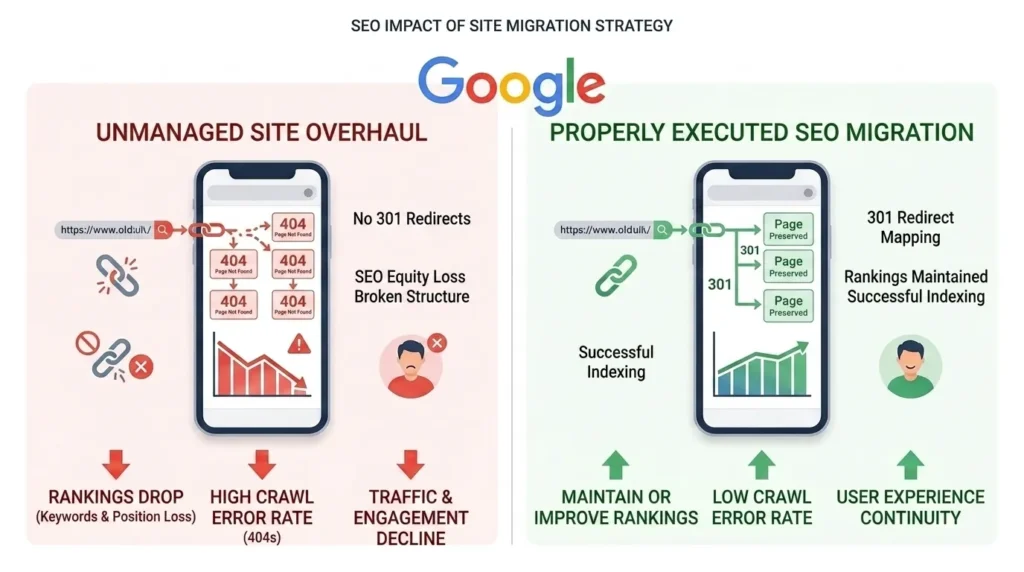
Every established website has SEO value embedded in its existing structure — backlinks pointing to specific URLs, Google’s understanding of page topics built over months of crawling, keyword rankings earned through content quality and authority accumulation, and indexed pages that drive organic traffic. When a redesign changes URLs, removes content, or alters page structure without proper SEO migration planning, this accumulated value is destroyed overnight.
What Happens When SEO Migration Is Ignored
A business redesigns its website — moving from a WordPress site to a new platform, or simply restructuring URLs. The old URL /services/seo-lahore becomes /seo-services/lahore in the new design. Without a 301 redirect from the old URL to the new one, every backlink pointing to /services/seo-lahore now leads to a 404 error — the link equity from those backlinks is lost. Google’s index still contains the old URL — when it discovers it now returns 404, it removes the page from its index. Rankings disappear.
This scenario plays out thousands of times every month — businesses invest significantly in redesigns that produce worse search performance than the old website, often requiring months of recovery work.
The good news: with proper planning, a website redesign can be executed without SEO loss — and sometimes with SEO improvement, if the new site corrects existing technical problems.
Phase 1 — Pre-Redesign Audit and Baseline Documentation
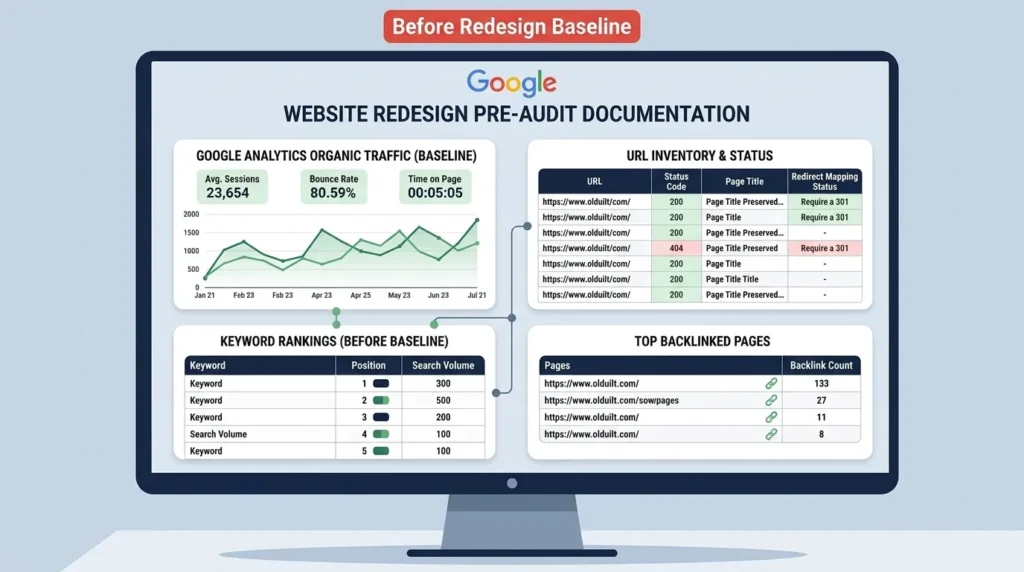
The most important phase of any website redesign happens before a single design element is created. Comprehensive pre-redesign documentation establishes the baseline that all post-launch performance is measured against and the SEO assets that must be preserved through the migration.
Analytics Baseline Documentation
Before any redesign work begins, document current performance metrics in detail:
Google Analytics — last 12 months:
- Total organic sessions by month
- Top 20 organic landing pages by sessions
- Organic conversion rate per landing page
- Bounce rate and average session duration by page
- Traffic by device (mobile vs desktop vs tablet)
Google Search Console — last 12 months:
- Top 50 keywords by clicks and impressions
- Average position for primary target keywords
- Click-through rates for top pages
- Core Web Vitals status — which pages pass, which fail
- Mobile usability issues — current count and types
- Coverage report — indexed pages, excluded pages, errors
This baseline data serves two purposes: it identifies which pages and keywords are most valuable (and must be preserved), and it provides the benchmark against which post-launch performance is measured to detect any ranking losses quickly.
Content Inventory
Create a complete inventory of every URL on the existing website. Use Screaming Frog (free up to 500 URLs) to crawl the site and export every URL with its:
- Page title
- Meta description
- H1 heading
- Word count
- Inbound internal links
- HTTP status code
- Canonical URL
This content inventory becomes the migration map — identifying which pages stay, which are consolidated, which are deleted, and which are restructured — with SEO preservation requirements for each decision.
Backlink Profile Documentation
Use Google Search Console’s Links report or a tool like Ahrefs to document the backlinks pointing to your most important pages. Any URL that receives significant external backlinks must either be preserved at the same URL or receive a 301 redirect to the new URL — loss of these redirects means loss of backlink equity.
Sort backlinks by referring domain authority — prioritize 301 redirect implementation for pages with the most valuable backlinks.
Keyword Ranking Snapshot
Export your current keyword rankings for all tracked terms — use Google Search Console or a rank tracking tool. This snapshot becomes the recovery benchmark if rankings drop post-launch — allowing you to identify specifically which keywords and pages declined and target recovery efforts precisely.
Phase 2 — Goal Setting and Success Metrics
A website redesign without clearly defined goals produces a redesigned website that may look better but performs no more effectively than its predecessor. Every design and content decision in the redesign must be anchored to specific, measurable business objectives.
Defining Redesign Goals
Lead generation improvement: If the primary goal is more contact form submissions or phone calls, the redesign must prioritize conversion rate optimization — prominent calls to action, clear value propositions, trust signals (testimonials, case studies), and streamlined contact paths.
Organic traffic growth: If the goal is more organic search visibility, the redesign must incorporate improved content architecture, better on page SEO, technical SEO improvements, and expanded content coverage of target keywords.
Brand repositioning: If the business has moved upmarket or shifted its target audience, the redesign must reflect the new positioning — through visual design, messaging, case studies, and pricing presentation.
Performance improvement: If Core Web Vitals failures are damaging rankings and user experience, the redesign must produce a technically superior site — faster, more stable, better structured.
Setting Measurable Success Metrics
| Goal | Success Metric | Measurement Tool |
|---|---|---|
| More leads | Contact form submissions +X% | Google Analytics Goals |
| Better rankings | Average position improvement | Google Search Console |
| More organic traffic | Organic sessions +X% | Google Analytics |
| Better performance | Core Web Vitals — all green | PageSpeed Insights |
| Lower bounce rate | Bounce rate reduction | Google Analytics |
| Mobile improvement | Mobile usability issues — zero | Search Console |
Define specific targets before the redesign begins — not after. Without targets, there is no objective measure of redesign success.
Phase 3 — Information Architecture and Navigation Planning
Information architecture — how content is organized and how users navigate between it — is the structural foundation of the redesigned website. Poor information architecture makes excellent design and content invisible — users cannot find what they need and leave.
Sitemap Planning
Create a complete sitemap for the new website — every page that will exist, organized in its hierarchical structure. This sitemap drives all subsequent decisions: navigation structure, URL structure, internal linking plan, and content requirements.
Common sitemap structure for a Pakistani agency website:
Homepage
├── Services
│   ├── SEO Services
│   ├── Web Design
│   ├── Content Marketing
│   └── Google Ads
├── Locations
│   ├── Digital Marketing Lahore
│   ├── Digital Marketing Karachi
│   └── Digital Marketing Islamabad
├── Blog
│   ├── SEO Category
│   ├── Web Design Category
│   └── Digital Marketing Category
├── About
├── Case Studies
└── Contact
Every page in this sitemap corresponds to a URL that needs to exist in the new website — and if it existed in the old website, a redirect plan.
Navigation Structure Planning
Navigation must reflect how users think about your content — not how your organization thinks about it internally. Common navigation mistakes: using internal department names as navigation labels, organizing by company process rather than user needs, creating too many top-level items (cognitive overload).
Navigation best practices for Pakistani business websites:
- Maximum 6 to 7 top-level navigation items
- Dropdown menus for services and locations — not for everything
- Clear, action-oriented labels: “Get SEO Help” not “Department Services”
- Mobile hamburger menu that reveals the complete navigation — not a truncated version
URL Structure Planning
If URLs are changing in the redesign, plan the new URL structure before any development begins — and map every old URL to its new destination in a redirect spreadsheet. Clean URL structure for the new site:
- Short, keyword-rich —
/seo-services-lahorenot/services/search-engine-optimization/lahore-pakistan - Consistent hierarchy — all service pages under
/services/, all blog posts under/blog/ - Lowercase, hyphens — no underscores, no special characters
- No dates in evergreen content URLs
Phase 4 — Design — UX, Visual Identity, and Wireframing
With information architecture defined and goals set, the design phase translates structure into visual experience. Effective website redesign design starts with user experience — not visual aesthetics.
UX Research and Heatmap Analysis
Before designing new pages, analyze how users interact with the existing site. Heatmap tools (Hotjar, Microsoft Clarity — both have free tiers) show where users click, how far they scroll, and where they leave. This behavioral data reveals:
- Which page sections users engage with most — preserve and feature prominently in the redesign
- Where users abandon the page — elements creating confusion or friction to be redesigned
- What users are trying to click that is not clickable — desired functionality to add
- How far users scroll — whether important content is being missed below the fold
Worked Example: Heatmap analysis of a Pakistani agency’s homepage reveals 70% of users scroll no further than the services section. The existing “Our Results” case study section is positioned below the fold and receives almost no views. In the redesign, case studies are moved above the fold — directly after the hero section — where they are seen by the full audience rather than 30%.
Wireframing
Wireframes are low-fidelity layout sketches — showing page structure, content hierarchy, and element positioning without visual design. Wireframing every key page template before visual design prevents expensive redesigns when clients realize they dislike a structural decision after full design is complete.
Key pages to wireframe:
- Homepage
- Service page template
- Blog post template
- Location page template
- Contact page
Visual Design Principles for Pakistani Businesses
Typography: Use maximum two typeface families — one for headings, one for body. Minimum 16px body text for mobile readability. Sufficient line-height (1.5 to 1.7) for comfortable reading.
Color: Establish a primary brand color, one complementary accent color, and neutral backgrounds. Sufficient contrast ratio (minimum 4.5:1 for body text per WCAG 2.1) for accessibility and readability.
Whitespace: More whitespace than you think is needed. Pakistani website design commonly errs toward content density — too many elements competing for attention. Generous whitespace improves perceived quality and directs attention to what matters.
Imagery: Real photography of real team members and real work consistently outperforms stock photography for trust and conversion. If budget allows, invest in professional photography before the redesign launches.
Phase 5 — Development on a Staging Environment
All website redesign development must happen on a staging environment — a private, non-indexed copy of the website on a development server — never directly on the live website.
Staging Environment Requirements
- Completely blocked from Google indexing —
robots.txt Disallow: /or password protection - Identical server configuration to production — same PHP version, same WordPress version, same plugins
- SSL certificate installed — development must match production environment
- Accessible to client and team for review — password-protected staging link
WordPress Staging Setup
For WordPress redesigns — the majority of Pakistani business websites — staging can be set up using:
- Local development: Local by Flywheel, MAMP, or XAMPP for local development
- Hosting staging: Most quality WordPress hosts (SiteGround, WP Engine, Kinsta) provide one-click staging environments
- Plugin staging: WP Staging plugin creates a staging copy on the same server
Development Checklist During Build
Performance from day one:
- ☐ Caching plugin configured — WP Rocket or W3 Total Cache
- ☐ Image optimization plugin active — ShortPixel or Imagify
- ☐ CDN configured if applicable
- ☐ Database optimization set up
SEO from day one:
- ☐ Rank Math or Yoast SEO installed and configured
- ☐ XML sitemap generating correctly
- ☐ Robots.txt correctly configured
- ☐ No noindex accidentally applied to important pages
- ☐ Schema markup configured for all page types
Responsive design verification:
- ☐ Every page template tested on mobile, tablet, desktop
- ☐ All images using
max-width: 100%and responsive srcsets - ☐ Navigation functioning correctly on mobile
- ☐ All forms functional on mobile
- ☐ Touch targets meeting 48px minimum size
Phase 6 — SEO Migration Planning
SEO migration planning is the most technically critical phase of any website redesign that changes URLs, restructures content, or moves platforms. It must be completed in full before launch — not as an afterthought.
The 301 Redirect Map
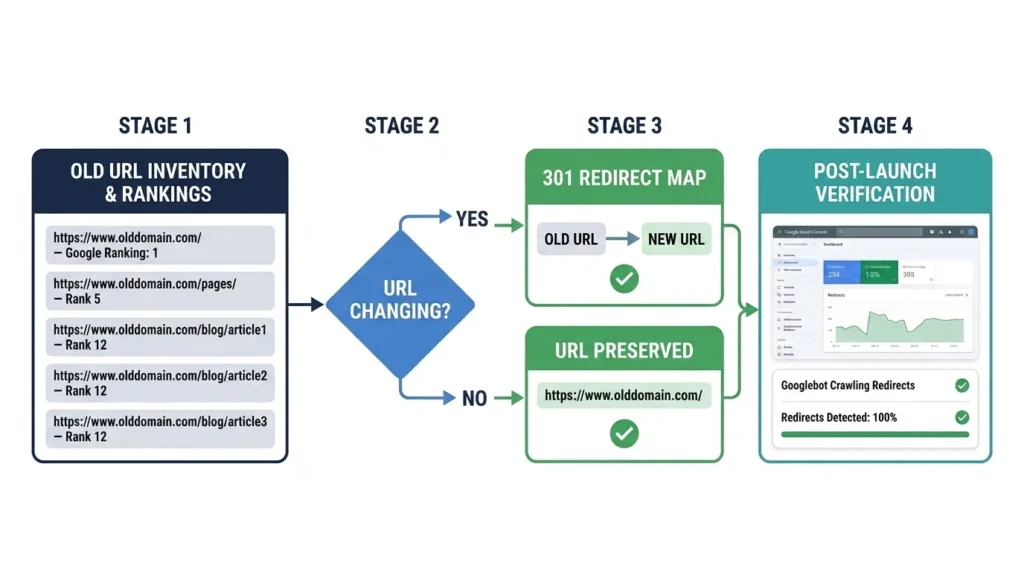
A 301 redirect map is a spreadsheet that lists every old URL and its corresponding new URL destination. Every old URL that is changing must be included — no exceptions.
| Old URL | New URL | Status |
|---|---|---|
| /services/seo | /seo-services-lahore | ☐ |
| /services/web-design | /web-design-services | ☐ |
| /blog/what-is-seo | /blog/what-is-seo-in-digital-marketing | ☐ |
Rules for 301 redirect mapping:
- Every URL that exists in the current site must map to exactly one new URL
- No redirect chains — old URL must redirect directly to new URL in one step
- Deleted pages with significant backlinks should redirect to the most relevant existing new page — not the homepage
- Pages with no backlinks and no rankings can 404 if they have no equivalent in the new site
Implementing 301 Redirects in WordPress
For WordPress redesigns, implement 301 redirects using the Redirection plugin or via the server’s .htaccess file. Server-level redirects (htaccess) are faster and preferred for large redirect volumes; plugin-based redirects are easier to manage and modify.
Never implement redirects through JavaScript or meta refresh — these are not recognized as permanent redirects by Google and do not pass link equity.
Preserving Link Equity
Every 301 redirect passes approximately 90 to 99% of the link equity from the old URL to the new URL. Pages with no redirect pass zero equity — the backlinks pointing to 404 pages are wasted. For a site with significant backlink profile, ensuring every old URL with backlinks has a 301 redirect to the most relevant new URL is the most important single SEO preservation action in the entire redesign process.
Phase 7 — Content Migration and Optimization
Moving content from the old website to the new one is not a copy-paste operation — it is an optimization opportunity. Every piece of content that moves to the new site should be reviewed, improved where needed, and verified for on page SEO compliance.
Content Audit — Keep, Improve, or Remove
For each page in the content inventory from Phase 1, make one of three decisions:
Keep as-is: High-performing content with strong rankings, good organic traffic, and current accuracy. Migrate with identical content, preserve the URL if possible, and verify all on page elements are correctly configured.
Keep and improve: Content with rankings or traffic potential but thin content, outdated information, or poor on page SEO. Migrate and improve simultaneously — expand thin content, update outdated statistics, add schema markup, optimize title tags and meta descriptions. For the complete on page optimization workflow, use our on page SEO checklist.
Remove or consolidate: Pages with no rankings, no traffic, no backlinks, and no strategic value. Multiple thin pages targeting the same topic should be consolidated into one comprehensive page. Removed pages with backlinks need 301 redirects to the most relevant remaining page.
Meta Tag Migration
Every page in the new website needs correctly configured meta title and meta description — verified in Rank Math or Yoast SEO before launch. Do not allow WordPress to auto-generate these from page titles — every tag should be specifically written.
Pages migrating from the old site should carry their existing meta tags if those tags were performing well — Google’s understanding of the page topic is partly established through consistent meta tag signals over time.
Internal Linking Audit
Internal links in migrated content must be updated to reflect new URLs. Any internal link pointing to an old URL that is changing must be updated to point to the new URL directly — relying on 301 redirects for internal links is poor practice that adds unnecessary redirect hops and wastes crawl budget.
After migration, run a crawl with Screaming Frog to identify any remaining internal links pointing to old or redirected URLs and update them.
Phase 8 — Pre-Launch Technical Checklist
Before any redesigned website goes live, a comprehensive pre-launch checklist prevents the most common launch-day disasters. Every item must be verified on the staging environment before launch is authorized.
SEO Pre-Launch Checklist
- ☐ All 301 redirects implemented and tested — each old URL redirects to correct new URL
- ☐ No redirect chains — all redirects resolve in one hop
- ☐ XML sitemap generated and accurate — contains only canonical, indexable HTTPS URLs
- ☐ Robots.txt correctly configured — important pages accessible, admin and duplicate URLs blocked
- ☐ Staging environment noindex confirmed removed — will not remain active after launch
- ☐ Canonical tags correct on all pages — no self-referencing canonicals pointing to wrong URL
- ☐ Meta titles unique on all pages — no duplicates
- ☐ Meta descriptions unique on all pages — no duplicates
- ☐ H1 tags present and unique on all pages
- ☐ Schema markup implemented — tested in Google Rich Results Test with no errors
- ☐ Google Analytics 4 tracking code installed and tracking correctly
- ☐ Google Search Console verified for new domain/structure
Performance Pre-Launch Checklist
- ☐ PageSpeed Insights mobile score above 70 — on staging environment
- ☐ PageSpeed Insights desktop score above 85
- ☐ LCP under 2.5 seconds on mobile
- ☐ CLS under 0.1 on all key page templates
- ☐ All images compressed and in WebP format
- ☐ Hero image preloaded
- ☐ Caching plugin active and configured
- ☐ CDN active if applicable
Functionality Pre-Launch Checklist
- ☐ All contact forms tested — submissions received and deliverable
- ☐ All phone number links functional
- ☐ All email links functional
- ☐ All external links opening correctly
- ☐ No broken internal links — verified with Screaming Frog crawl
- ☐ All images loading — no broken image sources
- ☐ SSL certificate active and all pages loading via HTTPS
- ☐ No mixed content warnings
- ☐ Mobile navigation tested on real devices
- ☐ All pages tested on mobile, tablet, and desktop
Phase 9 — Launch Day Procedure
Launch day is the highest-risk moment of any website redesign — the window when the new site goes live and the old site’s SEO equity either transfers correctly or begins to evaporate. A structured launch procedure minimizes this risk.
Pre-Launch Final Verification (2 Hours Before)
- Confirm staging environment is complete and client-approved
- Confirm all 301 redirects are in the redirect file, ready to deploy
- Confirm hosting environment is configured for new site
- Confirm Google Analytics and Search Console are ready
- Confirm team availability for monitoring during launch window
The Launch Sequence
Step 1 — Deploy new website files to production server. Upload or sync staging files to the live server environment.
Step 2 — Implement 301 redirects immediately. Before updating DNS or removing the old site, implement all redirects in .htaccess or the redirect plugin. Test each critical redirect from the redirect map.
Step 3 — Verify SSL certificate is active on new site. Confirm HTTPS is working before directing any traffic.
Step 4 — Remove noindex from new site. Confirm the staging-environment noindex is not carried into production. Check robots.txt and meta robots tags on key pages.
Step 5 — Submit new sitemap to Google Search Console. Immediately after launch, submit the new XML sitemap in Search Console to accelerate crawling and indexation of the new site structure.
Step 6 — Request indexing of critical pages. Use Search Console URL Inspection to request crawling of the homepage, all service pages, and all key location pages.
Step 7 — Monitor for 30 minutes post-launch. Check Google Analytics for live traffic appearing. Check Search Console for any immediate crawl errors. Verify redirects are working by testing old URLs in a browser.
Phase 10 — Post-Launch Monitoring and Recovery
The 30 days following a website launch are critical for SEO — this is the window during which Google recrawls and re-evaluates the new site, and any migration issues that were not caught pre-launch will manifest as ranking changes.
Week 1 — Daily Monitoring
Google Search Console — check daily:
- Coverage report — are new pages being indexed? Are old pages being removed?
- Any new crawl errors appearing?
- Any manual actions triggered?
- Core Web Vitals report — any new failures?
Google Analytics — check daily:
- Organic traffic trends — significant drops indicate ranking losses requiring immediate investigation
- Top landing pages — are the expected pages receiving traffic?
- Conversion rate — are forms submitting correctly?
Redirect verification:
- Test all high-priority old URLs confirm they redirect correctly
- Check for any 404 errors appearing in Search Console not covered by redirects
Ranking Monitoring — Week 2 to 4
Compare current keyword rankings against the pre-launch baseline documented in Phase 1. Expected behavior after a clean migration:
Days 1–7: Google discovers new site structure, begins recrawling. Some temporary ranking fluctuation is normal.
Days 7–14: Rankings stabilize for most keywords. Minor fluctuations continue.
Days 14–30: Rankings should return to or exceed pre-launch levels for all preserved content. Significant rankings losses after day 14 indicate migration issues requiring investigation.
How to Diagnose Post-Launch Ranking Drops
If specific pages lose rankings after launch, investigate in this order:
Is the page indexed? Check URL Inspection in Search Console. If not indexed, check robots.txt, noindex tags, and canonical configuration.
Does the old URL redirect correctly? Test the old URL — does it 301 redirect to the new URL with a single hop?
Is the content intact? Verify the page content matches or exceeds the old page’s content — no accidental truncation during migration.
Are internal links pointing to the new URL? Check that internal links were updated and are not pointing to the old URL through a redirect chain.
Are backlinks following the redirect? Backlinks to the old URL pass equity through the 301 redirect — verify the redirect is correctly implemented and returning a 301 status code (not 302 or meta refresh).
Website Redesign Cost in Pakistan — What to Expect
Website redesign costs in Pakistan vary based on website complexity, the scope of design and development work, SEO migration requirements, and whether you work with a freelancer or a professional agency.
Freelancer Pricing
Pakistani freelancers provide website redesign services at significantly lower rates than agencies — but with correspondingly variable quality, limited accountability, and often no SEO migration expertise.
| Scope | Freelancer Rate (PKR) |
|---|---|
| Simple 5-page business website | PKR 25,000 – 60,000 |
| Medium business site (10-20 pages) | PKR 60,000 – 150,000 |
| Complex site with custom functionality | PKR 150,000 – 400,000 |
| E-commerce redesign | PKR 200,000 – 600,000+ |
Freelancer risk: Most Pakistani freelancers do not include SEO migration planning in their redesign scope — they redesign the visual site without implementing 301 redirects, preserving SEO structure, or monitoring post-launch rankings. If your existing site has organic traffic, this omission can cost significantly more in lost business than the money saved on the redesign.
Professional Agency Pricing
A full-service digital agency like SiteNova Agency provides complete redesign including discovery, UX design, development, SEO migration, content optimization, and post-launch monitoring.
| Scope | Agency Rate (PKR) |
|---|---|
| Professional business website (15-25 pages) | PKR 150,000 – 350,000 |
| Mid-size company website with blog | PKR 300,000 – 600,000 |
| Large multi-service site with locations | PKR 500,000 – 1,200,000 |
| E-commerce with custom functionality | PKR 600,000 – 2,000,000+ |
Agency pricing includes project management, SEO migration, quality assurance, and ongoing support — reducing the risk of the most costly redesign failures.
What Drives Redesign Cost
- Number of unique page templates requiring design
- Number of pages requiring content migration and optimization
- Custom functionality requirements
- E-commerce complexity
- SEO migration complexity — number of URLs with redirect requirements
- Content production — whether new copy is required
- Photography — new imagery vs existing assets
Website Redesign for WordPress — Specific Guidance
Since the majority of Pakistani business websites run on WordPress, specific guidance for WordPress redesigns prevents the most common platform-specific mistakes.
Theme Change vs Custom Development
Theme change: Replacing the existing WordPress theme with a new theme — the fastest and lowest-cost redesign approach. Risk: content formatting may break, custom page builder configurations may not transfer, and function-heavy themes may conflict.
Page builder rebuild: Rebuilding pages in Elementor, Divi, or another builder on the same WordPress installation. Preserves posts, pages, and custom post types; requires rebuilding each page’s layout.
Custom theme development: Building a completely custom WordPress theme from scratch — highest quality, best performance, and complete design control. Highest cost and longest timeline.
WordPress Redesign SEO Preservation
For WordPress redesigns, the Redirection plugin manages 301 redirects without server access. Install before launch, import your redirect map CSV, and all redirects activate instantly.
Rank Math or Yoast SEO preserves meta titles and descriptions through theme changes and platform rebuilds — as long as the plugin remains active, SEO metadata is not lost when the theme changes.
For WordPress SEO that performs after your redesign, our guide on what is SEO content writing covers how to write and structure every page for maximum organic performance — building on the responsive, technically excellent foundation your redesign establishes.
WordPress Performance After Redesign
A common post-redesign disappointment: the new WordPress website is slower than the old one. This typically results from:
- Heavy page builder with excessive JavaScript (Divi, WPBakery poorly configured)
- Unoptimized images in the new design
- Too many plugins
- Inadequate caching configuration
- Hosting plan insufficient for the new site’s requirements
Resolve by: configuring WP Rocket, compressing all images with ShortPixel, removing unnecessary plugins, and verifying hosting resources are adequate for traffic levels.
Frequently Asked Questions About Website Redesign
Q: How long does a website redesign take?
A professional website redesign typically takes 8 to 20 weeks from initial discovery to launch — depending on website size, complexity, content requirements, and client approval speed. A simple 10-page business website can be redesigned in 8 to 10 weeks. A complex multi-service website with custom functionality and significant content migration may take 16 to 20 weeks. Rushing a redesign compresses the pre-launch verification and SEO migration phases that protect organic rankings — the most expensive shortcut in web design.
Q: Will a website redesign hurt my SEO rankings?
A website redesign can temporarily affect rankings during Google’s recrawl and re-evaluation period — typically 2 to 4 weeks. With proper SEO migration planning — complete 301 redirect map, preserved content quality, correct canonical tags, and immediate sitemap submission — most rankings recover within 30 days. Redesigns that ignore SEO migration can cause permanent ranking losses. The pre-redesign audit, redirect mapping, and post-launch monitoring described in this guide are the specific actions that prevent SEO damage.
Q: Should I keep my existing website URL structure?
Where possible, yes — preserving existing URLs eliminates redirect complexity and maintains direct Google ranking credit for those URLs. If the existing URL structure is poor — using numeric IDs, dates in URLs, or inconsistent hierarchy — a redesign is a legitimate opportunity to improve it, with complete 301 redirect mapping from every old URL to its new destination.
Q: How do I redesign my website without losing traffic?
Follow the ten-phase process in this guide: document your analytics baseline before starting, audit all existing content, plan your 301 redirects before development begins, build on a staging environment, complete the full pre-launch checklist, and monitor daily for 30 days after launch. The most critical action: implement every 301 redirect on the day of launch — before directing any traffic to the new site.
Q: What is the most important SEO consideration in a website redesign?
301 redirect implementation is the single most important SEO action in any redesign that changes URLs. Every URL that changes must have a 301 redirect from the old URL to the new URL — implemented on launch day, verified before traffic is directed to the new site. Missed redirects cause immediate 404 errors for Google, destroying ranking credit for affected pages. For the complete technical SEO foundation the redesigned site must meet, our technical SEO checklist covers every requirement.
Q: How do I know when my website needs a redesign vs just an update?
A redesign is warranted when: the site is not responsive (cannot be fixed without rebuilding), Core Web Vitals failures are structural (not fixable through optimization), URL structure needs significant change, the CMS is outdated and unsupported, or brand positioning has fundamentally changed. Minor improvements — updating content, improving page speed through optimization, adding pages, refreshing visual elements — do not require a full redesign and carry significantly lower SEO risk.
Conclusion — A Website Redesign Done Right Is One of the Highest-ROI Digital Investments
A website redesign is simultaneously the highest-risk and highest-reward digital project a business undertakes. Done correctly — with thorough pre-redesign auditing, careful SEO migration planning, development on staging, comprehensive pre-launch verification, and diligent post-launch monitoring — it delivers a faster, more beautiful, more conversion-effective website without losing a single position in Google’s search rankings.
Done incorrectly — rushing from concept to launch without redirect maps, without performance verification, without SEO preservation — it can destroy years of accumulated organic authority in a single day.
The ten-phase process in this guide exists because every phase prevents specific, documented failures that have cost real businesses real revenue. Skip the pre-redesign audit and you have no baseline to measure against. Skip the redirect map and you lose backlink equity. Skip the staging environment and launch-day errors go live. Skip post-launch monitoring and ranking drops compound before you notice them.
For Pakistani businesses investing in website redesigns — whether in Lahore, Karachi, Islamabad, or anywhere — the investment is substantial. Protecting it through rigorous process is not optional. The businesses that treat website redesign as a strategic, carefully executed project consistently achieve better design, better performance, better rankings, and better conversion rates than those that treat it as primarily a visual exercise.
At SiteNova Agency, we manage complete website redesigns for Pakistani businesses — from initial audit through design, development, SEO migration, launch, and post-launch monitoring. Every redesign we deliver preserves existing organic rankings while building a technically superior, conversion-optimized website that supports long-term growth. Contact us to discuss your redesign project.