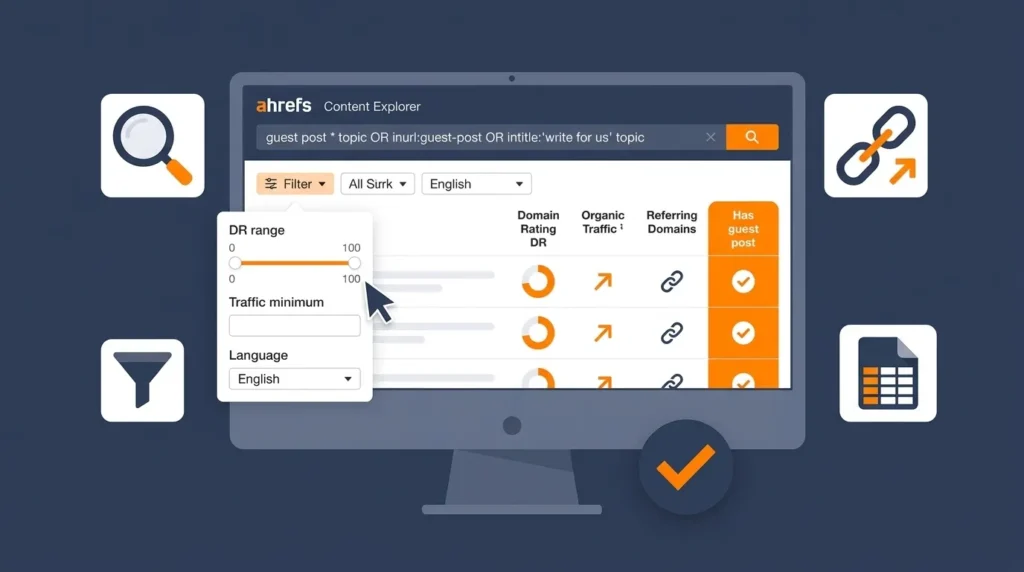
Finding guest post opportunities manually — searching Google for “write for us” pages, browsing competitor websites for contributing authors, and guessing at which publications might accept your pitch — is slow, inconsistent, and produces a prospect list with no quality validation.
Ahrefs solves every one of these problems simultaneously. Its database of over 35 trillion backlinks, indexed content from over 200 million domains, and real-time organic traffic data turns guest post prospecting from a manual guessing process into a data-driven research workflow that produces a qualified, prioritized outreach list in hours rather than days.
Table of Contents
- Why Use Ahrefs for Guest Post Prospecting?
- Ahrefs Tools You Need for Guest Post Research
- Method 1 — Finding Guest Post Sites With Ahrefs Content Explorer
- Method 2 — Competitor Backlink Analysis for Guest Post Targets
- Method 3 — Link Intersect to Find Untapped Guest Post Sites
- Method 4 — Finding “Write for Us” Pages With Ahrefs
- Method 5 — Best by Links Report for Identifying Guest Post Targets
- How to Filter and Qualify Your Guest Post Prospects
- How to Export Your Guest Post List From Ahrefs
- Turning Ahrefs Data Into an Outreach Campaign
- Ahrefs Free vs Paid — What You Can Do Without a Subscription
- Frequently Asked Questions
- Conclusion
Why Use Ahrefs for Guest Post Prospecting?
The key advantage of using Ahrefs for guest post opportunities is proof. When you find a site through a Google search for “write for us,” you know it accepts guest posts but you do not know its actual authority, its organic traffic, or whether the links it publishes are followed. When you find a site through Ahrefs competitor backlink analysis, you know it has already linked to a website like yours, you know its domain rating and organic traffic precisely, and you can see the actual backlink type and anchor text — before you spend a single minute crafting a pitch.
This guide walks through five specific Ahrefs methods for finding guest post opportunities — from Content Explorer searches through competitor analysis, Link Intersect, and the Best by Links report — with the exact steps, filters, and export process for each.
For the strategic context that makes this prospecting work — understanding what makes a guest post valuable, how to pitch editors effectively, and how to write content that gets accepted — our guides on what is guest post and free guest posting sites cover the complete guest posting strategy that this prospecting process feeds into.
Ahrefs Tools You Need for Guest Post Research
Ahrefs contains several distinct tools — each useful for a different stage of guest post prospecting. Understanding which tool to use for each research method prevents the confusion of looking for the right data in the wrong place.
Content Explorer
Content Explorer is Ahrefs’ searchable database of over 15 billion indexed web pages. You can search it by topic, filter results by domain rating, organic traffic, language, publishing date, and dozens of other parameters. For guest post prospecting, Content Explorer is used to find the publications producing the most-shared, most-linked content in your niche — which often correlates directly with publications that accept guest contributions.
Site Explorer
Site Explorer is Ahrefs’ backlink and organic search analysis tool. Enter any domain and see its complete backlink profile, top organic pages, referring domains, and keyword rankings. For guest post prospecting, Site Explorer is used to analyze which websites are linking to your competitors — revealing publications that have already accepted guest posts from similar sites.
Link Intersect
Link Intersect (found within Site Explorer’s More section) compares the backlink profiles of multiple domains and shows which sites link to some of them but not yours. For guest post prospecting, this reveals publications that link to your competitors but have not yet linked to you — your highest-priority outreach targets.
Ahrefs Webmaster Tools
The free version of Ahrefs available to verified website owners. Provides a site audit, backlink data for your own domain, and organic keyword rankings. Limited compared to the full Ahrefs subscription but sufficient for the competitor analysis method using your own domain as the starting point.
Method 1 — Finding Guest Post Sites With Ahrefs Content Explorer
Content Explorer is the fastest method for building a guest post prospect list in any niche — it searches Ahrefs’ indexed web content by topic and returns the highest-authority, most-shared pages in that space, many of which come from publications that accept guest contributions.
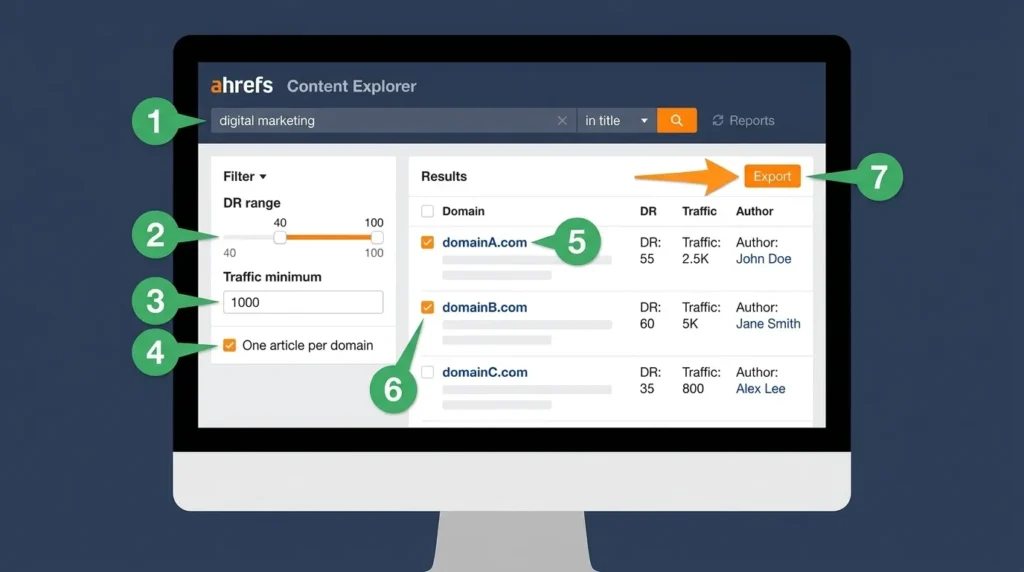
Step 1 — Open Content Explorer
Log into Ahrefs and click Content Explorer in the top navigation. The search interface appears — a single search bar with filter options below.
Step 2 — Search Your Niche Topic
Enter your primary niche topic in the search bar. Use a specific but not overly narrow term that represents your content category.
For a digital marketing agency: digital marketing
For an SEO consultant: search engine optimization
For a web design business: web design
For a finance business: personal finance
Select “In title” from the dropdown beside the search bar — this searches for your term in the page title specifically, returning pages where your topic is the primary subject rather than a passing mention.
Step 3 — Apply Domain Rating Filter
In the filter panel below the search bar, set the Domain Rating (DR) minimum. This is the most important filter for guest post prospecting quality.
Recommended settings:
- DR minimum: 40 (removes low-authority sites with negligible link value)
- DR maximum: Leave blank (no ceiling — higher is better)
If you want to start with the highest-authority targets first, set DR minimum to 60 and work downward after exhausting the top tier.
Step 4 — Apply Organic Traffic Filter
Set the organic traffic minimum filter to 1,000 monthly visitors. This eliminates sites with inflated domain ratings from purchased links but very little actual audience — sites that appear authoritative in metrics but have no real readership.
The organic traffic filter is one of the most important quality gates in Ahrefs guest post prospecting. A site with DR 55 and 50,000 monthly organic visitors is a far more valuable placement than a site with DR 65 and 200 monthly visitors.
Step 5 — Filter for “One Article Per Domain”
Check the “One article per domain” filter in the Content Explorer results panel. This collapses multiple results from the same domain into one entry — showing you unique publishing domains rather than multiple articles from the same site. This is essential for building a prospect list of unique websites rather than a list dominated by a single high-volume publisher.
Step 6 — Review and Qualify Results
Your filtered results show the top-performing content in your niche by DR and traffic. For each result, check:
Is this a publication that publishes content from multiple authors — or only from an in-house team? Click through to the site and check for “Write for Us,” “Contribute,” or “Guest Post” pages. Check the author names on published articles — multiple different author names indicate an external contributor program.
Is the content topically aligned with what you would contribute? A site ranking for your search term but publishing content in an adjacent niche may not be the right editorial fit for your pitch.
Does the site maintain active content publication? Check the most recent publication date — a site that has not published in six months may have an inactive editorial team.
Step 7 — Export Qualified Prospects
Check the boxes beside the domains you want to pursue and click Export. Ahrefs exports the data to a CSV file containing the domain, DR, organic traffic, referring domains, and the specific article that appeared in your search results. Use this CSV as the foundation of your outreach tracking spreadsheet.
Worked Example:
Searching “digital marketing” in title in Content Explorer, filtered to DR 40+, organic traffic 1,000+, one article per domain, returns hundreds of qualifying sites. The top results include well-known digital marketing publications, business blogs with marketing sections, and industry association websites — all of which are verified as receiving significant organic traffic and carrying meaningful domain authority.
Method 2 — Competitor Backlink Analysis for Guest Post Targets
Competitor backlink analysis is the most targeted guest post prospecting method — because it identifies publications that have already accepted guest posts from businesses like yours, confirming both willingness to accept similar content and topical alignment with your niche.
Step 1 — Identify Your Top Organic Competitors
In Ahrefs Site Explorer, enter your own domain and navigate to the Organic Search > Competing Domains report. This shows the websites that rank for the most similar keywords to your site — your real search competitors, not just your business competitors.
Select two to four competitors with higher domain ratings than yours — these are the sites whose link profiles you want to analyze, since they have likely built the relationships your guest posting program needs.
Alternatively, search your primary target keyword in Google and identify the websites ranking in positions 1 through 5 — these are your confirmed organic competitors for that keyword.
Step 2 — Open Competitor in Site Explorer
Enter your first competitor’s domain in Site Explorer. Navigate to Backlinks > Referring Domains in the left sidebar.
Step 3 — Filter for Followed Editorial Links
In the referring domains list, apply these filters:
Link type: Dofollow (shows only links passing authority)
DR filter: 40 minimum (removes low-authority sources)
The resulting list shows every high-authority website that links to your competitor with a followed link — a list that includes their guest post placements alongside their organic backlinks.
Step 4 — Identify Guest Post Placements
For each referring domain, click through to see the specific backlinks from that domain. Look for:
Links pointing to author bio pages or contributor profile pages — strong indicator of a guest post relationship.
Multiple links from the same domain to different pages of the competitor’s site — suggests an ongoing contributor relationship rather than a single organic link.
Links from pages with “guest post,” “contributed by,” or “author” in the URL structure.
The anchor text “contributed by [Name]” or “[Name] is a [job title] at [company]” in the link context — visible in Ahrefs’ backlink details when you hover over the referring URL.
Step 5 — Verify the Target Accepts Guest Posts
For each identified publication, visit the site and search for “write for us,” “contribute,” or “guest post guidelines” to confirm they have an active contributor program. Note the submission URL or editor contact information in your outreach spreadsheet.
Step 6 — Repeat for Each Competitor
Repeat steps 2 through 5 for each competitor you identified in Step 1. The intersection of publications that have linked to multiple competitors in your niche is your highest-priority guest post target list — these sites clearly publish in your space and have an established pattern of accepting external contributions.
Worked Example:
Analyzing three competitor digital marketing agencies in Ahrefs Site Explorer reveals that all three have received links from Search Engine Journal, Content Marketing Institute, and Business2Community — confirming these publications accept guest content from digital marketing practitioners. These three publications immediately go to the top of the outreach list.
Method 3 — Link Intersect to Find Untapped Guest Post Sites
Link Intersect is an Ahrefs feature specifically designed to identify link gap opportunities — sites that link to your competitors but not to you. For guest post prospecting, these are your highest-priority targets because they have demonstrated willingness to link to sites in your space and you have not yet approached them.
Step 1 — Access Link Intersect
In Ahrefs Site Explorer, enter your own domain. In the left sidebar, navigate to More > Link Intersect.
Step 2 — Enter Competitor Domains
In the Link Intersect interface, enter two to four competitor domains in the “But doesn’t link to” and “Show results that link to” fields. The tool asks you to specify:
Targets that should be linked (your competitors): Enter competitor domains in the “Link to at least one of these” fields.
Your domain that should NOT be linked yet: Enter your own domain in the “But doesn’t link to” field.
Step 3 — Apply DR Filter
Filter the results to DR 40 minimum to focus on quality link opportunities rather than low-authority sites.
Step 4 — Review Intersecting Domains
The results show every website that links to at least one of your competitors but has not yet linked to your domain. These sites are already interested in your niche — they have published content related to what your competitors do. They are your warmest guest post prospects.
Sort results by DR (highest first) to prioritize the most valuable placements. For each result, verify the same editorial standards as in Method 1 — checking for an active contributor program, recent publication activity, and topical alignment with your planned content.
Step 5 — Export and Prioritize
Export the Link Intersect results to CSV. In your outreach spreadsheet, tag these prospects as “Competitor-linked, High Priority” — they receive your most personalized pitch because they are the most valuable and most attainable targets in your link building campaign.
Method 4 — Finding “Write for Us” Pages With Ahrefs
Ahrefs can be used to find “write for us” and contributor pages that Google’s standard search operators might miss — particularly for publications that use non-standard terminology for their contributor programs.
Step 1 — Use Ahrefs Site Explorer Search
In Ahrefs Site Explorer, enter a broad industry domain (a top publication in your niche) and navigate to the Pages > Best by Links report. This shows the most-linked pages on that domain — contributor guidelines pages, if they exist, often appear here because they receive links from bloggers and link builders who reference them.
Step 2 — Content Explorer With Contributor Terms
In Content Explorer, search these variations to find pages that invite guest contributions:
"write for us" digital marketing"guest post guidelines" SEO"contribute" web design"submit an article" marketing"become a contributor" technology
Filter results to DR 40+ and organic traffic 500+. These searches surface contributor invitation pages that are indexed and ranking in Ahrefs’ content database.
Step 3 — Identify Non-Standard Invitation Pages
Some publications that actively accept guest posts do not use “write for us” terminology — they use “partner with us,” “editorial submissions,” “community contributions,” or simply “contact” pages where they mention accepting external content.
In Ahrefs Content Explorer, searching for these alternative terms in combination with your niche topic surfaces contributor opportunities that competitors using only standard Google search operators will miss.
Step 4 — Validate Each Result
For each contributor page found, click through to verify current acceptance status. Some publications stop accepting guest posts without updating their guidelines page — check the most recent publication date of contributed content on the site to confirm the program remains active.
Method 5 — Best by Links Report for Identifying Guest Post Targets
The Best by Links report in Ahrefs Site Explorer shows which pages on any domain have earned the most external backlinks — which reveals the content formats and topics that attract links in your niche. This method identifies guest post targets indirectly — by showing which publications’ content earns enough links to indicate genuine authority.
Step 1 — Analyze a Top Competitor’s Best by Links
In Ahrefs Site Explorer, enter a top competitor domain. Navigate to Pages > Best by Links. This shows the competitor’s pages that have earned the most referring domains — their highest-performing content by link acquisition.
Step 2 — Identify Which Sites Linked to That Content
Click into the referring domains count for your competitor’s highest-linked pages. The list of sites that have linked to those pages includes both organic backlinks and potential guest post relationships. For each high-authority referring domain, check whether it has a contributor program — these are publications that find your niche’s content link-worthy.
Step 3 — Use the Report for Content Gap Identification
The Best by Links report also reveals content formats that attract the most backlinks in your niche. If your competitor’s most-linked pages are comprehensive guides, case studies, or original research — these are the content formats most likely to earn links naturally and to be accepted as guest posts by high-authority publications in your space.
Use these insights to shape your guest post content strategy — writing in the formats that publications in your niche are most likely to accept and that their audiences are most likely to share and link to.
How to Filter and Qualify Your Guest Post Prospects
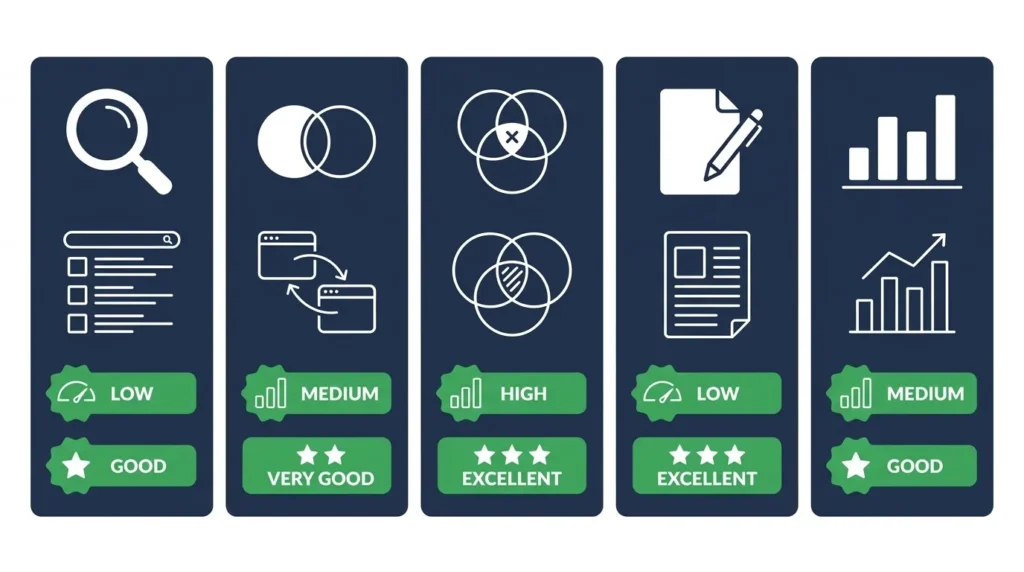
Raw Ahrefs data produces a large list of potential guest post sites. Filtering that list to a qualified, prioritized outreach campaign requires applying a consistent evaluation framework to every prospect.
Primary Qualification Criteria
Domain Rating (DR): Minimum 40 for any site worth pitching. Priority tier: DR 60 and above for your main outreach focus, DR 40 to 60 for secondary efforts.
Organic Traffic: Minimum 1,000 monthly visitors verified in Ahrefs. Sites with high DR but very low organic traffic often have inflated authority from historical link schemes — their links carry less real value than the DR suggests.
Topical Relevance: The site must publish content in your specific niche or a directly adjacent field. A high-DR site in an unrelated industry produces a link with less topical authority signal than a lower-DR site in your exact space.
Active Publication: Check that the site has published new content within the past 90 days. Inactive sites may have suspended their contributor programs even if the guidelines page remains live.
Editorial Standards: Read three to five recent articles. Is the content substantive and well-written? Are authors identified with real names and credible bios? Low editorial standards indicate the site may be heading toward the link farm category — associating your content with it may provide short-term link value that evaporates if the site is later penalized.
Secondary Qualification Criteria
Spam Score: Check Moz Spam Score for any site where DR and traffic data look inconsistent. A site with high DR but Spam Score above 30% warrants removal from the prospect list.
Link Type Confirmation: Verify that links on published guest posts are dofollow by checking the source code of a published article. Right-click any author bio link and inspect the HTML — rel="nofollow" indicates the site does not pass link equity through guest post placements.
Competitor Citation Frequency: Sites that have linked to multiple competitors in your niche are higher priority than sites that have linked to only one — repeated linking to your industry suggests an active, receptive editorial relationship with your content category.
Building a Prioritized Outreach Spreadsheet
Organize your qualified prospects into three tiers:
Tier 1 — High Priority: DR 60+, organic traffic 10,000+, topically aligned, competitor-linked. These receive your most personalized, research-intensive pitches.
Tier 2 — Medium Priority: DR 40 to 60, organic traffic 1,000 to 10,000, good topical alignment. These receive personalized pitches with slightly less upfront research investment.
Tier 3 — Lower Priority: DR 40 to 60, moderate traffic, adjacent niche. These receive templated-but-personalized pitches when your Tier 1 and 2 outreach is underway.
How to Export Your Guest Post List From Ahrefs
Ahrefs provides CSV export functionality across all its major reports — allowing you to move your prospect data into a spreadsheet for outreach tracking and prioritization.
Exporting From Content Explorer
After applying your filters in Content Explorer, click the Export button in the top right of the results panel. Select whether to export all results or only checked results. Choose “Export as CSV.” The exported file contains: domain, URL, DR, referring domains, organic traffic estimate, title, author, publishing date, and social share counts.
Import this CSV into Google Sheets or Excel. Add columns for: Pitch Status, Editor Name, Editor Email, Pitch Sent Date, Response Date, Article Topic Pitched, Submission Date, and Published URL. This becomes your outreach CRM for the guest posting campaign.
Exporting From Site Explorer Referring Domains
In the Referring Domains report, apply your DR and traffic filters, then click Export. The export contains: referring domain, DR, organic traffic, number of dofollow links, number of nofollow links, and first and last link dates. The first and last link dates are useful for identifying whether a publication’s relationship with your competitor is recent (active relationship) or dated (potentially inactive).
Managing Duplicate Prospects
When running multiple Ahrefs methods, the same domains will appear in multiple export files. When consolidating into your master outreach spreadsheet, use the VLOOKUP function or Google Sheets’ Remove Duplicates feature to identify and merge duplicate domain entries — keeping the richest data from whichever source provided the most complete information for that domain.
Turning Ahrefs Data Into an Outreach Campaign
A prospect list in a spreadsheet is not a link building campaign — it is raw material. Converting it into actual guest post placements requires a systematic outreach process built on the data Ahrefs has provided.
Personalizing Pitches With Ahrefs Data
The Ahrefs data you collected enables pitch personalization that goes significantly beyond what manual research would provide.
You know the publication’s DR and traffic — you can reference the quality of their audience specifically: “Your site reaches over 45,000 organic visitors monthly in the digital marketing space — exactly the audience that would benefit from a deep-dive on this topic.”
You know which specific articles on their site are most linked — you can pitch content that fills a gap relative to their best-performing content: “Your guide on [topic] has earned over 300 backlinks — I noticed you have not yet published a companion piece on [related topic] that your audience is clearly interested in.”
You know that they have linked to your competitors — you can reference shared editorial context: “I noticed you have published content from contributors at [Competitor Agency] — I have a similar but more current perspective on [topic] that I think would resonate with your readers.”
This level of personalization is only possible because Ahrefs data tells you specific, verifiable things about each publication before you pitch — making every email relevant rather than generic.
Setting Outreach Cadence
For a sustainable guest posting program, target two to three new pitch emails per week across your Tier 1 and Tier 2 prospects. This pace produces two to four new guest post placements per month at typical acceptance rates (20 to 40% for personalized pitches to qualified targets).
Track every pitch in your outreach spreadsheet with date sent and follow-up dates. Send one follow-up email seven to ten days after an unanswered pitch — a single polite follow-up is standard outreach practice and significantly increases response rates. Do not send more than two emails to any editor who has not responded.
Building Long-Term Contributor Relationships
The most valuable outcome of a guest posting campaign is not a single backlink — it is a recurring contributor relationship with a high-authority publication. After your first article is published on a site, ask the editor whether they would welcome future contributions. A recurring contributor relationship produces multiple high-quality placements from a single outreach investment and builds genuine industry credibility alongside the SEO value.
Ahrefs Free vs Paid — What You Can Do Without a Subscription
Ahrefs’ full suite of guest post prospecting tools requires a paid subscription — starting at $129 per month for the Lite plan. For businesses not ready to invest in a full Ahrefs subscription, here is what is available free and what requires payment.
Free Ahrefs Tools for Guest Post Prospecting
Ahrefs Webmaster Tools (Free for Verified Domains):
Provides a complete backlink profile for your own domain, site audit data, and organic keyword rankings. Useful for identifying which sites already link to you (and therefore may accept content) and for running a site audit on your own domain. Does not provide competitor backlink analysis without a paid plan.
Ahrefs Free Backlink Checker:
Available at ahrefs.com/backlink-checker — shows the top 100 backlinks to any domain without requiring login. Useful for a quick check of competitor backlinks, though significantly limited compared to the full Site Explorer data.
Ahrefs Free SERP Checker:
Shows the top 10 organic results for any keyword with their DR scores — useful for quickly identifying high-authority sites ranking for your target keywords that may accept guest posts.
What Requires a Paid Plan
Content Explorer search with full filtering capability, complete referring domain export from Site Explorer, Link Intersect analysis, full Best by Links reports, and unlimited domain analysis all require a paid Ahrefs subscription.
For businesses prospecting at scale — building a guest posting program targeting 50 to 100+ sites — the paid plan investment pays for itself rapidly in the quality and efficiency of the prospect list it generates compared to manual research.
For businesses with limited budgets, the combination of Ahrefs Webmaster Tools (free), Google search operators for “write for us” pages, and the manual competitor analysis described in our free guest posting sites guide provides a functional starting point before investing in a full Ahrefs subscription.
Frequently Asked Questions
Q: How do I find guest post opportunities on Ahrefs?
The most effective method is Ahrefs Content Explorer. Search your niche topic with “In title” selected, apply a DR 40+ filter and organic traffic 1,000+ minimum, check “One article per domain,” and review the results for publications with active contributor programs. Supplement this with competitor backlink analysis in Site Explorer — enter your top organic competitors and filter their referring domains for high-DR, followed links that reveal guest post placements. Export qualified prospects to a spreadsheet and begin personalized outreach.
Q: Can I use Ahrefs to find guest posting sites for free?
Ahrefs Webmaster Tools is free for verified domain owners and provides backlink data for your own site — useful for identifying which sites already link to you. The free Ahrefs Backlink Checker shows up to 100 backlinks for any domain without login. However, the full Content Explorer, complete Site Explorer data, and Link Intersect features that make Ahrefs most powerful for guest post prospecting require a paid subscription starting at $129 per month.
Q: What filters should I use in Ahrefs Content Explorer for guest post prospecting?
Apply these filters for a qualified guest post prospect list: DR minimum 40 (removes low-authority sites), organic traffic minimum 1,000 (verifies genuine audience), “One article per domain” (produces unique site list rather than multiple results per publisher), language filter set to English (or your target language), and date published within the last 12 months (confirms active publication). These combined filters reduce a raw list of thousands of results to a manageable, qualified set of genuine opportunities.
Q: How do I identify whether a site accepts guest posts using Ahrefs?
After finding a site in Ahrefs, visit it directly and search for “write for us,” “guest post guidelines,” “contribute,” or “become a contributor” pages. Check the author names on published articles — multiple different authors indicate external contributors. In Ahrefs Site Explorer, look at the referring domains for that site’s published articles — if articles are earning backlinks from diverse sources, their content attracts genuine editorial interest. In the backlink details, look for links with anchor text patterns like “contributed by” or “author bio” that indicate guest post placements.
Q: What is Link Intersect in Ahrefs and how does it help with guest posting?
Link Intersect identifies sites that link to your competitors but not to your domain. In Site Explorer, navigate to More > Link Intersect, enter your competitors’ domains as the “link to” targets and your own domain as the “doesn’t link to” target. The resulting list shows publications that have already demonstrated interest in your niche by linking to competitors — these are your highest-priority guest post targets because they are proven to publish in your space and have not yet linked to you.
Q: How many guest post prospects should I build from Ahrefs research?
A practical outreach list for a three-month guest posting campaign is 50 to 100 qualified prospects — divided into Tier 1 (highest DR and traffic, most relevant, 15 to 20 sites), Tier 2 (strong metrics, good relevance, 25 to 35 sites), and Tier 3 (solid metrics, adjacent niche, 20 to 30 sites). Outreach to Tier 1 and 2 simultaneously produces two to four placements per month at typical acceptance rates, building toward a steady guest posting cadence that consistently grows your domain authority over time.
Conclusion
Ahrefs transforms guest post prospecting from a manual, inconsistent process into a data-driven research workflow. The five methods covered in this guide — Content Explorer search, competitor backlink analysis, Link Intersect, Write for Us page discovery, and Best by Links analysis — collectively produce a qualified, prioritized prospect list with verified domain authority, organic traffic, and editorial fit data attached to every target before you write a single pitch email.
The quality difference between an Ahrefs-driven prospecting process and manual “write for us” searches is not marginal — it is the difference between pitching 50 verified, relevant, high-authority targets and sending 200 emails to a mix of genuine publications and link farms with no quality filtering. Better targeting produces higher acceptance rates, higher-quality placements, and stronger SEO outcomes per hour invested in the outreach process.
Use the methods in this guide to build your guest post prospect list, apply the qualification framework to prioritize it, export your data from Ahrefs into a structured outreach spreadsheet, and begin personalized pitching to your Tier 1 targets first. Combine this prospecting discipline with the guest post strategy and pitch writing guidance in our what is guest post guide and the curated site list in our free guest posting sites guide for a complete, systematic link building program.