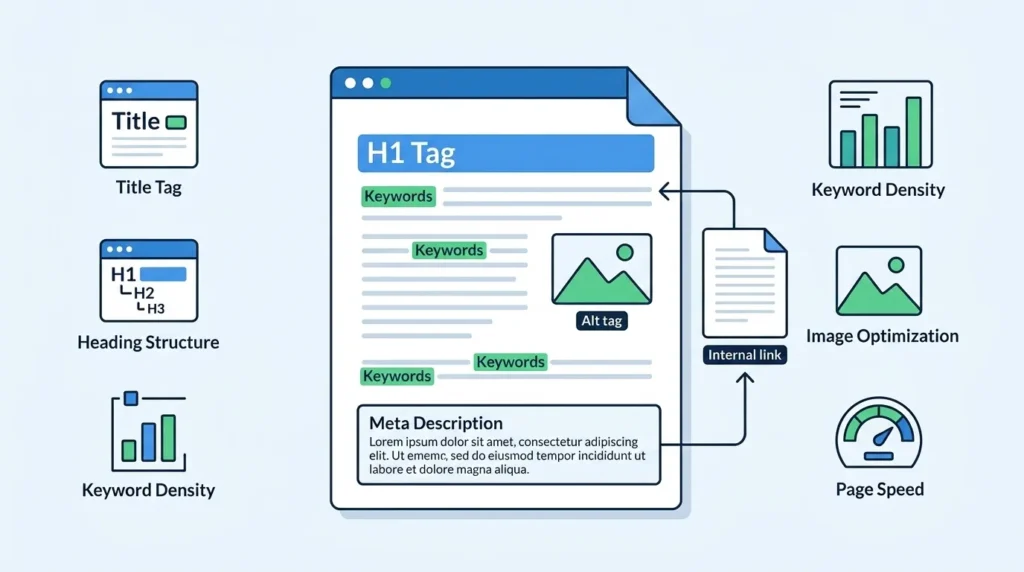
On page SEO is the practice of optimizing individual web pages to rank higher in search engine results and attract more relevant organic traffic. It encompasses every element on your actual webpage that you can directly control and optimize — from the words in your title tag and the structure of your headings to the quality of your content, the optimization of your images, and the speed at which your page loads.
The “on page” in on page SEO refers to the fact that these optimizations happen on your actual website pages — as opposed to off page SEO, which involves actions taken outside your website like link building, and technical SEO, which addresses the underlying infrastructure of your website.
Understanding how to do on page SEO correctly is the most direct path to improving your search rankings — because on page factors are entirely within your control. Unlike off page SEO, which requires earning links from other websites, or technical SEO, which often requires developer expertise, on page SEO can be implemented by any business owner or content creator with the right knowledge and tools.
For businesses in Lahore, Karachi, Islamabad, and across Pakistan, mastering on page SEO is particularly valuable — because most local competitors have not invested in proper on page optimization, leaving significant ranking opportunities for businesses that do.
This guide is part of our complete SEO education series at SiteNova Agency. For essential context before diving into on page SEO specifically, we recommend reading our foundational guides on what SEO is in digital marketing, how to do keyword research for SEO, and what is SEO content writing — all three provide the foundational knowledge that makes on page SEO implementation significantly more effective.
Table of Contents
- What Is On Page SEO?
- Why On Page SEO Is the Foundation of Every SEO Strategy
- On Page SEO vs Off Page SEO vs Technical SEO
- How to Do On Page SEO — Title Tag Optimization
- How to Do On Page SEO — Meta Description Optimization
- How to Do On Page SEO — URL Structure
- How to Do On Page SEO — Heading Tags (H1, H2, H3)
- How to Do On Page SEO — Keyword Optimization
- How to Do On Page SEO — Content Quality and Depth
- How to Do On Page SEO — Internal Linking
- How to Do On Page SEO — Image Optimization
- How to Do On Page SEO — Page Speed Optimization
- How to Do On Page SEO — Mobile Optimization
- How to Do On Page SEO — Schema Markup
- How to Do On Page SEO — User Experience Signals
- On Page SEO for WordPress — Step by Step
- On Page SEO Mistakes to Avoid
- How to Measure On Page SEO Results
- Frequently Asked Questions
- Conclusion
Why On Page SEO Is the Foundation of Every SEO Strategy
On page SEO is the element of search engine optimization that Google most directly evaluates when deciding whether your page deserves to rank for a specific search query. Before Google can consider your backlink profile, your domain authority, or your social signals — it must first be able to understand what your page is about, confirm that it matches the user’s search intent, and verify that it provides a quality experience.
On page SEO is what provides Google with all of this information. Without proper on page optimization, even the strongest backlink profile and highest domain authority cannot compensate for pages that Google cannot properly understand or that fail to satisfy search intent.
It Directly Communicates Your Topic to Google
Every on page element — title tag, headings, content, URL, meta description, image alt text — is a signal to Google about what your page covers and which search queries it should rank for. Proper on page SEO ensures these signals are clear, consistent, and aligned with your target keywords and search intent.
It Controls the Most Directly Controllable Ranking Factors
Of the three pillars of SEO — on page, off page, and technical — on page is the most immediately actionable. You can optimize a title tag today and see Google recrawl and update your listing within days. You cannot build a backlink profile with the same speed or directness.
It Determines Whether Other SEO Investments Pay Off
Link building, content marketing, and technical SEO all depend on strong on page foundations to deliver their full value. A page with a weak title tag, mismatched search intent, and poor content structure will not rank well even with excellent backlinks — because Google will not be confident enough in its relevance to show it prominently. On page SEO is what makes all other SEO investments more effective.
On Page SEO vs Off Page SEO vs Technical SEO
Before going deeper into how to do on page SEO, understanding how it relates to the other two pillars of SEO clarifies its specific role and importance.
| Factor | On Page SEO | Off Page SEO | Technical SEO |
|---|---|---|---|
| Location | On your actual web pages | Outside your website | Website infrastructure |
| Control | Full — entirely in your hands | Partial — depends on others | Full — but requires technical expertise |
| Key elements | Title, content, headings, keywords, links | Backlinks, brand mentions, social signals | Speed, crawlability, schema, Core Web Vitals |
| Speed of impact | Fast — days to weeks | Slow — months | Medium — weeks to months |
| Difficulty | Low to medium | Medium to high | Medium to high |
| Primary goal | Signal relevance to Google | Build authority and trust | Enable crawling and indexing |
| Best starting point | Yes — always optimize on page first | After on page foundations | Alongside on page |
The relationship between these three is sequential — on page SEO should always come first. There is no value in building backlinks to a page that is not properly optimized on page, because those backlinks will point to a page that Google cannot confidently rank. Fix your on page first, then build authority through off page activities, while maintaining technical health as an ongoing foundation.
How to Do On Page SEO — Title Tag Optimization
The title tag is the single most important on page SEO element. It is the clickable blue headline that appears in Google search results, the text that appears in browser tabs, and one of Google’s strongest signals about what your page is about. Getting your title tag right is the first and most impactful on page SEO action you can take.
Rules for SEO-Optimized Title Tags
Include your primary keyword near the beginning — Google gives more weight to words that appear earlier in the title. “On Page SEO — Complete Step-by-Step Guide for 2026” is stronger than “A Complete Guide to Understanding On Page SEO.”
Keep it within 55 to 60 characters — titles longer than approximately 60 characters are truncated in search results with an ellipsis, cutting off information and reducing click-through rates. Use a title tag length checker tool to verify before publishing.
Write for clicks, not just rankings — your title must convince users to click your result over the others on the page. Numbers (“7 On Page SEO Techniques”), power words (“Complete,” “Ultimate,” “Proven”), and clear value communication all improve click-through rates.
Include your brand name — adding “| SiteNova Agency” to the end of your title builds brand recognition among users who repeatedly see your results in search.
Make every title unique — duplicate title tags across multiple pages confuse Google and dilute ranking signals. Every page needs a unique, specific title.
Common Title Tag Mistakes
Leaving title tags as the default page name WordPress generates — “Home — SiteNova Agency” or “Page 1 — WordPress” — is one of the most common and damaging on page SEO mistakes. Always write custom title tags for every page. Also avoid keyword stuffing in titles — “SEO Services Lahore SEO Agency Pakistan SEO Company” — which Google treats as spam.
How to Do On Page SEO — Meta Description Optimization
The meta description is the short text summary that appears below your title tag in Google search results. While Google has confirmed that meta descriptions are not a direct ranking factor, they are one of the most powerful click-through rate influencers available in on page SEO — and click-through rate does influence rankings indirectly.
Rules for SEO-Optimized Meta Descriptions
Keep it between 150 and 160 characters — Google typically truncates descriptions beyond this length. Write concisely and purposefully within this limit.
Include your primary keyword naturally — Google bolds keywords in meta descriptions that match the user’s search query, making your result more visually prominent on the results page.
Communicate clear, specific value — tell the user exactly what they will learn, get, or accomplish by clicking your result. Vague descriptions like “Learn about SEO on this page” underperform compared to specific ones like “Learn exactly how to do on page SEO with our complete step-by-step guide — title tags, headings, keywords, images and more.”
Include a call to action — “Learn how,” “Discover,” “Get the complete guide,” and similar action phrases encourage clicks.
Include your brand name — “SiteNova Agency explains” adds credibility and brand recognition.
Write unique descriptions for every page — duplicate meta descriptions across pages miss individual optimization opportunities and signal lazy on page SEO to Google.
When Google Rewrites Your Meta Description
Google frequently rewrites meta descriptions — pulling different text from the page content that it believes better matches the specific query a user searched. This happens when your meta description does not closely match the search intent of the query triggering your page’s appearance. The solution is writing meta descriptions that precisely match the primary search intent of your target keyword — which also improves the overall relevance of your on page SEO.
How to Do On Page SEO — URL Structure
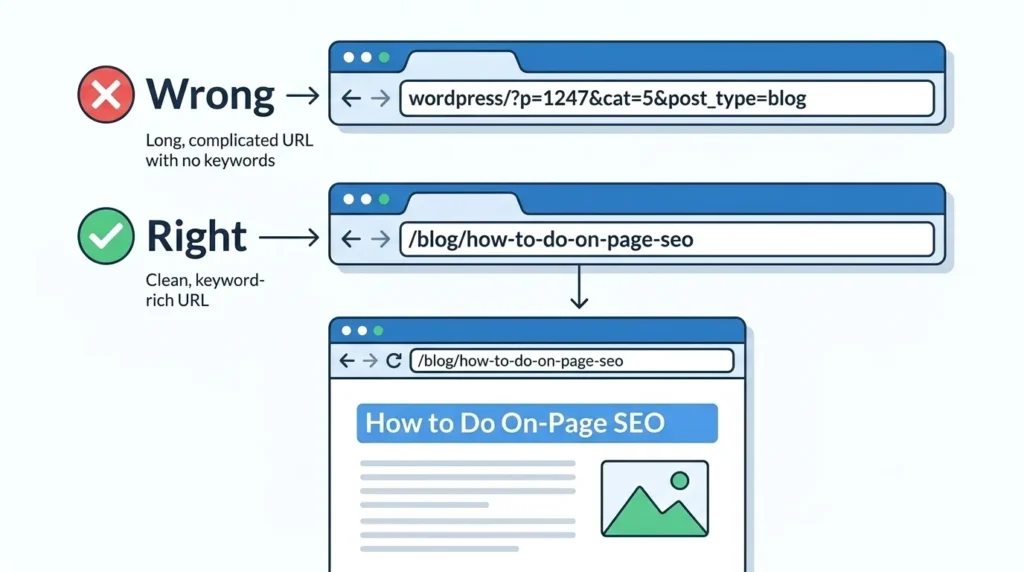
Your page URL is an on page SEO signal that tells Google about your page’s topic before it even crawls the content. Clean, keyword-rich URLs consistently outperform long, complicated, or auto-generated URLs in search rankings.
Rules for SEO-Optimized URLs
Include your primary keyword — your URL should include your target keyword: /blog/how-to-do-on-page-seo is significantly better than /blog/?p=247 or /blog/2026/07/post-title-that-is-way-too-long.
Keep it short and descriptive — shorter URLs are preferred by both Google and users. Remove unnecessary words — articles like “a,” “an,” “the” and filler words like “and,” “or,” “for” can typically be removed without losing meaning.
Use hyphens to separate words — hyphens are the correct word separator in URLs for SEO purposes. Never use underscores (on_page_seo) or spaces — these create indexation problems.
Use lowercase only — uppercase letters in URLs can create duplicate content issues when some servers treat uppercase and lowercase URLs as different pages.
Avoid dates in URLs where possible — including dates in blog post URLs (/2026/07/on-page-seo-guide) creates outdated-looking URLs as the content ages and makes URL structure inflexible.
Match URL to page title — your URL and H1 should be closely aligned, creating consistency that reinforces your on page topic signal to Google.
How to Do On Page SEO — Heading Tags (H1, H2, H3)
Heading tags — H1, H2, H3, H4, H5, H6 — create the structural hierarchy of your page content. They are critical on page SEO elements because they tell both readers and Google how your content is organized, what topics it covers, and which points are most important.
H1 — The Most Important Heading
Every page must have exactly one H1 tag — no more, no less. Your H1 is the main title of your page content and should include your primary keyword. It should appear once, at the very top of your page content, and should be closely aligned with your title tag — though it does not need to be identical.
For this page, our H1 is “How to Do On Page SEO: A Complete Step-by-Step Guide” — including the primary keyword “on page SEO” near the beginning and clearly communicating the page’s value to both Google and readers.
H2 — Section Dividers
H2 tags divide your content into major sections. They are the most important subheadings for on page SEO purposes. Include your primary keyword or close synonyms in at least two to three H2 tags throughout your content — this reinforces topical relevance without keyword stuffing.
Notice how each major section of this guide uses “How to Do On Page SEO —” as a consistent H2 pattern. This deliberately repeats the primary keyword in multiple H2s while creating a clear, navigable content structure that serves both readers and Google.
H3 — Subsections
H3 tags break H2 sections into specific subtopics. They are important for content organization and readability but carry less individual SEO weight than H1 and H2 tags. Include secondary keywords and semantic variations in H3 tags where they fit naturally.
Critical Heading Rules for On Page SEO
Never skip heading levels — jumping from H1 to H3 without an intervening H2 creates a broken content hierarchy that confuses Google’s structural understanding of your page. Never use heading tags purely for visual formatting — heading tags should represent genuine content hierarchy, not just make text bigger or bolder. Never put your entire first paragraph in an H1 — H1 is a title, not a paragraph.
How to Do On Page SEO — Keyword Optimization
Keyword optimization is the process of placing your target keywords in the right positions within your page content at the right frequency to maximize relevance signals without creating unnatural, forced text. It is perhaps the most widely misunderstood element of on page SEO.
Primary Keyword Placement Rules
For effective on page SEO, your primary keyword must appear in these specific positions:
Within the first 150 words — Google gives particular weight to keywords that appear in the opening section of your content. For this guide, “on page SEO” appears in the very first sentence — establishing topical relevance immediately.
In the H1 heading — as covered in Section 7, your primary keyword must be in your single H1 tag.
In two to three H2 subheadings — naturally incorporated into your main section headings throughout the content.
In the meta title — as covered in Section 4.
In the meta description — as covered in Section 5.
In the URL — as covered in Section 6.
In at least one image alt text — as covered in Section 11.
Throughout body content at natural frequency — appearing regularly but never forced.
Keyword Density — The Right Approach
Keyword density — targeting a specific percentage of keyword usage relative to total word count — is an outdated concept that leads to unnatural writing. Modern on page SEO does not optimize toward a specific keyword density percentage. Instead, write comprehensively about your topic and your primary keyword will naturally appear at appropriate frequency.
A 2,500-word guide on on page SEO will naturally mention “on page SEO” many times simply by virtue of covering the topic thoroughly. That natural frequency is what Google expects and rewards — not a calculated percentage.
Keyword Variants and Semantic Terms
Do not repeat your exact primary keyword phrase every time you reference the concept. Use natural variants — “on-page optimization,” “on page search engine optimization,” “page-level SEO” — along with semantically related terms — “title tags,” “meta descriptions,” “heading structure,” “search intent,” “keyword placement” — that demonstrate comprehensive topical coverage without repetitive, robotic keyword usage.
How to Do On Page SEO — Content Quality and Depth
Content quality is the most important on page SEO factor — and the one that most directly determines whether all other on page optimizations actually produce ranking results. Google’s primary goal is to show users the most helpful, accurate, comprehensive answer to their search query. Your content must be that answer.
Writing for Search Intent First
Before writing a single word of content, verify the search intent behind your target keyword. Search your keyword in Google and analyze the top five results. What type of content is ranking — blog posts, listicles, how-to guides, service pages, or videos? What length are the top results? What subtopics do they all cover? This analysis tells you exactly what Google considers the best content format for your keyword — and your on page SEO depends on matching it.
Content Comprehensiveness
On page SEO in 2026 rewards comprehensive content — pages that cover a topic so thoroughly that a user has no reason to return to Google for follow-up questions. This does not mean padding content with unnecessary words — it means genuinely addressing every meaningful aspect of your topic.
Identify content gaps by comparing your planned content against the top three ranking results. Any subtopic they cover that your content does not is a content gap that weakens your on page SEO. Fill every meaningful gap to make your content the most comprehensive resource available for your target keyword.
E-E-A-T in Content
Every piece of content you publish as part of your on page SEO strategy should demonstrate Experience, Expertise, Authoritativeness, and Trust. This means writing from genuine knowledge and first-hand experience, citing accurate and verifiable information, attributing content to real authors with credible backgrounds, and maintaining accuracy and transparency throughout.
For a detailed breakdown of how to write content that satisfies both users and Google’s quality standards, our guide on SEO content writing covers every element of quality content creation in detail.
Content Length
Write as much as the topic genuinely requires to be comprehensively covered — no more, no less. Analyze the average word count of top-ranking pages for your keyword. A thorough on page SEO guide like this one requires substantial length to cover every element properly. A product page or local service page requires far less. Match your content length to what top-ranking pages demonstrate is appropriate for satisfying the specific search intent.
How to Do On Page SEO — Internal Linking
Internal linking — creating links between pages on your own website — is one of the most powerful and most underutilized on page SEO techniques. Every internal link you add to a page serves three simultaneous purposes: it helps Google discover and crawl related pages, it passes page authority from one page to another, and it keeps readers engaged with additional relevant content.
Why Internal Links Matter for On Page SEO
Google’s crawlers navigate your website by following links. Pages with more internal links pointing to them receive more frequent crawling and stronger authority signals than isolated pages. A new blog post that is internally linked from five existing pages will be discovered, indexed, and ranked significantly faster than one that exists in isolation with no internal links pointing to it.
How to Build an Internal Linking Strategy
Link from high-authority pages to new pages — your homepage, your most-linked service pages, and your highest-traffic blog posts are your most authoritative pages. Linking from these to newer, lower-authority pages passes authority and accelerates ranking.
Use descriptive anchor text — the clickable text of your internal links should describe the destination page’s content. “Learn how to do keyword research for SEO” is better anchor text than “click here.” Descriptive anchor text tells Google what the linked page is about, strengthening its relevance for that topic.
Link contextually — add internal links where they are genuinely useful to the reader — where mentioning a related topic makes it natural to reference the full guide on that topic. This guide naturally links to our keyword research, SEO content writing, and local SEO guides because readers of an on page SEO guide will genuinely benefit from those resources.
Create content clusters — build interconnected groups of content around core topics. Our SEO series — covering digital marketing fundamentals, SEO basics, keyword research, local SEO, Google Business Profile, SEO content writing, and now on page SEO — forms a content cluster where each piece reinforces the others through internal linking, collectively building topical authority across our entire SEO subject area.
Aim for three to five internal links per piece of content — this is a practical minimum for most blog posts. Longer, more comprehensive guides like this one naturally support more internal links across their greater length.
How to Do On Page SEO — Image Optimization
Images are a frequently neglected on page SEO element — yet they contribute meaningful ranking signals while significantly impacting the page speed and user experience that influence those rankings. Every image on every page of your website represents an on page SEO optimization opportunity.
File Name Optimization
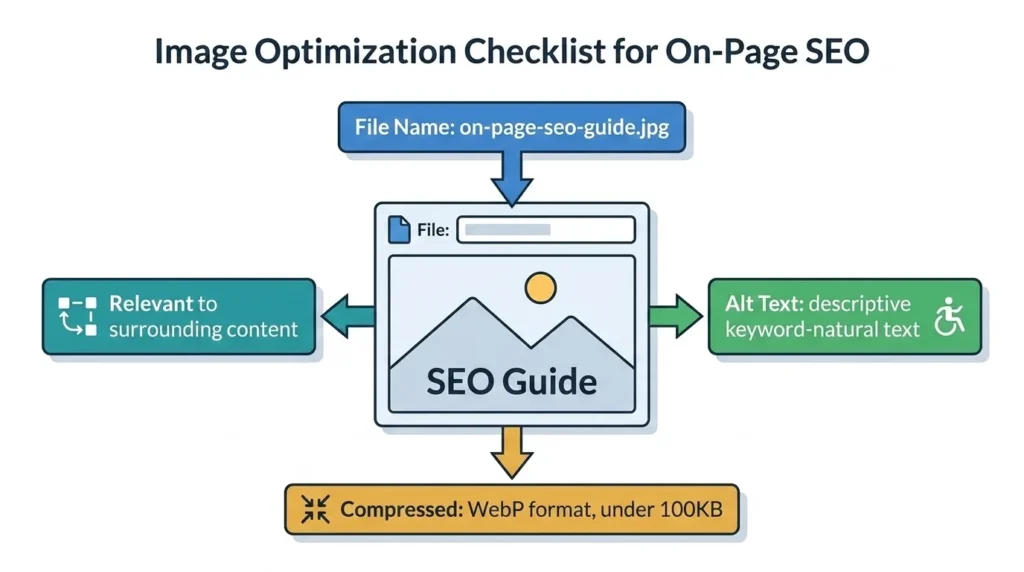
Name your image files descriptively before uploading them to your website. Your file name is an on page SEO signal — it tells Google what the image depicts before it even analyzes the image content. “on-page-seo-guide-2026.jpg” provides a relevant signal. “IMG_4829.jpg” provides no signal at all.
Include your primary keyword in at least one image file name per page — naturally, as part of a genuine description. “how-to-do-on-page-seo-heading-structure.jpg” is an appropriate keyword-containing file name for an image showing heading structure in an on page SEO guide.
Alt Text Optimization
Alt text — the alternative text attribute added to image HTML tags — serves two SEO purposes simultaneously. It describes images to visually impaired users using screen readers, and it tells Google what each image depicts — contributing to the page’s overall topical relevance signals.
Every image on every page should have descriptive, specific alt text that accurately describes the image content. For on page SEO, at least one image alt text per page should naturally include your primary keyword.
Write alt text as genuine descriptions — “On page SEO heading structure diagram showing H1 H2 H3 hierarchy with keyword placement examples” — not as keyword strings — “on page SEO on page optimization SEO headings.” Google can identify keyword-stuffed alt text and treats it as a negative signal.
Image Compression and WebP Format
Large, uncompressed images are one of the most common causes of slow page load speeds — which directly damage both Core Web Vitals scores and on page SEO performance. Every image should be compressed before upload using tools like TinyPNG, ShortPixel, or Squoosh.
Converting images to WebP format — which produces files 25 to 35% smaller than equivalent JPEGs with no perceptible quality difference — is one of the highest-impact page speed optimizations available. Most modern WordPress image optimization plugins handle WebP conversion automatically.
Image Relevance
Every image on your page should be genuinely relevant to the surrounding content — either illustrating a concept explained in the adjacent text or visualizing data referenced nearby. Decorative stock photos that bear no relationship to the content around them add page weight without adding SEO value. In on page SEO, every element should serve a purpose — images included.
How to Do On Page SEO — Page Speed Optimization
Page speed is both a direct Google ranking factor and one of the most significant influences on user experience — making it one of the most important on page SEO elements to maintain. Google’s Core Web Vitals — LCP, INP, and CLS — are the specific speed and stability metrics that influence rankings, and all three are influenced by on page decisions.
Core Web Vitals and On Page SEO
LCP (Largest Contentful Paint) measures how long it takes for the largest visible element — typically a hero image or main heading — to fully load. Target: under 2.5 seconds. On page optimization for LCP includes proper image compression, preloading your hero image, and minimizing render-blocking resources.
INP (Interaction to Next Paint) measures how quickly your page responds to user interactions — clicks, taps, key presses. Target: under 200 milliseconds. On page optimization for INP includes minimizing heavy JavaScript execution and optimizing event handlers.
CLS (Cumulative Layout Shift) measures visual stability — how much page elements shift as the page loads. Target: under 0.1. On page optimization for CLS includes specifying image dimensions in HTML, avoiding dynamically injected content above existing content, and ensuring web fonts do not cause layout shifts.
On Page Speed Optimization Techniques
Minimize render-blocking resources — CSS and JavaScript files that load before page content render are render-blocking. Moving non-critical JavaScript to load asynchronously and deferring non-essential CSS prevents these files from delaying page display.
Enable browser caching — caching allows returning visitors’ browsers to store static page elements locally, dramatically reducing load time for repeat visits.
Reduce server response time — choose quality hosting that delivers fast server response times (under 200 milliseconds). Shared hosting on overloaded servers is one of the most common causes of slow page speed for Pakistani business websites.
Use a Content Delivery Network (CDN) — a CDN stores copies of your website’s static files on servers around the world, delivering content from the server closest to each user’s location. Cloudflare offers a free CDN tier that significantly improves speed for websites with international audiences.
Test your page speed regularly using Google’s free PageSpeed Insights tool, which provides specific, actionable recommendations for every speed issue it identifies.
How to Do On Page SEO — Mobile Optimization
Google uses mobile-first indexing — meaning it primarily evaluates the mobile version of your website for ranking purposes. This makes mobile optimization a critical on page SEO requirement, not an optional enhancement.
What Mobile-First Indexing Means for On Page SEO
If your website’s mobile version has less content than its desktop version — missing sections, truncated text, absent images — Google will evaluate the reduced mobile content for ranking purposes. This means any on page SEO element that appears only on desktop — a key paragraph, an important heading, an internal link — is essentially invisible to Google’s ranking evaluation.
Always ensure your mobile and desktop versions contain identical content. Responsive design — which adapts a single HTML document to different screen sizes — is the recommended approach precisely because it eliminates mobile vs desktop content discrepancies.
Mobile On Page SEO Checklist
Readable text without zooming — body text should be at minimum 16px on mobile devices. Text that requires pinching to zoom creates poor user experience that increases bounce rates and damages on page SEO signals.
Tap targets appropriately sized — buttons and links must be large enough to tap accurately on touchscreens. Google recommends tap targets of at least 48×48 pixels with adequate spacing between adjacent targets.
No horizontal scrolling — content that extends beyond the viewport width on mobile devices is a direct mobile usability issue that Google identifies and penalizes.
Fast mobile load speed — mobile connections are often slower than desktop connections. Mobile page speed optimization is even more important than desktop — prioritize reducing page weight and render-blocking resources for mobile performance.
Viewport meta tag — ensure your pages include the viewport meta tag that tells browsers how to scale content for mobile devices. Most WordPress themes include this automatically, but verify it is present on every page.
How to Do On Page SEO — Schema Markup
Schema markup — also called structured data — is code added to your web pages that explicitly tells Google what your content means, not just what it says. It is one of the most advanced and most underutilized on page SEO techniques, particularly among Pakistani businesses.
Why Schema Markup Matters for On Page SEO
Schema markup enables rich results — enhanced search listings that display additional information directly in search results. Rich results can include star ratings, FAQ dropdowns, how-to steps, event dates, product prices, and more — all displayed in the search results page itself, before users click through.
Pages with rich results consistently achieve higher click-through rates than standard listings — because they provide more information and occupy more visual real estate on the results page. In competitive search results, a rich result with star ratings and FAQ dropdowns stands out dramatically against plain text listings.
Most Important Schema Types for On Page SEO
Article schema — for blog posts and news articles. Tells Google the article’s headline, author, date published, and featured image.
FAQPage schema — for pages containing frequently asked questions. Enables FAQ dropdowns to appear directly in search results, dramatically increasing listing size and visibility.
LocalBusiness schema — for businesses with physical locations. Provides Google with NAP information, business hours, service area, and contact details — reinforcing local SEO signals.
HowTo schema — for step-by-step instructional content. Enables how-to steps to display as rich results with individual step visibility in search results.
BreadcrumbList schema — shows the page’s position in your website hierarchy directly in search results — replacing the URL with a readable breadcrumb path.
How to Add Schema Markup in WordPress
For WordPress websites — which includes the majority of Pakistani business sites — Rank Math and Yoast SEO both offer schema markup implementation without requiring manual code editing. Rank Math in particular provides extensive schema options through a simple interface that makes FAQPage, Article, and LocalBusiness schema implementation straightforward.
How to Do On Page SEO — User Experience Signals
User experience signals — how users behave on your page after arriving from search results — are increasingly important on page SEO factors in 2026. Google uses these behavioral signals to refine its understanding of whether your page truly satisfies user intent, beyond what the page’s text and structure indicate.
Key User Experience Signals in On Page SEO
Bounce rate — the percentage of users who leave your page immediately after arriving without taking any action. High bounce rates signal that your page did not satisfy the user’s expectation — either the content did not match what they were searching for, the page loaded too slowly, or the user experience was poor.
Dwell time — how long users spend on your page before returning to search results. Longer dwell time signals genuine user engagement with your content — a positive on page SEO signal. Short dwell time — users quickly returning to Google — is a negative signal called “pogo-sticking.”
Scroll depth — how far down the page users scroll. Content that keeps users scrolling — through engaging writing, clear structure, relevant visuals, and genuine value — sends positive engagement signals.
Click-through rate from search results — pages with higher CTR than Google expects for their position receive ranking boosts, while pages with lower CTR than expected face ranking demotions.
How to Improve User Experience for On Page SEO
Match content to search intent perfectly — the most important UX signal improvement is ensuring your content exactly matches what users were searching for when they clicked your result. Mismatched intent produces immediate bounces regardless of content quality.
Write engaging introductions — your first paragraph must immediately confirm to the user that they are in the right place. State what the article covers, why it matters, and what the reader will gain — in the first three sentences.
Use clear, readable formatting — short paragraphs, abundant subheadings, bold key points, and bulleted lists all make content easier to consume and keep users engaged longer.
Add relevant visuals — images, diagrams, and infographics break up text, illustrate concepts, and increase time spent on page.
Include a clear table of contents — for long-form content, a table of contents allows users to navigate directly to the section most relevant to their specific question — reducing frustration and improving engagement.
On Page SEO for WordPress — Step by Step
Since the majority of Pakistani business websites run on WordPress, here is a specific on page SEO implementation workflow for WordPress using Rank Math or Yoast SEO:
Step 1 — Install Rank Math or Yoast SEO
Both plugins provide real-time on page SEO analysis as you write and edit content. Rank Math is generally recommended for its more comprehensive free tier features, including schema markup options and Google Search Console integration.
Step 2 — Set Your Focus Keyphrase
In the Rank Math or Yoast panel below your content editor, enter your primary keyword as the Focus Keyphrase. The plugin will analyze your content and show you exactly which on page SEO elements are green (correctly optimized), orange (needs improvement), or red (requires fixing).
Step 3 — Optimize Title Tag and Meta Description
In the Rank Math or Yoast panel, edit the SEO title and meta description fields. These control exactly what appears in Google search results. Use the character count indicator to ensure both stay within recommended limits.
Step 4 — Set Your URL Slug
WordPress automatically generates a URL slug from your post title. Always review and edit this to ensure it is concise, keyword-rich, and formatted correctly — lowercase, hyphens between words, no unnecessary words.
Step 5 — Add Schema Markup
In Rank Math’s Schema tab, select the appropriate schema type for your content — Article for blog posts, FAQPage if your content includes Q&A sections, HowTo for instructional content. Complete the required fields and Rank Math generates and inserts the correct schema code automatically.
Step 6 — Review the On Page SEO Checklist in the Plugin
Go through every item in your SEO plugin’s analysis panel and address each orange or red item. Common items to check include keyphrase in introduction, keyphrase in H2 subheadings, keyphrase density, outbound links, internal links, image alt text, and content length.
Step 7 — Preview on Mobile Before Publishing
Use WordPress’s built-in mobile preview or a browser developer tool to verify your content displays correctly on mobile before publishing. Check that all images load correctly, text is readable without zooming, and all buttons and links are tappable.
On Page SEO Mistakes to Avoid
Even businesses that understand on page SEO make these recurring mistakes that reduce the effectiveness of their optimization efforts:
Duplicate Title Tags and Meta Descriptions
Having identical title tags or meta descriptions across multiple pages is one of the most common and most damaging on page SEO mistakes. Every page needs unique, specifically crafted title tags and meta descriptions. Audit your entire website for duplicates using Google Search Console’s Coverage report or Screaming Frog.
Keyword Cannibalization
Keyword cannibalization occurs when multiple pages on your website target the same primary keyword — competing against each other and diluting ranking potential for both. Use a keyword map to ensure each primary keyword is targeted by only one page. Our guide on how to do keyword research for SEO covers keyword mapping in detail.
Ignoring Search Intent
Creating content without first verifying what type of content ranks for your target keyword produces pages that fail to rank regardless of how well other on page elements are optimized. Always search your keyword before creating content and match the content type, format, and depth to what Google already knows users want.
Missing or Generic H1 Tags
Every page must have exactly one H1 tag containing the primary keyword. Pages with no H1 or with generic H1s like “Home” or “Welcome” miss a critical on page relevance signal.
Unoptimized Images
Publishing pages with large, uncompressed images, missing alt text, and generic file names wastes significant on page SEO opportunity while simultaneously damaging page speed. Image optimization is quick, easy, and directly impactful — make it a consistent part of every content publication workflow.
Thin Content
Pages with fewer than 300 words, or pages that cover a topic superficially without genuine depth, are classified as thin content by Google’s Helpful Content system and either fail to rank or actively suppress the rankings of your entire website. Every page needs genuinely valuable, appropriately comprehensive content.
No Internal Links
Publishing pages with no internal links to related content wastes authority distribution opportunities, slows Google’s discovery of your content, and misses engagement opportunities. Every page should link to at least three to five relevant pages on your website. For a complete understanding of how internal linking fits within your broader SEO strategy, our guide on white hat vs black hat SEO covers ethical link building practices in detail.
How to Measure On Page SEO Results
On page SEO without measurement is optimization without direction. Tracking the right metrics after implementing on page optimizations shows you what is working, what needs improvement, and where the highest-value opportunities remain.
Google Search Console
Google Search Console is the most valuable and completely free tool for measuring on page SEO results. The Performance report shows you exactly which keywords your pages rank for, what positions they hold, how many impressions they receive, and what click-through rates they achieve. Track these metrics monthly for every page you optimize.
Pay particular attention to pages ranking in positions 5 to 15 — these near-page-one positions are your highest-value on page SEO optimization opportunities. A page ranking in position 8 that moves to position 3 after on page improvements can generate several times more traffic from the same keyword.
Key Metrics to Track After On Page SEO Implementation
Average position — are your target keywords moving up in rankings over time following on page optimization?
Click-through rate — is your optimized title tag and meta description generating more clicks than before?
Impressions — are more users seeing your pages in search results — indicating Google is showing them for more queries?
Core Web Vitals — are your page speed optimizations keeping LCP, INP, and CLS scores in Google’s preferred green ranges?
Organic traffic — is your total organic search traffic growing as on page improvements take effect across your website?
Tools for On Page SEO Measurement
Google Analytics — tracks user behavior on your pages including time on page, bounce rate, scroll depth, and conversion rate. Integrates with Search Console for complete picture of on page SEO performance.
Rank Math or Yoast SEO — provides real-time on page SEO scoring as you create and edit content, with specific actionable feedback on every optimization element.
Screaming Frog — crawls your entire website and identifies on page SEO issues at scale — missing title tags, duplicate content, missing alt text, broken internal links, and more.
Frequently Asked Questions About How to Do On Page SEO
Q: What is on page SEO and why is it important?
On page SEO is the optimization of elements within your actual web pages — title tags, meta descriptions, headings, content, images, internal links, and page speed — to improve search engine rankings and attract more organic traffic. It is important because it directly communicates your page’s topic and quality to Google, controls the most immediately actionable ranking factors, and determines whether other SEO investments like link building and content marketing pay off fully.
Q: How long does it take for on page SEO to show results?
On page SEO typically produces results faster than off page or technical SEO. Google often recrawls optimized pages within days to weeks of changes being made. Initial ranking movement from on page improvements can be visible within 2 to 4 weeks. Significant ranking improvements for competitive keywords may take 2 to 3 months of on page optimization combined with ongoing content and link building activity.
Q: What is the most important on page SEO factor?
If forced to choose one, search intent alignment is the most important on page SEO factor — because content that mismatches what users actually want will not rank regardless of how well every other element is optimized. After intent, title tag optimization is typically the single highest-impact individual on page element because it directly influences both Google’s understanding of your page and users’ decision to click your result.
Q: How do I do on page SEO for existing pages?
Audit existing pages using Google Search Console to identify which keywords they currently rank for. Then optimize the title tag, meta description, and H1 to include those keywords prominently. Improve content comprehensiveness by filling gaps identified through competitor analysis. Add internal links from related pages. Optimize all images with descriptive alt text. Check and improve page speed. These existing page optimizations often produce faster results than creating new pages — because the pages already have some Google authority.
Q: What is the difference between on page SEO and technical SEO?
On page SEO involves the visible elements of your web pages — content, headings, title tags, meta descriptions, images, and internal links. Technical SEO addresses the underlying infrastructure — crawlability, indexation, site architecture, Core Web Vitals, and schema markup implementation. Both are essential and complementary. On page SEO gives Google the content signals it needs to rank your pages, while technical SEO ensures Google can find, access, and properly evaluate those pages. For businesses just starting with SEO, on page optimization is the right first priority.
Q: Do I need Yoast SEO or Rank Math for on page SEO?
These plugins are not strictly required for on page SEO — you can manually optimize every element without them. However, for WordPress websites, they provide significant value through real-time on page SEO analysis, guided optimization checklists, automated schema markup, and direct integration with Google Search Console. Rank Math’s free version is particularly comprehensive and is recommended for most Pakistani business websites running on WordPress.
Conclusion — On Page SEO Is the Most Controllable Path to Better Rankings
On page SEO is the element of search engine optimization most entirely within your control — and therefore the most direct path to improving your website’s search rankings. Every title tag you optimize, every heading structure you correct, every image you properly compress and alt-tag, every internal link you add, and every piece of content you write with genuine search intent alignment is an on page SEO improvement that accumulates into sustained ranking improvement over time.
The businesses that invest consistently in on page SEO — auditing existing pages, optimizing new content before publication, and continuously improving their best-performing pages — build search visibility that compounds over time. In Pakistan’s digital market, where most competitors treat on page SEO as an afterthought, businesses that make it a disciplined, ongoing practice gain a meaningful competitive advantage in organic search.
Every element covered in this guide — title tags, meta descriptions, URL structure, heading hierarchy, keyword placement, content quality, internal linking, image optimization, page speed, mobile responsiveness, schema markup, and user experience signals — works together as an integrated on page SEO system. Neglecting any element weakens the whole system. Optimizing all elements consistently builds a page that Google has every reason to rank prominently.
At SiteNova Agency, on page SEO is the foundation of every SEO strategy we build for clients across Pakistan and internationally. Our team audits, optimizes, and continuously improves on page elements across entire websites — ensuring every page communicates its relevance clearly to Google and delivers the quality user experience that converts search visitors into customers.
To continue building your SEO knowledge, explore our complete series: what is digital marketing, what is SEO in digital marketing, white hat vs black hat SEO, how to do keyword research for SEO, what is SEO content writing, why local SEO is important, and Google Business Profile for local SEO. Your next step is our complete on page SEO checklist — the practical companion to this guide that gives you a step-by-step action list for optimizing every page on your website.