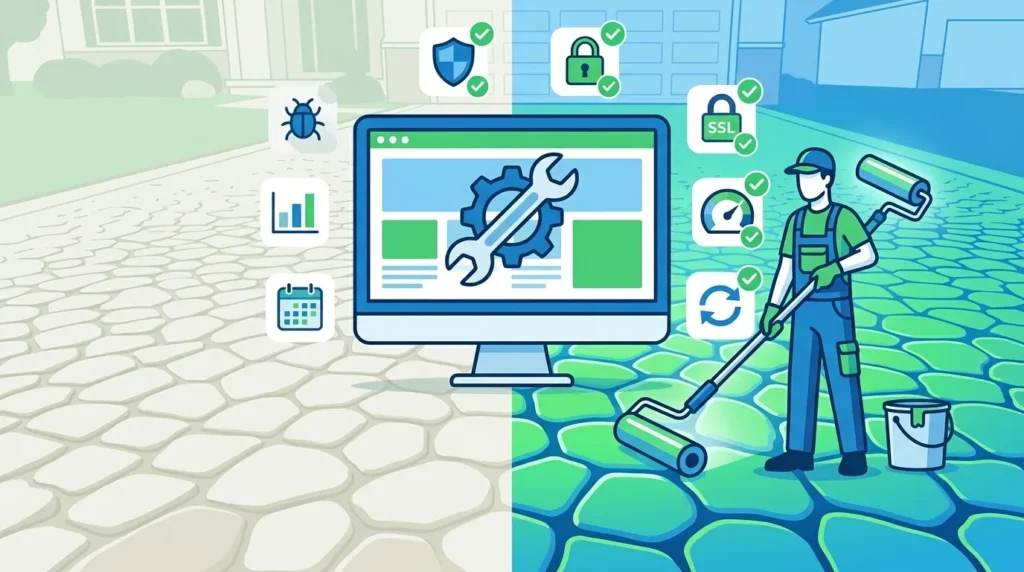
Why website maintenance is important is a question every business owner discovers the answer to — either proactively through regular upkeep, or painfully through a hacked website, crashed server, lost rankings, or broken customer experience that costs real revenue. For businesses that depend on their website to generate leads, drive sales, or establish credibility, understanding why website maintenance is important is not optional knowledge — it is essential business intelligence.
Your website is not a one-time project. It is a living digital asset that requires consistent care, regular updates, and ongoing optimization to remain secure, fast, functional, and effective. The moment a website goes live, the clock starts ticking on software becoming outdated, plugins developing vulnerabilities, content becoming stale, and performance metrics declining — all of which directly impact your business’s online visibility and revenue.
In Pakistan’s rapidly growing digital economy, where businesses in Lahore, Karachi, Islamabad, and beyond increasingly depend on their websites for customer acquisition, a neglected website is not just a technical problem — it is a business risk. Competitors with well-maintained, fast, secure, and regularly updated websites consistently outperform those whose websites are treated as set-and-forget investments.
This guide covers every dimension of why website maintenance is important — from security and SEO to user experience and business credibility — along with a complete checklist of what maintenance tasks need to be done and when.
This is part of our digital marketing series at SiteNova Agency. For context on how your website fits into your broader digital marketing strategy, we recommend reading our guides on what SEO is in digital marketing and why local SEO is important — both explain how website health directly impacts search rankings.
Table of Contents
- Why Website Maintenance Is Important — The Big Picture
- What Is Website Maintenance?
- Types of Website Maintenance
- Why Website Maintenance Is Important for Security
- Why Website Maintenance Is Important for SEO Rankings
- Why Website Maintenance Is Important for Speed and Performance
- Why Website Maintenance Is Important for User Experience
- Why Website Maintenance Is Important for Business Credibility
- Why Website Maintenance Is Important for Conversion Rates
- Key Advantages of Regular Website Maintenance
- Disadvantages and Risks of Neglecting Website Maintenance
- Website Maintenance Checklist — What to Do and When
- Website Maintenance for WordPress Sites
- How Much Does Website Maintenance Cost in Pakistan?
- DIY Website Maintenance vs Professional Website Maintenance
- Frequently Asked Questions
- Conclusion
2. What Is Website Maintenance?
Website maintenance is the ongoing process of keeping a website updated, secure, functional, and optimized after its initial launch. It encompasses a wide range of tasks — from software updates and security monitoring to content refreshes, performance optimization, broken link fixes, and regular backups — all designed to ensure the website continues to serve its business purpose effectively.
Think of website maintenance the way you think of maintaining a car or a physical office space. A new car runs perfectly on day one — but without regular oil changes, tyre rotations, and servicing, it gradually deteriorates until eventually it breaks down at the worst possible moment. A website works the same way. Launched with everything working perfectly, it requires ongoing attention to remain in peak condition as the digital environment around it constantly evolves.
Website maintenance is not a single activity — it is a system of regular, scheduled tasks combined with responsive fixes when issues arise. Effective website maintenance covers:
- Software and plugin updates — keeping your CMS, themes, and plugins current
- Security monitoring and hardening — protecting against hacks, malware, and vulnerabilities
- Performance optimization — maintaining fast page load speeds and Core Web Vitals scores
- Content updates — keeping information accurate, fresh, and relevant
- Backup management — ensuring complete, restorable backups exist at all times
- Broken link auditing — finding and fixing links that lead to error pages
- SEO health monitoring — tracking rankings, fixing technical issues, and updating content
- Uptime monitoring — ensuring the website is accessible to users at all times
- Analytics review — monitoring traffic, user behavior, and conversion performance
Types of Website Maintenance
Website maintenance divides into several distinct categories — each serving a different protective or optimization function:
Preventive Maintenance
Preventive maintenance involves regular, scheduled tasks that prevent problems before they occur. Software updates, security scans, performance audits, and backup verification are all preventive maintenance activities. This is the most important category — investing in prevention consistently costs less than recovering from the problems prevention would have avoided.
Corrective Maintenance
Corrective maintenance addresses problems that have already occurred — fixing broken links, resolving error pages, repairing plugin conflicts, recovering from security breaches, and restoring accidentally deleted content. While some corrective maintenance is unavoidable, businesses that invest in preventive maintenance require significantly less corrective intervention.
Adaptive Maintenance
Adaptive maintenance updates your website to remain compatible with changing technology and standards. As browsers update, Google changes its algorithm, new devices and screen sizes emerge, and platform requirements evolve — adaptive maintenance ensures your website remains compatible, functional, and competitive in the changing digital environment.
Perfective Maintenance
Perfective maintenance improves your website’s performance, functionality, and user experience beyond its original specifications. Adding new features, improving page speed, enhancing mobile responsiveness, and updating design elements to reflect current standards are all perfective maintenance activities that make a good website better over time.
Why Website Maintenance Is Important for Security
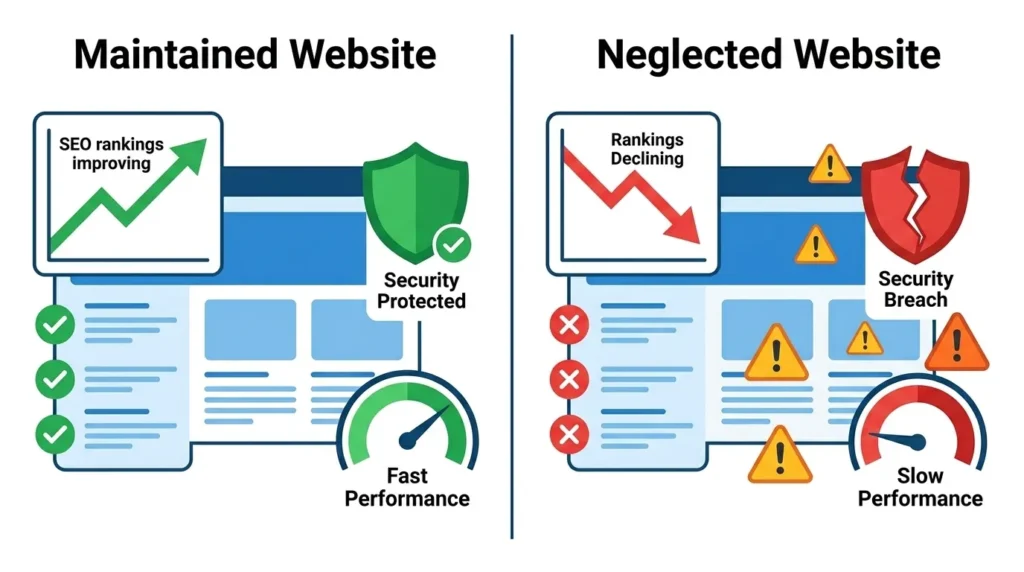
Security is the most urgent reason why website maintenance is important — and the dimension where neglect can produce the most catastrophic, rapid consequences for your business.
The Scale of the Threat
Cybersecurity threats to websites are not hypothetical — they are constant, automated, and relentless. Automated bots continuously scan the internet for websites running outdated software with known vulnerabilities. A WordPress website running plugins that have not been updated for three months is a known target. The question is not whether your website will be attacked — it is whether your website is protected when the attack happens.
How Outdated Software Creates Vulnerabilities
Every major CMS — WordPress, Joomla, Drupal — and every plugin and theme receives regular security updates when vulnerabilities are discovered. When a security researcher discovers a vulnerability in a popular WordPress plugin, they report it to the plugin developer, who releases a patch. But here is the critical issue: the vulnerability is publicly disclosed when the patch is released — meaning every hacker on the internet now knows exactly which websites using the unpatched version are vulnerable.
Websites that do not update promptly become sitting targets. The window between a vulnerability being disclosed and automated exploitation attempts beginning is often measured in hours, not days.
Consequences of a Hacked Website
The consequences of a security breach from neglected website maintenance are severe and multi-dimensional:
Data theft — customer data, payment information, and business data can be stolen and sold or held for ransom. For Pakistani businesses handling customer information, data breaches carry both reputational and legal consequences.
Malware injection — hackers inject malicious code into your website that infects visitors’ devices, redirects them to fraudulent websites, or uses your server to send spam. Google detects this and immediately blacklists your website from search results.
Complete defacement — hackers replace your website content with their own messaging — political statements, spam advertisements, or simply destruction. Every visitor to your website during this period experiences the defacement directly.
SEO damage — Google’s Safe Browsing system adds blacklist warnings to hacked websites — displaying “This site may be harmful” warnings in search results that destroy click-through rates overnight. Recovering from a Google blacklist requires both cleaning the hack and submitting a reconsideration request — a process that typically takes weeks.
Business downtime — cleaning a hacked website and restoring normal function typically takes days to weeks and often requires professional security expertise — representing significant direct cost in addition to the revenue lost during downtime.
Security Maintenance Tasks That Prevent Breaches
Regular website maintenance significantly reduces security risk through:
- Immediate software updates — updating WordPress core, themes, and plugins within days of release
- Strong password policies — regular password rotation for all admin accounts
- Two-factor authentication — adding a second verification layer to admin logins
- Web Application Firewall (WAF) — filtering malicious traffic before it reaches your website
- Malware scanning — regular automated scans that detect injected malicious code
- SSL certificate maintenance — ensuring your HTTPS certificate remains valid and current
- User access auditing — regularly reviewing and removing unnecessary admin accounts
- Login attempt limiting — blocking IP addresses that make repeated failed login attempts
Why Website Maintenance Is Important for SEO Rankings
Website maintenance is directly connected to SEO performance — and neglecting maintenance is one of the fastest ways to lose hard-earned search rankings. Understanding why website maintenance is important for SEO reveals how technical website health and organic search visibility are inseparably linked.
Core Web Vitals Degrade Without Maintenance
Google uses Core Web Vitals — LCP (Largest Contentful Paint), INP (Interaction to Next Paint), and CLS (Cumulative Layout Shift) — as direct ranking factors. These performance metrics degrade over time without active maintenance. As new plugins are added, images accumulate without compression, code becomes less optimized, and hosting resources become strained — page load speeds slow and Core Web Vitals scores decline, directly impacting search rankings.
Regular performance maintenance — image compression, database optimization, cache management, and code minification — keeps Core Web Vitals scores in the green range that Google rewards with ranking preference.
Broken Links Damage SEO
Every time a page on your website is moved, renamed, or deleted without proper redirects, any links pointing to it — internal or external — break, creating 404 error pages. Broken internal links prevent Google from crawling your full content structure. Broken external backlinks waste the ranking authority those links were passing to your site. Regular broken link auditing and fixing is an essential website maintenance task with direct SEO impact.
Outdated Content Loses Rankings
Google increasingly favors fresh, current content. Blog posts and service pages that were accurate and comprehensive when published may become outdated as industry practices evolve, statistics change, and new information emerges. Content that was once considered the best answer to a search query loses that status when fresher, more current content appears.
Regular content auditing and updating — refreshing statistics, adding new examples, expanding thin sections — is a website maintenance activity that directly maintains and often improves existing rankings.
Technical SEO Issues Accumulate
Without regular technical SEO auditing, issues accumulate silently — duplicate meta descriptions, missing alt text, incorrect canonical tags, crawl errors, and indexation problems that gradually erode search performance. Monthly technical SEO health checks as part of website maintenance identify and resolve these issues before they compound into significant ranking damage.
For a complete understanding of how technical health connects to search rankings, our guide on what SEO is in digital marketing covers the technical SEO foundation in detail. And for businesses concerned about local search specifically, our guide on Google Business Profile for local SEO explains how website health impacts local pack rankings.
Why Website Maintenance Is Important for Speed and Performance
Website speed is not just a user experience consideration — it is a direct business metric. Research consistently shows that every one-second delay in page load time reduces conversions by 7%, increases bounce rates by 11%, and reduces page views by 11%. For Pakistani businesses where mobile internet connections vary in speed, fast-loading websites are especially critical. Google’s own Page Speed Insights tool allows you to test your website’s current performance score and Core Web Vitals status for free — providing specific recommendations for every improvement your website needs.
Why Websites Slow Down Without Maintenance
Websites naturally accumulate performance drag over time without active maintenance:
Database bloat — WordPress databases accumulate post revisions, spam comments, transient data, and orphaned records that grow the database size and slow query performance. Regular database optimization removes this accumulated weight.
Uncompressed images — every new image added to a website without compression adds to page load weight. A website that launched with properly optimized images gradually accumulates heavier, unoptimized images as new content is added.
Plugin accumulation — each additional plugin adds code that loads on every page. Many websites accumulate deactivated or unnecessary plugins that continue loading code even when not in use.
Outdated caching — caching plugins require regular configuration review. As website content changes, caching rules may need adjustment to ensure users receive current content while still benefiting from caching speed improvements.
Hosting resource strain — as website traffic grows, content accumulates, and databases expand, hosting resources that were sufficient at launch may become inadequate — requiring maintenance review and possible hosting upgrades.
Performance Maintenance Tasks
Regular website maintenance keeps performance metrics in optimal ranges through:
- Image compression and conversion to WebP — compressing all new images before upload and converting existing image libraries to WebP format
- Database optimization — monthly database cleanup removing revisions, spam, and orphaned data
- Plugin auditing — quarterly review and removal of unnecessary, deactivated, or redundant plugins
- Cache management — maintaining cache configuration and clearing cache after content updates
- CDN implementation and maintenance — ensuring Content Delivery Network configuration remains optimized for current content
- Hosting performance review — monitoring server response times and upgrading resources when performance metrics indicate strain
Why Website Maintenance Is Important for User Experience
User experience — how visitors feel when using your website — directly influences both conversion rates and SEO rankings. A website that provided excellent user experience at launch can gradually develop friction points that drive visitors away, without any dramatic single failure point.
Broken Functionality Frustrates Users
Contact forms stop working. Booking systems fail silently. Payment gateways lose compatibility with updated browser versions. Navigation links lead to error pages. These are all failure modes that develop over time without maintenance — and each one represents a visitor who tried to engage with your business and had a frustrating experience instead.
A contact form that silently fails to deliver submissions may go unnoticed for weeks — during which every visitor who filled it out and waited for a response received nothing and assumed either that your business is unresponsive or that something is wrong. The damage to potential customer relationships happens invisibly.
Mobile Responsiveness Degrades
As new devices with different screen sizes and browsers are released, websites that were perfectly mobile-responsive at launch may develop display issues on newer devices. Regular cross-device and cross-browser testing as part of website maintenance identifies these issues before they affect significant portions of your audience.
Outdated Design Reduces Credibility
Design trends evolve. A website that looked modern and professional in 2022 may look dated by 2026 — signaling to visitors that the business behind it may be similarly outdated. Regular maintenance includes periodic design reviews that keep the visual presentation current without requiring complete redesigns.
Why Website Maintenance Is Important for Business Credibility
Your website is the face of your business online. For many potential customers — particularly in Pakistan’s growing digital economy — your website is their first, and sometimes only, impression of your business before deciding whether to contact you.
Outdated Information Damages Trust
Outdated phone numbers, old addresses, expired promotional offers, past event announcements that were never removed, copyright dates from several years ago — all these signals tell visitors that the business behind the website does not pay attention to details. For businesses where trust is paramount — professional services, healthcare, financial services — outdated website information is a significant credibility liability.
Broken Website Elements Signal Unprofessionalism
Broken images showing alt text placeholders, links that lead to 404 pages, forms that do not submit, inconsistent formatting across pages — these are the website equivalents of showing up to a client meeting with a torn shirt. They signal lack of attention to detail and professionalism that directly influences whether potential clients choose to work with you.
SSL Certificate Expiry Destroys Instant Trust
An expired SSL certificate triggers immediate “Not Secure” warnings in all major browsers — displaying a prominent warning to every visitor before they see any of your content. This single maintenance failure — which takes less than 30 minutes to prevent through certificate renewal tracking — can eliminate the majority of visitor engagement overnight.
Why Website Maintenance Is Important for Conversion Rates
Conversion rate — the percentage of website visitors who take a desired action — is the ultimate measure of a website’s business performance. Website maintenance directly protects and improves conversion rates through several interconnected mechanisms.
Fast Websites Convert Better
The direct relationship between page speed and conversion rate is one of the most well-documented findings in digital marketing. Google’s research consistently shows that as page load time increases from one second to three seconds, the probability of a mobile visitor bouncing increases by 32%. Websites that maintain fast load speeds through regular performance maintenance consistently outperform slow competitors in conversion metrics.
Functional Conversion Paths Convert Better
Every conversion on your website follows a path — from landing on a page, through consuming content, to taking an action via a form, button, or phone number. Any break in this path — a form that does not submit, a button that does not respond, a phone number that is no longer active — terminates the conversion. Regular functional testing of all conversion paths as part of website maintenance ensures these paths remain intact.
Fresh Content Builds Conversion Confidence
Regularly updated content — current blog posts, up-to-date case studies, recent testimonials, current team profiles — signals to potential customers that your business is active, growing, and engaged. This freshness builds the confidence that converts visitors into inquiries. A website whose most recent blog post is 18 months old, whose testimonials are undated, and whose team page shows people who have since left the business actively undermines conversion.
Key Advantages of Regular Website Maintenance
Consolidating the benefits covered throughout this guide, here are the key advantages of regular website maintenance:
Continuous security protection — regular updates and security monitoring prevent the majority of cyberattacks, protecting your business data, customer information, and website availability.
Maintained and improved SEO rankings — technical health maintenance, content freshness, and performance optimization preserve and improve the organic search rankings that drive qualified traffic to your business.
Consistent fast performance — ongoing performance optimization ensures page load speeds remain fast as content accumulates and traffic grows — maintaining the user experience and conversion rates that depend on speed.
Zero surprise downtime — proactive maintenance identifies and resolves issues before they become failures — preventing the unplanned downtime that costs revenue and damages customer relationships.
Professional business credibility — a consistently updated, well-functioning website signals professionalism and attention to detail that builds customer trust and supports conversion.
Protected data and backups — regular backup management ensures that any data loss or website failure can be recovered quickly with minimal business disruption.
Compatibility with evolving technology — regular updates maintain compatibility with new browsers, devices, and platform requirements — ensuring all visitors receive a consistent experience regardless of how they access your website.
Improved conversion rates — fast, functional, credible, and current websites consistently convert higher percentages of visitors into leads and customers.
Long-term cost savings — investing in regular preventive maintenance consistently costs less than emergency recovery from security breaches, crashed websites, or lost rankings that neglected maintenance causes.
Competitive advantage — in Pakistan’s market where most businesses underinvest in website maintenance, a well-maintained website provides a meaningful competitive advantage in both search visibility and customer impression.
Disadvantages and Risks of Neglecting Website Maintenance
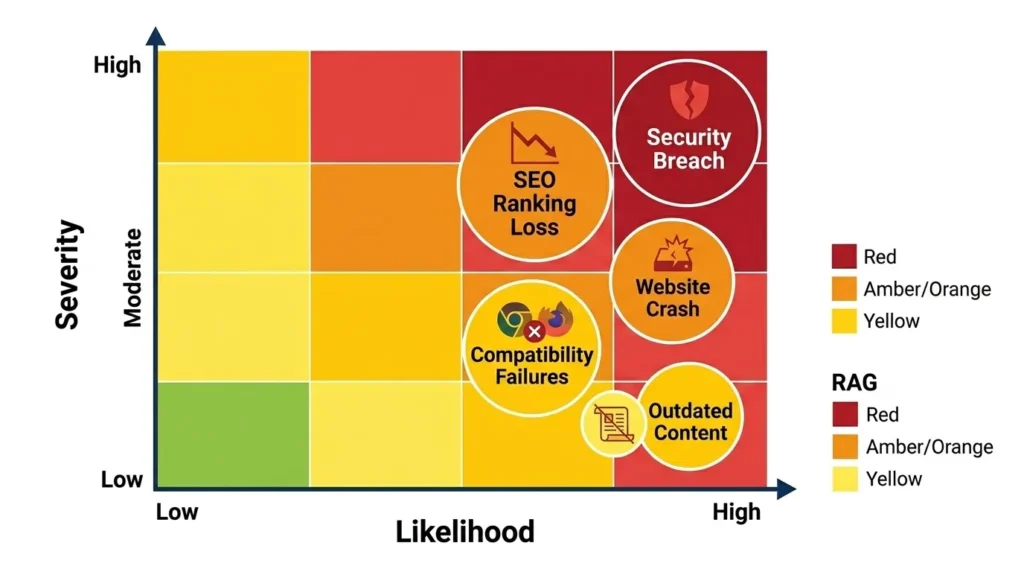
Understanding why website maintenance is important also requires understanding precisely what happens when maintenance is neglected. These are the real consequences Pakistani businesses face when they treat their websites as one-time investments:
Security Breach and Data Loss
The most severe consequence of neglected maintenance. An unpatched vulnerability leads to a successful attack. Customer data is stolen or destroyed. The website is defaced or used to attack others. Google blacklists the site. Recovery requires professional security intervention, complete content restoration from backup (if a backup exists), Google blacklist removal, and customer notification — a process that can cost more in direct expenses and lost business than years of professional maintenance would have.
Complete Website Crash
Unresolved plugin conflicts, database corruption, server resource exhaustion, or hosting platform changes can cause a website to become completely inaccessible. Without recent backups, recovery may require rebuilding from scratch — losing all content, all SEO equity, and all historical data.
Gradual Ranking Decline
Unlike a dramatic crash, ranking decline from neglected maintenance is slow and insidious — happening over months as Core Web Vitals degrade, content becomes stale, technical issues accumulate, and competitors with better-maintained websites gradually overtake neglected sites in search results. By the time the decline becomes obvious, significant organic traffic and the revenue it generated has already been lost.
Loss of Customer Data
Without regular backups, any website failure — hack, server crash, accidental deletion, or CMS update gone wrong — can result in permanent loss of customer inquiries, contact form submissions, order history, and user account data. This loss is not just a technical problem — it is a direct business loss with potential legal implications for businesses that hold customer data.
Compatibility Failures
A website that has not been maintained gradually loses compatibility with current browsers and devices as updates roll out. Features that worked in 2023 browsers may break in 2026 versions. Mobile display that was correct for 2023 screen sizes may be incorrect for 2026 device dimensions. These failures happen silently — your analytics show declining engagement from certain device segments while you remain unaware of the display issues driving that decline.
Reputational Damage
A hacked website showing malware warnings, a website displaying incorrect business information, a contact form that silently fails, or a website that loads unacceptably slowly all damage your business reputation with every affected visitor. In Pakistan’s relationship-driven business culture, reputational damage from a poor website experience can have lasting consequences that far outweigh the cost of the maintenance that would have prevented it.
Emergency Repair Costs
Emergency response to a crashed or hacked website costs significantly more than preventive maintenance. Professional emergency website recovery in Pakistan typically costs PKR 25,000 to PKR 150,000 or more — vastly exceeding the monthly cost of professional maintenance that would have prevented the emergency. This does not account for the revenue lost during downtime or the long-term SEO damage from a period of website unavailability.
Website Maintenance Checklist — What to Do and When
Effective website maintenance follows a structured schedule — different tasks at different frequencies based on their urgency and impact:
Daily Maintenance Tasks
- Monitor website uptime — use automated uptime monitoring tools that alert immediately if the website becomes inaccessible
- Check for critical security alerts from your WAF and security monitoring plugin
- Review and respond to new contact form submissions and comments
- Monitor server error logs for critical errors
Weekly Maintenance Tasks
- Update WordPress core, themes, and plugins immediately when updates are available
- Review and clear spam comments
- Check Google Search Console for new crawl errors, manual actions, or security issues
- Review website analytics for unusual traffic patterns that may indicate security issues
- Test primary conversion paths — contact forms, booking systems, payment processes
- Publish fresh content or update existing content
Monthly Maintenance Tasks
- Complete full website backup verification — test that backups are complete and restorable
- Run full malware scan
- Audit and fix broken links — internal and external
- Review and optimize database — remove revisions, spam, transient data
- Check all page load speeds and Core Web Vitals scores
- Review and update outdated content — statistics, dates, offers, team information
- Check SSL certificate expiry date and renew if within 30 days
- Review Google Analytics for conversion rate changes and user behavior patterns
- Audit and remove unnecessary plugins
- Review and update meta titles and descriptions for underperforming pages
Quarterly Maintenance Tasks
- Complete SEO technical audit — crawl errors, duplicate content, canonical issues, indexation problems
- Cross-browser and cross-device compatibility testing
- Security audit — review user accounts, passwords, and access permissions
- Review and update privacy policy and terms of service if legal requirements have changed
- Evaluate hosting performance and capacity — assess whether current plan remains adequate
- Review and update Google Business Profile information for consistency with website
- Competitive content audit — identify new competitor content that threatens existing rankings
- Review and refresh design elements that appear dated
Annual Maintenance Tasks
- Complete website redesign assessment — evaluate whether design remains current and effective
- Full content audit — identify pages to update, consolidate, or remove
- Complete SEO strategy review — reassess keyword targeting based on current ranking data
- Security penetration testing
- Hosting contract review — assess whether current hosting plan and provider remain optimal
- Website performance benchmarking against competitors
Website Maintenance for WordPress Sites
The majority of Pakistani business websites run on WordPress — making WordPress-specific maintenance knowledge particularly valuable. WordPress’s flexibility and plugin ecosystem make it both powerful and maintenance-intensive compared to simpler website platforms.
WordPress Core Updates
WordPress core updates are released regularly — major versions several times per year, minor security updates more frequently. Core updates should be applied promptly — within days of release — particularly security releases. Always back up your website before applying major core updates and test functionality on a staging environment before updating production sites.
Plugin Management
Plugins are the primary attack vector for WordPress security breaches — and the primary source of update-related conflicts. Effective WordPress maintenance includes:
Regular plugin updates — update all plugins promptly when updates are available, testing in a staging environment before applying to the live site for major updates.
Plugin auditing — quarterly review of all installed plugins to identify and remove those that are deactivated, redundant, abandoned (no updates for 12+ months), or poorly coded (low ratings, security issues reported).
Conflict monitoring — watch for unexpected behavior after plugin updates — broken layouts, PHP errors, or functionality failures — and address conflicts promptly.
WordPress Database Maintenance
WordPress databases accumulate significant bloat over time. Monthly database maintenance using plugins like WP-Optimize or Advanced Database Cleaner removes post revisions (WordPress saves every draft), spam comments, deleted content, transient options, and orphaned metadata — typically reducing database size by 30 to 60% and improving query performance measurably.
Theme Updates and Child Themes
Theme updates are essential for security and compatibility — but applying updates directly to a modified parent theme overwrites all customizations. Professional WordPress maintenance always uses child themes for customizations — allowing parent theme updates to apply safely without losing custom code.How Much Does Website Maintenance Cost in Pakistan?
Website maintenance costs in Pakistan vary based on website complexity, the scope of maintenance required, and whether you use in-house resources, a freelancer, or a professional agency.
DIY Maintenance
For business owners with technical knowledge, basic WordPress maintenance — plugin updates, content updates, and plugin-based security scanning — can be managed in-house with a time investment of 4 to 8 hours per month. The financial cost is primarily tool subscriptions — security plugins (PKR 5,000 to PKR 15,000 per year), backup plugins (PKR 5,000 to PKR 20,000 per year), and uptime monitoring tools.
Freelance Maintenance
Pakistani freelancers providing website maintenance services typically charge PKR 5,000 to PKR 25,000 per month depending on scope. Basic maintenance packages cover updates, backups, and uptime monitoring. More comprehensive packages include security monitoring, performance optimization, and content updates.
Professional Agency Maintenance
Professional website maintenance from a qualified agency in Pakistan typically ranges from PKR 15,000 to PKR 75,000 per month depending on website complexity and scope of services. Agency packages typically include all technical maintenance, security monitoring, performance optimization, content updates, monthly reporting, and priority response for issues.
Emergency Repair Cost Comparison
The most compelling financial argument for regular maintenance investment is the cost comparison with emergency repairs. A security breach recovery — cleaning malware, restoring from backup, removing Google blacklist — typically costs PKR 25,000 to PKR 150,000 in professional fees alone, plus revenue lost during the downtime period. This single emergency event costs more than 6 to 12 months of professional maintenance would have.
At SiteNova Agency, our website maintenance packages are designed for businesses that understand the value of protecting their digital investment. Contact us through our services page to discuss the right maintenance plan for your website.
DIY Website Maintenance vs Professional Website Maintenance
| Factor | DIY Maintenance | Professional Maintenance |
|---|---|---|
| Cost | Low direct cost — high time cost | Monthly service fee |
| Expertise required | Moderate to high technical knowledge | Handled by specialists |
| Time investment | 4 to 10 hours per month | Near zero for business owner |
| Response speed | Dependent on your availability | Dedicated response SLA |
| Security expertise | Limited — relies on plugin automation | Advanced security monitoring |
| SEO maintenance | Basic — manual checks | Comprehensive technical SEO auditing |
| Risk | Higher — missed updates, errors | Lower — professional accountability |
| Best for | Technically skilled owners with time | Business owners focused on growth |
The decision between DIY and professional maintenance ultimately comes down to the value of your time and the risk tolerance of your business. For businesses whose website is a primary revenue channel — e-commerce, lead generation, service booking — the cost of professional maintenance is easily justified by the revenue protection it provides.
Frequently Asked Questions About Why Website Maintenance Is Important
Q: Why is website maintenance important for my business?
Website maintenance is important because your website is a living digital asset that requires ongoing care to remain secure, fast, and effective. Without regular maintenance, websites become vulnerable to security breaches, lose search engine rankings, develop broken functionality, and gradually deliver a worse experience to potential customers — all directly impacting your business’s ability to generate leads and revenue online.
Q: How often should a website be maintained?
Website maintenance should happen at different frequencies depending on the task. Software updates should be applied weekly when available. Full backups should be verified monthly. Technical SEO audits, performance checks, and content reviews should happen monthly. Cross-device testing, security audits, and competitive content analysis should happen quarterly. Annual reviews assess whether design, hosting, and overall strategy remain optimal.
Q: What happens if I don’t maintain my website?
Neglecting website maintenance creates compounding risks over time. Security vulnerabilities go unpatched, making your site an easy target for hackers. Page speeds slow as content accumulates without optimization. SEO rankings decline as technical issues accumulate. Broken links and outdated content damage user experience and credibility. Eventually, these neglect consequences converge into a significant business problem — a hacked site, crashed rankings, or completely failed website that costs far more to fix than regular maintenance would have.
Q: Is website maintenance the same as website hosting?
No — website hosting and website maintenance are different services. Hosting is the server infrastructure your website files live on — you pay a hosting provider to store your website and make it accessible on the internet. Website maintenance is the ongoing work of keeping your website updated, secure, and optimized. Hosting provides the foundation your website sits on — maintenance keeps the website itself in good condition.
Q: How does website maintenance affect SEO?
Website maintenance directly affects SEO through multiple mechanisms. Page speed maintenance keeps Core Web Vitals scores in Google’s preferred range. Security maintenance prevents hacks that trigger Google blacklisting. Broken link fixes prevent crawl errors that limit Google’s access to your content. Content updates signal freshness that Google rewards. Technical SEO auditing identifies and resolves indexation and crawlability issues. A well-maintained website consistently outranks a neglected one in organic search results. For the complete picture of how technical health impacts rankings, read our guide on how to do keyword research for SEO and SEO content writing.
Q: Can I do website maintenance myself?
Basic website maintenance tasks — applying plugin and software updates, checking for broken links, reviewing analytics, and publishing content — can be managed independently with moderate technical knowledge. More advanced maintenance — security hardening, performance optimization, database management, technical SEO auditing, and emergency security incident response — typically requires specialized expertise. For businesses whose websites are critical to revenue, professional maintenance by qualified specialists provides stronger protection and better results than DIY maintenance by non-specialists.
Conclusion — A Maintained Website Is a Protected Business Asset
Understanding why website maintenance is important ultimately comes down to understanding what your website represents to your business. For most Pakistani businesses in 2026, a website is not just a digital brochure — it is the primary channel through which potential customers discover, evaluate, and contact your business. It is the destination for every SEO effort, every Google Ads click, every social media post, and every business card handed out. It is the foundation of your entire digital marketing strategy.
A website that is secure, fast, functional, current, and technically sound serves all those purposes effectively — converting the traffic your marketing generates into real business outcomes. A website that is hacked, slow, broken, outdated, or technically compromised undermines every marketing investment you make — sending potential customers to competitors whose websites work properly.
Website maintenance is the insurance policy on your most important digital asset. It is the difference between a website that consistently grows your business and one that quietly works against it. The cost of regular professional maintenance is modest compared to the cost of the emergencies it prevents — and the revenue protection it provides makes it one of the most straightforward digital marketing investments available.
At SiteNova Agency, website maintenance is one of our core services — keeping Pakistani business websites secure, fast, and optimized so our clients can focus on their business while we protect their digital foundation. Explore our complete range of services including SEO, content marketing, local SEO, and Google Ads to see how we help businesses build and protect their complete digital presence.