
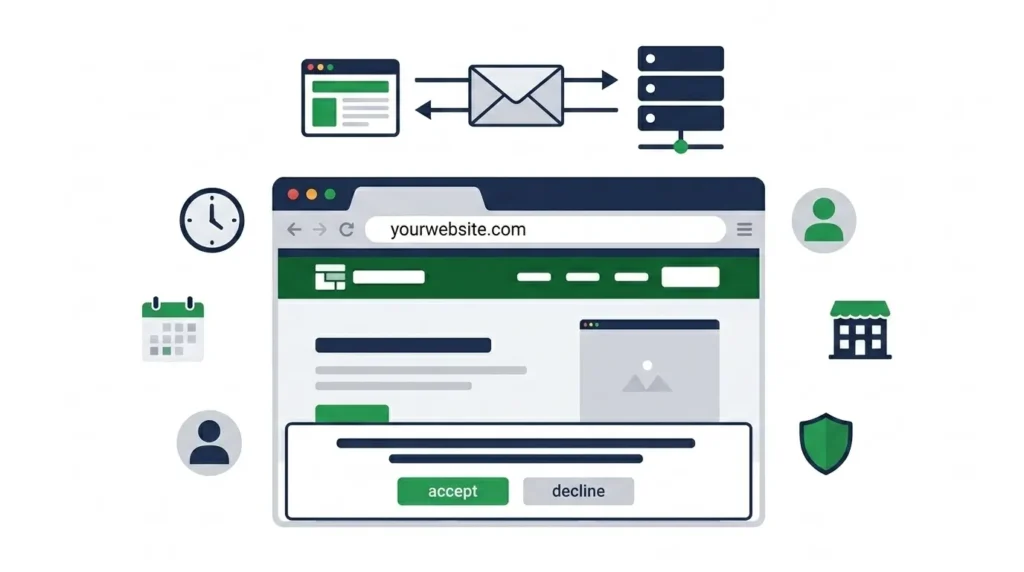
A cookie on a website is a small text file that a website saves to your browser when you visit it. The file contains a piece of data — typically an identifier or a set of preferences — that the website can read the next time you visit, allowing it to recognize you, remember your settings, or track your activity across sessions.
The name has nothing to do with the baked goods. It comes from a computing concept called a “magic cookie” — a packet of data passed between programs to maintain state in a stateless communication system. The web’s foundational protocol, HTTP, does not retain any memory of previous interactions — each request from your browser to a web server is treated as completely new. Cookies solve this problem by storing a small piece of information on your device that is sent back to the server with every subsequent request, giving the server a way to recognize that you are the same user who visited before.
In practical terms, cookies are why you stay logged into your email between browser sessions, why items remain in your shopping cart when you close and reopen a tab, why a website remembers your language preference, and why advertisements seem to follow you from one website to another. All of these behaviors depend on cookies — or technologies that have evolved alongside them.
Understanding what a cookie on a website actually does — and what it does not do — removes the confusion that leads many users to either ignore cookies entirely or treat them as an active threat to their security when most are neither harmful nor intrusive.
For businesses building or managing websites, understanding cookies is increasingly important because cookie compliance — ensuring your website’s cookie usage meets legal requirements and is properly disclosed to users — is a legal obligation in many jurisdictions and a growing expectation in others. Our guide on why website maintenance is important covers cookie policy maintenance as one of the ongoing website management responsibilities that requires regular attention.
Table of Contents
- What Is a Cookie on a Website?
- How Website Cookies Work — The Technical Process
- What Information Do Cookies Store?
- Types of Website Cookies
- First-Party vs Third-Party Cookies
- What Are Cookies Used For on Websites?
- Are Website Cookies Dangerous?
- Cookie Privacy Laws — GDPR, CCPA, and Pakistan
- Cookie Consent Banners — Why Websites Ask for Your Permission
- How to View and Delete Cookies in Your Browser
- The Future of Cookies — Third-Party Cookie Deprecation
- What Website Owners Need to Know About Cookies
- Cookies vs Other Browser Storage Technologies
- Frequently Asked Questions
- Conclusion
How Website Cookies Work — The Technical Process
The mechanism by which cookies operate is straightforward once you understand the stateless nature of HTTP — the protocol that governs how browsers and web servers communicate.
The Problem Cookies Solve
Every time your browser requests a page from a web server, that request is independent — the server has no built-in memory of whether you visited the same site ten seconds ago or ten years ago. Without a mechanism for maintaining state across requests, websites could not keep you logged in between page loads, could not remember your shopping cart contents as you navigate from product to product, and could not personalize any aspect of your experience based on your previous behavior.
Cookies provide that mechanism. They create a persistent information bridge between your browser and the web server — allowing the server to identify your browser across multiple requests and over time.
The Cookie Exchange — Step by Step
Step 1 — Server sets the cookie: When you visit a website for the first time and the site wants to set a cookie, the server includes a Set-Cookie header in its HTTP response. This header contains the cookie’s name, value, and optional attributes including expiry date, domain, path, and security flags.
Step 2 — Browser stores the cookie: Your browser receives the Set-Cookie header and saves the cookie data in its local storage — the browser’s cookie jar. The cookie is stored as a small text file associated with the website’s domain.
Step 3 — Browser sends cookie with future requests: On every subsequent request to the same domain, your browser automatically includes the stored cookie in the request’s HTTP Cookie header — sending the saved data back to the server without any action required from you.
Step 4 — Server reads the cookie: The server receives the cookie data in the request header, reads the stored value, and uses it to identify your session, retrieve your preferences, or any other purpose the cookie was designed for.
A practical example: You log into an online store. The server authenticates your credentials and creates a session — a record in its database that you are logged in. It sets a cookie in your browser containing a unique session ID. On every subsequent page load, your browser sends that session ID back to the server. The server looks up the session ID, confirms you are authenticated, and serves the page as if you are logged in. When you log out, the server deletes the session and tells the browser to delete or ignore the cookie.
What Information Do Cookies Store?
This is one of the most misunderstood aspects of cookies. Cookies do not store your passwords, your credit card numbers, or your personal files. They cannot access your device’s file system, your camera, or any information that you have not explicitly provided to the website.
A cookie is a text string — a name and a value, like a simple key-value pair in a database record. The value can be a number, a string of characters, or encoded data — but it is almost always an identifier or a preference setting rather than sensitive personal information.
What Cookies Typically Contain
Session identifiers: A long random string of characters (like abc123xyz789) that maps to a session record stored on the server. The cookie itself contains no personal information — just an ID that the server uses to look up your session data in its own database.
Preference settings: Simple values storing your choices — “language=en,” “theme=dark,” “currency=PKR” — that the website uses to display content in your preferred format.
Analytics identifiers: A unique identifier assigned to your browser that analytics platforms use to distinguish you from other visitors — enabling metrics like returning vs new users and session duration without storing personally identifiable information.
Cart contents: On eCommerce sites that store cart data in cookies rather than server-side sessions, the cookie may contain product IDs and quantities — enough to reconstruct your cart on the next visit.
Tracking identifiers: Advertising cookies often contain identifiers that advertising networks use to build a profile of your interests across multiple websites — this is the category that raises the most privacy concerns, discussed in detail in the privacy and third-party cookie sections below.
What Cookies Cannot Do
Cookies cannot read files from your device. They cannot access other websites’ cookies (same-origin policy prevents cross-domain cookie access). They cannot execute code or install software. They cannot directly identify you by name, email, or government ID — though combining cookie data with information you have voluntarily provided to a website can create a profile that indirectly identifies you.
Types of Website Cookies
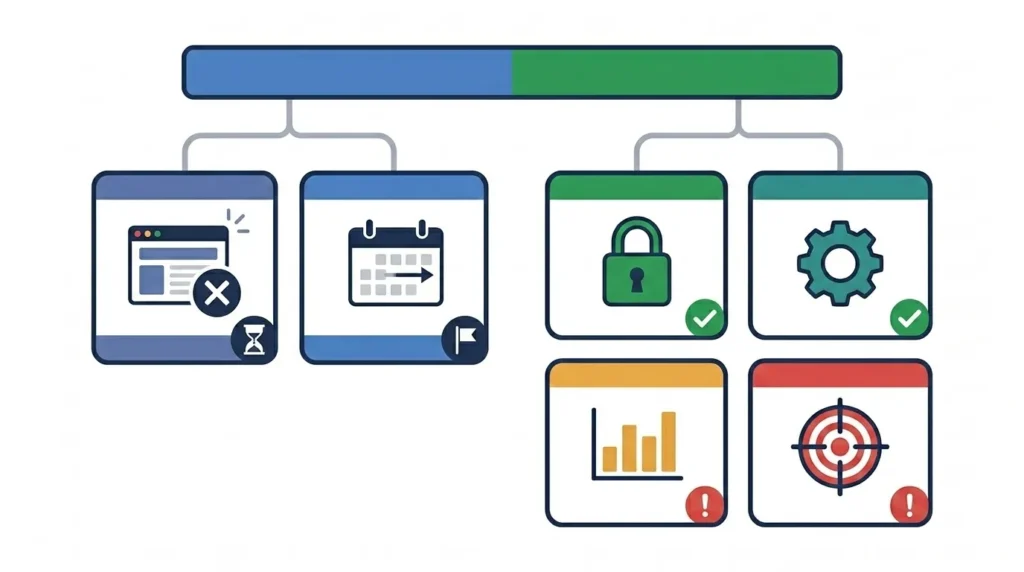
Cookies are categorized in two ways — by their lifespan (how long they persist) and by their purpose (what they are used for). Understanding both classification systems helps clarify which cookies require consent under privacy regulations and which are essential to basic website function.
By Lifespan
Session cookies: Temporary cookies that exist only for the duration of your browser session. When you close the browser, session cookies are deleted automatically. They are used for authentication, shopping cart management, and maintaining state across a single visit. Session cookies have no expiry date attribute — the browser recognizes their temporary nature and clears them on session end.
Persistent cookies: Cookies with a specific expiry date — they remain in your browser until that date, even if you close and reopen the browser. Persistent cookies are used for remembering login status (the “remember me” checkbox), storing language preferences, and analytics tracking across multiple visits over time. Persistent cookies can expire after minutes, days, months, or years depending on what the website requires.
By Purpose
Strictly necessary cookies: Cookies without which the website cannot function — authentication session cookies, shopping cart cookies, security tokens, and load balancing cookies. These cookies do not require user consent under most privacy regulations because they are essential to providing the service the user has explicitly requested.
Functional cookies: Cookies that enable enhanced functionality and personalization — remembering language preference, storing chat widget state, or maintaining user interface settings. These improve user experience but are not strictly required. Most privacy frameworks require disclosure but not explicit consent for purely functional cookies.
Analytics and performance cookies: Cookies used to collect anonymous usage statistics — page views, session duration, traffic sources, most visited pages. Google Analytics cookies are the most common example. These cookies do not track users for advertising purposes but do collect behavioral data. Privacy regulations typically require either disclosure or consent depending on whether the data is truly anonymous.
Marketing and advertising cookies: Cookies set by advertising networks to track users across multiple websites and build interest profiles for targeted advertising — retargeting, behavioral advertising, and conversion tracking. These are the most privacy-sensitive category and almost universally require explicit user consent under modern privacy regulations.
| Cookie Type | Consent Required | Examples |
|---|---|---|
| Strictly necessary | No | Session ID, authentication token, CSRF token |
| Functional | Disclosure typically sufficient | Language preference, theme, chat state |
| Analytics | Consent in most jurisdictions | Google Analytics, Hotjar, Mixpanel |
| Marketing/Advertising | Explicit consent required | Facebook Pixel, Google Ads, retargeting pixels |
First-Party vs Third-Party Cookies
The distinction between first-party and third-party cookies is the most important technical concept for understanding both how cookies affect your privacy and why this area is undergoing significant change in 2026.
First-Party Cookies
First-party cookies are set by the website you are directly visiting — the domain in your browser’s address bar. When you visit sitenovaagency.com and the site sets a cookie with the domain sitenovaagency.com, that is a first-party cookie. Your browser only sends this cookie back to sitenovaagency.com — it is not accessible to other websites you visit.
First-party cookies are the foundation of essential website functionality — authentication, cart management, user preferences, and site-specific analytics. They are generally considered low-risk from a privacy perspective because their scope is limited to the website that set them.
Third-Party Cookies
Third-party cookies are set by a domain different from the website you are visiting — typically through embedded content like advertising scripts, social media buttons, video embeds, or analytics pixels loaded from external servers.
When you visit a website that includes a Facebook Like button, Facebook’s server delivers that button element to your browser — and sets a Facebook cookie in your browser even though you did not navigate to facebook.com. The next website you visit that also includes a Facebook element sends that same Facebook cookie back to Facebook’s server — allowing Facebook to know that the same browser visited both websites.
This cross-site tracking capability is what makes third-party cookies the primary mechanism behind behavioral advertising — building a profile of your interests based on which websites you visit — and the primary target of privacy regulation and browser-level restrictions.
The Same-Origin Policy
Browsers enforce a same-origin policy that prevents websites from reading each other’s cookies directly — a security boundary that prevents malicious sites from stealing authentication cookies from banking sites, for example. Third-party cookies circumvent this restriction in a limited way: the third-party domain cannot read your cookies from another website, but it can see that the same browser visited multiple sites that embed its content, because those sites load content from the third-party’s server.
What Are Cookies Used For on Websites?
Understanding the specific functions cookies perform in website operation clarifies which ones are genuinely essential and which ones serve the website owner’s data collection interests rather than the user’s needs.
Authentication and Session Management
The most universally present use of cookies. When you log into any website — email, social media, banking, eCommerce — the server creates a session and sets a cookie containing your session ID. Every subsequent page load sends that session ID to the server, which looks it up and serves your authenticated experience.
Without this cookie, you would be logged out every time you navigated to a new page within the same website — because HTTP has no memory between requests. The “remember me” checkbox on login forms sets a persistent version of this cookie — one with a longer expiry (days or weeks rather than just the browser session) so you remain logged in across multiple browser sessions.
Shopping Cart Persistence
eCommerce websites use cookies (or server-side sessions identified by a cookie) to maintain cart contents across pages. When you add a product to your cart and navigate to another page or close and reopen the browser, the cart persists because the cookie tells the server which session your cart belongs to.
User Preferences and Personalization
Language selection, currency preference, dark mode toggle, notification settings, and any other per-user interface preference is often stored in a cookie so your choices persist across visits without requiring an account. These functional cookies improve user experience without collecting sensitive data.
Website Analytics
Analytics platforms — Google Analytics being the most widespread — use cookies to collect usage data: how many users visit, which pages they view, how long they stay, where they came from, and whether they complete conversion goals. Google Analytics uses several cookies including one that assigns a unique identifier to each browser (not each person) for distinguishing between unique users and returning users.
Analytics cookies do not identify you personally — they track browser-level behavior aggregated across all users to give website owners statistical insights into how their site is being used. This data informs content decisions, navigation improvements, and conversion rate optimization.
Advertising and Retargeting
This is the category most commonly associated with privacy concerns. Advertising networks — Google Ads, Meta Ads, programmatic advertising platforms — set cookies (or use equivalent tracking technologies) that track which websites you visit and build an interest profile used to serve relevant advertisements.
Retargeting specifically relies on cookies: when you visit an eCommerce site and view a product without purchasing, a retargeting cookie records that visit. When you subsequently visit another website that serves ads from the same advertising network, that network serves you an advertisement for the product you viewed — because the retargeting cookie tells it that your browser showed interest.
A/B Testing and Conversion Optimization
Websites testing different versions of their design, content, or functionality use cookies to ensure you see the same variant throughout your session and across multiple visits — preventing inconsistent experiences where you see version A on one page and version B on another.
Are Website Cookies Dangerous?
The answer depends entirely on which cookies you are discussing and how they are implemented.
Cookies Are Not Malware
Cookies are text data — they cannot execute code, they cannot install software, and they cannot directly harm your device or compromise your files. A cookie is fundamentally passive: it is a note that a website leaves in your browser to read later.
The browser’s same-origin policy prevents any website from reading cookies set by a different domain — so sitenovaagency.com cannot read the session cookie your bank set, and your bank cannot read the analytics cookie this site set. Each cookie is isolated to the domain that created it.
Cookie-Based Privacy Risks
The privacy concern with cookies is not direct security harm — it is data collection and profiling. Third-party advertising cookies enable cross-site tracking that builds detailed behavioral profiles of individual browsers without explicit user consent in many implementations. These profiles are used to target advertising and can, in some circumstances, be combined with other data sources to identify individuals.
This is a privacy concern rather than a security vulnerability — but it is a genuine concern that motivated both privacy regulations (GDPR, CCPA) and browser-level responses (Safari’s Intelligent Tracking Prevention, Firefox’s Enhanced Tracking Protection, and Chrome’s planned third-party cookie deprecation).
Cookie Hijacking — A Real Security Risk
Cookie hijacking is a genuine security attack. If an attacker intercepts the cookie containing your session ID — through a man-in-the-middle attack on an unencrypted connection, or through cross-site scripting (XSS) that executes malicious JavaScript on a vulnerable website — they can use that session ID to impersonate you.
This is why the Secure and HttpOnly attributes on cookies matter: Secure prevents the cookie from being transmitted over unencrypted HTTP connections (only HTTPS), and HttpOnly prevents JavaScript from accessing the cookie — both attributes significantly reduce hijacking risk. Any website handling authentication should set these attributes on session cookies.
Tracking Cookies and Behavioral Advertising
The most debated category. Tracking cookies used for behavioral advertising are not dangerous in the security sense — they cannot compromise your device. But they do enable surveillance of your browsing behavior across websites in ways that many users consider an intrusive violation of privacy expectations.
Whether this constitutes a “danger” depends on your perspective and the specific data practices of the advertising networks involved. What is clear is that this use of cookies is the primary driver of privacy regulation requiring cookie consent — giving users the legal right to refuse tracking cookies while still accessing websites that use them.
Cookie Privacy Laws — GDPR, CCPA, and Pakistan
Cookie compliance is a legal requirement in many jurisdictions — and for websites that serve users in those jurisdictions, compliance is not optional regardless of where the website’s servers are located.
GDPR — General Data Protection Regulation (European Union)
The GDPR, which came into force in May 2018, is the most comprehensive and globally influential privacy regulation. Under GDPR, cookies that process personal data require explicit informed consent before being set — meaning the cookie banner must appear before the cookies are loaded, not after.
GDPR consent requirements for cookies:
Consent must be freely given — users must be able to refuse cookies without being denied access to the website’s core functionality (though gating non-essential services behind consent is permissible in some circumstances).
Consent must be specific — a single “accept all” button without granular category options is not sufficient. Users must be able to accept or decline different categories of cookies separately.
Consent must be informed — users must be told clearly what each category of cookie does and who sets them.
Consent must be revocable — users must be able to withdraw consent as easily as they gave it, and the website must honor that withdrawal.
The GDPR’s extraterritorial reach means it applies to any website that targets or monitors users in EU countries — regardless of where the website is hosted or where the website owner is located.
CCPA — California Consumer Privacy Act (United States)
California’s CCPA gives California residents the right to know what data is collected about them, to request deletion of their data, and to opt out of the “sale” of their personal information — which includes sharing data with advertising partners through third-party cookies.
Unlike GDPR’s opt-in requirement, CCPA operates on an opt-out model — cookies can be set by default, but users must have a clear mechanism to opt out of data sale, typically a “Do Not Sell My Personal Information” link.
Pakistan — PECA and Data Protection
Pakistan’s Prevention of Electronic Crimes Act (PECA) 2016 and the proposed Personal Data Protection Bill address electronic privacy broadly, but specific cookie consent requirements comparable to GDPR have not been enacted as of 2026. Pakistani businesses operating domestically are not subject to the same explicit cookie consent regime as EU or California-targeted sites.
However, Pakistani websites that serve European or California users — including any business targeting international clients — are subject to GDPR and CCPA respectively for those user populations. For businesses like digital marketing agencies, software companies, and eCommerce stores with international traffic, cookie compliance is a practical legal requirement regardless of the website’s Pakistani origin.
For website owners, implementing a proper cookie consent solution is both a legal precaution and an increasingly expected standard of professionalism. Our website maintenance guide covers cookie policy review as one of the annual maintenance tasks that keeps a website compliant as regulations evolve.
Cookie Consent Banners — Why Websites Ask for Your Permission
The cookie consent banner — the overlay or bar that appears at the bottom or top of websites asking you to accept, reject, or manage cookies — exists because privacy regulations require it for cookies that process personal data.
What a Compliant Cookie Banner Must Do
For websites targeting EU users under GDPR, a compliant cookie banner must:
Appear before any non-essential cookies are set — not after. Many websites get this wrong, setting analytics and advertising cookies on page load and then asking for consent. This reverses the legal requirement.
Offer a genuinely easy rejection option. A compliant banner must make rejecting cookies as easy as accepting them — a single prominent “Accept All” button alongside a hard-to-find “Manage Preferences” link does not meet this requirement under current GDPR interpretation.
Categorize cookies clearly — typically: Strictly Necessary, Functional, Analytics, and Marketing — allowing users to accept some categories and reject others.
Remember the user’s choice — not re-asking on every visit for users who have already made a choice, unless the consent period has expired (typically 12 months) or the cookie categories have changed significantly.
Consent Management Platforms
A Consent Management Platform (CMP) is the software that manages cookie consent — displaying the banner, recording users’ choices, loading only the consented cookies, and maintaining consent records for compliance documentation.
Well-known CMPs include Cookiebot, OneTrust, TrustArc, and Usercentrics — all of which provide both the user-facing consent banner and the backend consent record management required to demonstrate GDPR compliance. For WordPress websites, plugins like CookieYes and Cookie Notice by dFactory provide compliant consent management without requiring a full enterprise CMP subscription.
Why Cookie Banners Are Often Poorly Implemented
Many cookie banners are designed to maximize consent rates rather than to provide genuine transparency and choice. Dark patterns — design choices that make rejecting cookies more difficult than accepting them — are common: accept buttons in bright colors and rejection options in grey text, multi-step rejection processes versus single-click acceptance, and pre-ticked consent boxes that users must manually uncheck.
Regulators in the EU have increasingly enforced against these dark patterns. Several major websites and CMPs have received significant fines for cookie banners that technically comply with the letter of GDPR while violating its spirit of genuine informed consent.
How to View and Delete Cookies in Your Browser
Every major browser provides tools for viewing the cookies stored by websites you have visited and deleting them individually or in bulk.
Viewing Cookies in Chrome
Open Chrome DevTools by pressing F12 or right-clicking anywhere on the page and selecting “Inspect.” Navigate to the Application tab in the DevTools panel. In the left sidebar, expand the Cookies section under Storage — you will see your current domain and any third-party domains that have set cookies during your current session. Clicking any domain shows all cookies set by that domain with their name, value, expiry, domain, path, and security attributes.
This view is invaluable for understanding exactly what data a specific website is storing in your browser — and for debugging cookie-related issues on websites you are developing or managing.
Deleting Cookies
Delete cookies from a specific site in Chrome: Go to Settings > Privacy and security > Cookies and other site data > See all cookies and site data. Search for the domain you want to clear, select it, and delete.
Delete all cookies in Chrome: Settings > Privacy and security > Clear browsing data. Select “Cookies and other site data” and choose your time range. Note that deleting all cookies will log you out of every website you are currently authenticated with.
Delete cookies in Firefox: Settings > Privacy and Security > Cookies and Site Data > Manage Data. Search and select specific sites or clear all.
Delete cookies in Safari: Settings > Safari > Privacy > Manage Website Data. Select specific sites or remove all.
What Happens When You Delete Cookies
Deleting cookies logs you out of websites, clears saved preferences, resets shopping carts on sites that store them in cookies, and removes tracking identifiers — which means advertising networks will assign you a new anonymous identifier rather than continuing to use the previous one.
It does not delete any data stored on websites’ own servers — your account information, order history, and saved addresses remain on the website’s database regardless of whether you delete your browser cookies.
The Future of Cookies — Third-Party Cookie Deprecation
Third-party cookies are being phased out across the web — a transition that has significant implications for advertising, analytics, and any website that relies on cross-site tracking.
Chrome’s Third-Party Cookie Deprecation
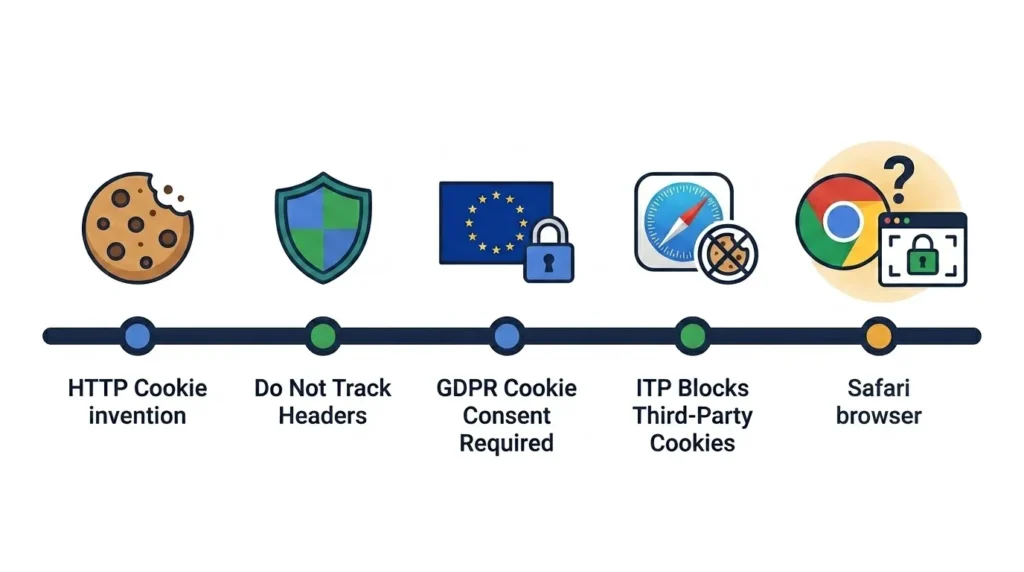
Google Chrome — the most widely used web browser globally — has been working toward deprecating third-party cookies since 2020. The timeline has been extended multiple times due to the complexity of the transition for the advertising ecosystem, but the direction is clear: third-party cookies will eventually stop working in Chrome.
Safari has already implemented Intelligent Tracking Prevention (ITP) that severely restricts third-party cookie functionality. Firefox’s Enhanced Tracking Protection blocks many third-party trackers by default. Chrome’s eventual deprecation will effectively end the cross-site tracking model that third-party cookies have enabled.
What Replaces Third-Party Cookies
Google’s Privacy Sandbox initiative proposes several alternatives to third-party cookies that aim to enable targeted advertising without individual cross-site tracking:
Topics API: Rather than tracking which specific sites you visit, the browser classifies your recent browsing into broad interest categories (Sports, Travel, Technology) and shares these categories with advertisers — providing targeting capability without revealing specific browsing history.
Protected Audience API (formerly FLEDGE): Allows remarketing (showing ads for products you previously viewed) without a third-party tracking cookie — the remarketing list is stored in the browser itself rather than on an advertising server.
These replacement technologies are more privacy-preserving than third-party cookies but less precise for advertisers — a deliberate trade-off that reflects the regulatory and user expectation environment that has made third-party cookies unsustainable in their current form.
What This Means for Websites
For websites that rely on third-party advertising for revenue — display advertising, programmatic ads — the deprecation of third-party cookies requires a transition to Privacy Sandbox alternatives or first-party data strategies.
For businesses that advertise using behavioral targeting — retargeting campaigns, interest-based audience targeting — the loss of third-party cookie data reduces campaign precision and requires investment in first-party data collection: email lists, logged-in user data, and CRM-based audience targeting that does not depend on cross-site tracking.
For analytics, first-party analytics solutions and server-side tracking are gaining adoption as replacements for client-side third-party analytics cookies. Google Analytics 4’s approach to measurement is designed to be more resilient to cookie restrictions than its predecessor — though the implications are still working through the industry.
What Website Owners Need to Know About Cookies
For businesses managing or building websites, cookies are not just a user-facing feature — they are a legal compliance area, a technical configuration requirement, and a data governance responsibility.
Conducting a Cookie Audit
Before you can comply with cookie privacy requirements, you need to know which cookies your website actually sets. This is less obvious than it sounds — many cookies are set by third-party scripts you have embedded (Google Analytics, Facebook Pixel, live chat widgets, advertising tags) that you may not have inventoried systematically.
A cookie audit identifies every cookie your website sets, which domain sets it, its purpose, its lifespan, and whether it processes personal data. Tools like Cookiebot’s website scanner, OneTrust’s cookie audit tool, or the browser DevTools Application panel provide a starting point — though a manual audit of all embedded scripts is necessary for a comprehensive picture.
For websites built on WordPress, cookie audit plugins scan your installation and generate a report of all detected cookies with their classifications — providing both compliance documentation and the basis for your cookie consent configuration.
Implementing a Cookie Policy
A cookie policy is a page on your website that discloses what cookies you use, why you use them, how long they last, and how users can control them. It is a separate document from a Privacy Policy, though they are often linked.
Your cookie policy should list every cookie category you use, provide examples of specific cookies in each category, explain the purpose of each category in plain language, describe how users can manage or delete each category, and provide contact information for privacy-related questions.
Link your cookie policy from your cookie consent banner, your website’s footer, and your Privacy Policy. Update it whenever you add or remove cookies from your website — a policy that describes cookies you no longer use or omits cookies you do use is a compliance risk.
Configuring Your Website’s Cookie Attributes
For cookies set directly by your website (authentication cookies, session cookies, preference cookies), ensure the technical attributes are correctly configured:
Secure attribute: Prevents the cookie from being transmitted over unencrypted HTTP. Should be set on all cookies for HTTPS-only websites.
HttpOnly attribute: Prevents JavaScript from accessing the cookie — protecting session cookies from cross-site scripting attacks.
SameSite attribute: Controls whether the cookie is sent with cross-site requests. SameSite=Strict prevents the cookie from being sent in any cross-site context. SameSite=Lax (the default in modern browsers) allows the cookie to be sent with top-level navigation but not with embedded cross-site requests. SameSite=None allows cross-site sending but requires Secure.
For websites built on WordPress, WooCommerce, and most major CMS platforms, these attributes are managed by the platform and major plugins — but verifying the configuration in browser DevTools after any significant platform update is a sound maintenance practice.
Cookies vs Other Browser Storage Technologies
Cookies are the oldest and most widely supported browser storage mechanism — but they are not the only way websites store data on your device. Understanding how cookies compare to other storage technologies clarifies both their limitations and their continuing relevance.
localStorage and sessionStorage
The Web Storage API — introduced in HTML5 — provides two storage mechanisms: localStorage (persistent, no expiry) and sessionStorage (cleared when the tab is closed). Both store data as key-value pairs in the browser, accessible only by JavaScript running on the same origin.
Unlike cookies, Web Storage data is not automatically sent to the server with every HTTP request — the data stays in the browser unless JavaScript explicitly reads and transmits it. This makes Web Storage more appropriate for client-side state management (saving draft content, storing UI state) and less appropriate for server-side session management.
Web Storage holds significantly more data than cookies — up to 5 to 10 MB per origin versus the 4KB limit per cookie — making it suitable for storing larger data structures.
IndexedDB
IndexedDB is a low-level browser database API designed for storing large amounts of structured data — entire databases of records rather than simple key-value pairs. It is used by progressive web apps, offline-capable applications, and any web application that needs persistent client-side storage at meaningful scale.
Like Web Storage, IndexedDB data is not transmitted to servers automatically — it exists exclusively on the client side unless explicitly synced through API calls.
How These Technologies Relate to Privacy
Because localStorage, sessionStorage, and IndexedDB are not automatically cleared when users delete cookies, they are sometimes used as cookie replacements for tracking purposes — a technique called “respawning” or “zombie cookies.” Advertising trackers have used these storage mechanisms to reconstruct tracking identifiers after users delete their cookies.
Modern browsers increasingly treat these storage mechanisms as subject to the same tracking protections as cookies — applying storage access restrictions, imposing site-based partitioning (preventing cross-site access), and including them in “clear browsing data” operations that users expect to remove tracking data.
Cache and Supercookies
Browser cache — the stored copies of website resources (images, CSS, JavaScript) that browsers maintain to avoid redownloading unchanged files — can theoretically be used as a tracking mechanism through techniques called cache probing, though this is an advanced technique far beyond standard cookie usage.
A “supercookie” or “evercookie” is a tracking technique that stores identifiers across multiple storage mechanisms simultaneously — cookies, localStorage, IndexedDB, cache — so that deleting any one does not remove the tracker. These techniques are specifically designed to circumvent user privacy choices and are considered a privacy violation rather than legitimate web practice.
Frequently Asked Questions About Cookies on Websites
Q: What is a cookie on a website in simple terms?
A cookie on a website is a small text file saved to your browser by the website you visit. It stores a piece of information — typically an ID or a preference setting — that the website reads on your next visit to recognize you, keep you logged in, remember your settings, or track your activity. Cookies are how websites maintain continuity between visits even though the underlying web protocol treats every request as completely new.
Q: Are cookies dangerous?
Most cookies are not dangerous. Strictly necessary cookies, functional cookies, and standard analytics cookies do not harm your device and cannot access your files or personal information. The primary concern with cookies is privacy — particularly third-party advertising cookies that track your behavior across multiple websites to build interest profiles for targeted advertising. The Secure and HttpOnly attributes on authentication cookies prevent most security attacks. Deleting cookies periodically reduces tracking exposure without affecting your device’s security.
Q: Should I accept or decline cookies on websites?
For strictly necessary cookies, acceptance is effectively required — declining them means the website cannot function. For analytics and marketing cookies, the decision depends on your privacy preferences. If you decline marketing cookies, your browsing will not contribute to advertising interest profiles — though you will still see advertisements, just less targeted ones. Most privacy advocates recommend declining or at least reviewing marketing and advertising cookies, particularly on websites you do not trust.
Q: Why do websites ask me to accept cookies?
Websites display cookie consent banners because privacy regulations — primarily the EU’s GDPR — require informed consent before setting cookies that process personal data. The banner appears first so you can make an informed choice before any tracking cookies are set. Not all cookie banners are compliant — some set cookies before asking, or make rejection significantly harder than acceptance — but the legal requirement behind them is genuine.
Q: How do I stop websites from tracking me with cookies?
Several approaches reduce cookie-based tracking. Use a browser with built-in tracking protection — Firefox with Enhanced Tracking Protection and Safari with Intelligent Tracking Prevention block many third-party tracking cookies by default. Decline marketing and analytics cookies when prompted in consent banners. Regularly clear your browser cookies. Install a privacy-focused browser extension (uBlock Origin, Privacy Badger) that blocks known tracking domains. Use a privacy-focused search engine (DuckDuckGo) and browser (Brave) as a comprehensive approach.
Q: Do cookies slow down my website?
Individual cookies are tiny (4KB maximum per cookie) and have negligible performance impact. What can affect performance is the JavaScript required to set and manage multiple third-party cookies — particularly advertising pixels and tag manager implementations that load multiple tracking scripts. Each additional third-party script request adds to page load time. Auditing and removing unnecessary third-party tracking scripts is both a privacy improvement and a page speed optimization.
Q: What happens if I delete all my cookies?
Deleting all cookies logs you out of every website you are currently authenticated with — you will need to log back into email, social media, banking, and any other sites where you had an active session. Saved preferences (language, theme, notification settings) will reset to defaults. Shopping cart contents stored in cookies will be cleared. Analytics platforms will assign your browser a new anonymous identifier. Advertising networks will lose their record of your browsing history and start building a new profile. Your device and files are completely unaffected.
Q: How long do cookies last?
Session cookies are deleted when you close your browser — they have no expiry date. Persistent cookies last until a specific expiry date set by the website — ranging from minutes to years. Advertising and analytics cookies often have expiry periods of 1 to 2 years. Authentication “remember me” cookies typically expire after 30 to 90 days. You can view the expiry date of any cookie stored in your browser through your browser’s developer tools under Application > Cookies.
Conclusion
A cookie on a website is fundamentally a simple mechanism — a text file that allows a website to recognize your browser across visits — that has become layered with complexity through its role in authentication, personalization, analytics, and advertising. Understanding what cookies actually do removes both the confusion that leads people to ignore consent banners without reading them and the fear that leads others to treat all cookies as security threats.
For users: the cookies worth understanding and actively managing are third-party advertising cookies — those that track your behavior across multiple websites to build interest profiles. Most other cookies are either essential to websites functioning at all or a minor and benign exchange of preference data for a better user experience.
For website owners and developers: cookies are a legal compliance area that requires active management — auditing what you set, disclosing it transparently, implementing consent correctly, and keeping cookie policies current as your website’s tracking configuration changes. The regulatory environment is tightening, and the technical landscape is shifting with third-party cookie deprecation — both trends that reward proactive compliance and technical preparation over reactive scrambling when enforcement or browser changes arrive.
At SiteNova Agency, we build and maintain websites with proper cookie configuration, compliance-ready consent management, and the technical security attributes that protect users’ session data. If you are building a new website or reviewing your existing site’s cookie compliance, our team provides complete web design services that include cookie policy setup, consent management implementation, and the ongoing website maintenance that keeps compliance current as regulations evolve.