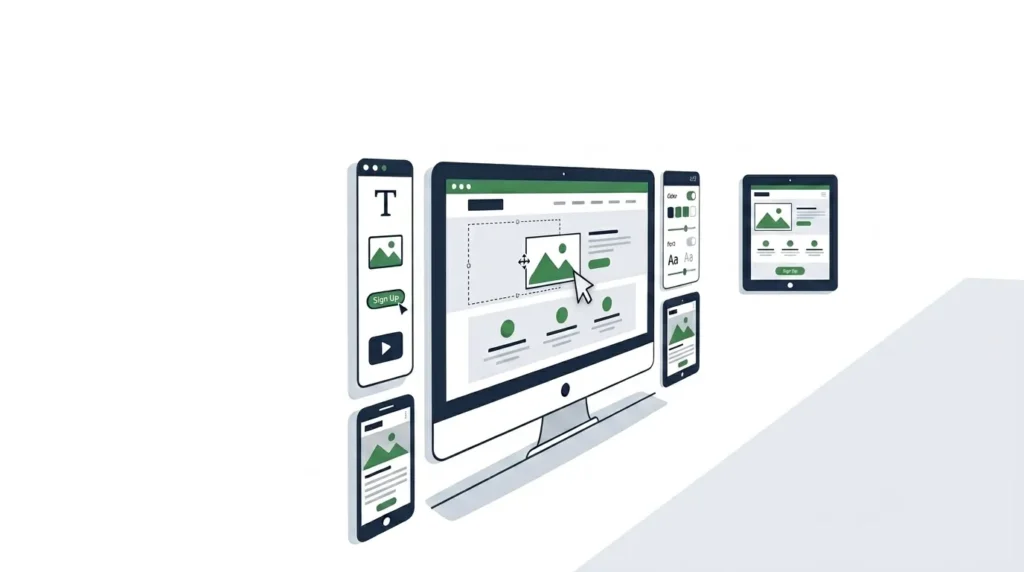
A website builder is a software platform that allows individuals and businesses to create, design, and publish a website without writing code from scratch. Instead of hiring a developer or manually building HTML and CSS files, a website builder provides a visual interface — typically drag and drop — where you assemble pages from pre-built components, apply design templates, and publish to the web directly from the platform.
Website builders emerged as a response to the gap between what most businesses needed (a professional online presence) and the technical skills required to build one from scratch (HTML, CSS, JavaScript, server configuration, database management). For the vast majority of small and medium businesses, a well-configured website builder produces a result that is indistinguishable from custom-coded sites to the end user — and delivers it faster and at lower cost.
The category covers a wide range. At one end: fully hosted, closed platforms like Wix and Squarespace — where the builder, hosting, security, and software updates are all managed by the platform, and you interact exclusively through a visual interface. At the other end: open-source CMS platforms like WordPress.org — where a visual builder (Elementor, Divi) operates on top of self-hosted software, giving you complete control over every technical aspect at the cost of managing that infrastructure yourself.
Understanding which type of website builder fits your situation — and where builder limitations require a different approach — is what this guide covers in full.
For businesses that need a professionally designed, custom-built website rather than a self-service builder solution, SiteNova Agency provides complete web design services for Pakistani businesses — building on WordPress and WooCommerce with full customization, SEO configuration, and ongoing support.
Table of Contents
- What Is a Website Builder?
- Website Builder vs Custom Web Design — Which Is Right for You?
- What to Look for in a Website Builder
- Wix — Best for Design Flexibility
- Squarespace — Best for Visual Portfolios and Creatives
- Shopify — Best eCommerce Website Builder
- WordPress.com — Best for Blogging and Content Sites
- Webflow — Best for Designers Who Want Code-Level Control
- GoDaddy Website Builder — Best for Absolute Beginners
- Website Builder Comparison Table
- Website Builder SEO Capabilities — What You Need to Know
- Website Builder for eCommerce in Pakistan
- Free Website Builder vs Paid Plans — Is Free Worth It?
- How Fast Are Website Builders? Speed and Core Web Vitals
- When a Website Builder Is Not Enough
- Frequently Asked Questions
- Conclusion
Website Builder vs Custom Web Design — Which Is Right for You?
The most important decision in website creation is not which builder to choose — it is whether a builder is the right tool at all for your specific situation. Builders and custom design solve different problems for different business types.
When a Website Builder Makes Sense
A website builder is the right starting point when your primary need is getting a professional-looking website live quickly, at low cost, without ongoing developer involvement. Specifically:
You are an individual professional — a freelancer, consultant, or creative — who needs a portfolio or information site that represents your work and makes it easy for clients to contact you.
You are a small business with straightforward needs — a homepage, an about page, a services page, a contact form, and perhaps a blog. Your website is a digital business card rather than a complex customer acquisition system.
You are testing a business concept and need web presence before committing to a full custom site investment — a website builder allows you to establish an online presence immediately and migrate to a custom site once the business model is validated.
You have a tight budget and timeline and a limited need for custom functionality that builder templates cannot provide.
When Custom Web Design Is the Better Choice
A custom-designed website is the appropriate investment when:
Your business depends on your website for the majority of its lead generation or revenue — and the performance difference between a builder and a custom site directly affects business outcomes.
You need functionality that builders cannot provide without significant compromises — complex custom product configurations, advanced membership systems, multi-vendor marketplace features, deep third-party API integrations, or B2B workflow automation.
You operate in a competitive market where your website needs to outperform competitors technically — in page speed, Core Web Vitals scores, and SEO configuration depth — and builder platform constraints prevent achieving that performance.
Your brand requires a distinctive visual identity that template-based designs cannot deliver — particularly for premium service businesses, established brands, and businesses where design differentiation is a competitive factor.
For Pakistani businesses in competitive industries — digital marketing, legal services, healthcare, real estate, high-value retail — a professionally custom-built website typically produces better business outcomes than a builder solution, because the performance, customization, and SEO configuration advantages compound into meaningful differences in organic traffic and conversion rate over time. Our website redesign guide covers exactly when a business should move from a builder to a custom-built solution and how to make that transition without disrupting existing performance.
What to Look for in a Website Builder
Before comparing specific platforms, understanding the evaluation criteria clarifies what matters and what does not for your specific use case.
Ease of Use
The most important practical criterion for most users. A website builder’s interface should allow you to accomplish your design goals intuitively — without consulting documentation for basic tasks. Drag and drop interfaces, visual editing (seeing changes in real time as you make them), and clear component organization all reduce the learning curve.
Evaluate ease of use by actually testing the free trial of any platform before committing. What reads as intuitive in marketing materials may not match your experience with the actual interface.
Design Quality and Template Range
Templates determine your starting point and significantly influence the ceiling of what your site can look like without custom design work. Evaluate the design quality of available templates, not just their quantity — fifty mediocre templates are less valuable than fifteen excellent ones. Check whether templates are mobile-responsive by default and whether template switching (changing the template after content is added) is supported without starting from scratch.
eCommerce Capability
If you need to sell products or services online, verify the platform’s eCommerce functionality matches your requirements — before choosing a plan or committing to a platform. Key eCommerce features: product management, variant handling, inventory tracking, payment gateway integration (specifically with Pakistani payment providers if selling domestically), abandoned cart recovery, and discount and coupon management.
SEO Tools
Every website builder claims SEO features. The gap between “SEO tools included” and genuinely comprehensive SEO capability is significant. Minimum requirements: editable meta titles and meta descriptions for every page, custom URL slugs, XML sitemap generation, robots.txt access, image alt text editing, and schema markup support. Advanced requirements: canonical tag management, hreflang for international sites, structured data customization, and granular crawl configuration.
Speed and Performance
Platform speed affects both user experience and Google rankings. Check independent speed benchmarks for each platform — not the platform’s own claims — using tools like WebPageTest to compare real-world loading performance on typical websites built with each builder.
Pricing and Value
Compare the total cost of ownership — not just the advertised monthly price, but the cost of the plan tier you actually need (which is almost always higher than the entry plan), domain registration (often a separate charge after the first year), premium template costs, and app or plugin fees for functionality not included in the base plan.
Wix — Best for Design Flexibility
Wix is the most widely used hosted website builder globally, with over 230 million users. Its primary competitive advantage is design flexibility — the Wix editor allows pixel-level positioning of elements, giving designers a level of visual control that most drag and drop builders do not offer.
What Wix Does Well
The Wix ADI (Artificial Design Intelligence) feature creates a complete first-draft website from answers to a few questions about your business — a genuinely useful starting point for users who are uncertain about design direction. The full Wix Editor then allows complete customization of that starting point.
Wix’s template library contains over 900 professionally designed templates across every common business category — significantly more than most competitors. Template quality varies, but the best Wix templates are visually competitive with custom designs for most business types.
The Wix App Market provides over 300 integrations for third-party services — email marketing, CRM, bookings, live chat, forms, and analytics — without requiring code. For small businesses that need specific functionality beyond the core builder, the app ecosystem reduces the gap between builder limitations and custom development.
Wix Limitations
Wix’s design flexibility comes at a cost: once a template is chosen and content is added, switching to a different template requires rebuilding the site from scratch. This differs from platforms where templates are applied to a content layer and can be swapped non-destructively.
Wix SEO capabilities have improved significantly in recent years but still lag behind WordPress in configurability. Advanced SEO requirements — full control over structured data, granular canonical tag management, complex redirect rules — are difficult or impossible within Wix’s interface.
Wix page speed is a frequently cited limitation. Wix sites typically score lower on Google PageSpeed Insights than equivalent sites built on optimized WordPress installations — which has direct implications for Core Web Vitals rankings and mobile user experience.
Wix Pricing (2026)
Free plan available (with Wix subdomain and ads). Paid plans from $17/month (Light) to $159/month (Enterprise). eCommerce requires Business plan at $36/month or above.
Squarespace — Best for Visual Portfolios and Creatives
Squarespace is consistently ranked among the most visually refined website builders available — its templates set a design quality standard that most competitors do not match. For creative professionals — photographers, designers, artists, architects, and agencies — Squarespace’s aesthetic quality is a genuine competitive advantage.
What Squarespace Does Well
Squarespace templates are designed by professional designers and maintain visual quality without requiring significant customization. For a creative professional who wants to showcase their portfolio without spending time on design, Squarespace delivers a professionally credible result faster than almost any other platform.
The Squarespace blogging platform is among the most refined in the website builder category — with full post scheduling, categories, tags, RSS feeds, contributor management, and subscription capabilities. For content-first businesses where the blog is the primary audience-building channel, Squarespace provides a significantly better blogging experience than Wix.
Built-in analytics (Squarespace Analytics) provides visitor traffic, traffic sources, page views, and conversion tracking without requiring third-party tool integration — useful for users who find Google Analytics overwhelming for basic traffic monitoring.
Squarespace Limitations
Squarespace’s design philosophy prioritizes aesthetic consistency over unlimited flexibility. Layouts are more constrained than Wix or Webflow — you work within Squarespace’s grid system rather than positioning elements freely. For users who need specific layout configurations that Squarespace’s system does not support naturally, this constraint requires CSS customization that negates the no-code advantage.
The Squarespace extension library is significantly smaller than Wix’s App Market — fewer third-party integrations are available natively, and businesses with complex integration requirements may find Squarespace insufficient without custom development.
Squarespace Pricing (2026)
No permanent free plan. Plans from $16/month (Personal) to $52/month (Commerce Advanced). All plans include hosting and SSL.
Shopify — Best eCommerce Website Builder
Shopify is not a general website builder — it is an eCommerce platform with website building capabilities built around its core function of selling products online. For businesses whose primary website purpose is an online store, Shopify is the most focused and feature-complete solution in the builder category.
What Shopify Does Well
Shopify’s eCommerce infrastructure is genuinely best-in-class for a hosted platform. Inventory management, product variants, shipping rate calculation, tax handling, abandoned cart recovery, discount and promotional code management, and order management are all handled within Shopify’s core system without requiring third-party apps.
The Shopify App Store contains over 10,000 third-party integrations — the largest ecosystem in the eCommerce platform category. Email marketing, upselling, subscription management, reviews, loyalty programs, advanced analytics, and virtually every eCommerce business function has multiple specialized app options.
Shopify Payments provides a fully integrated payment processor in markets where it is available. For international payment processing, Shopify integrates with over 100 payment gateways globally — a broader range than any other eCommerce builder.
Shopify Limitations for Pakistani Businesses
Shopify Payments — Shopify’s native payment processing with no transaction fee — is not available in Pakistan as of 2026. Pakistani Shopify stores must use a third-party payment gateway (Jazz Commerce, 2Checkout, Stripe if available), which attracts an additional 0.5% to 2% transaction fee on every sale depending on the Shopify plan.
Over time, this transaction fee compounds significantly on volume. A business processing PKR 1 million monthly in orders pays PKR 10,000 to PKR 20,000 per month in transaction fees above what a WooCommerce store with a direct payment gateway integration would pay — a cost that accumulates to PKR 120,000 to PKR 240,000 annually for only moderately sized operations.
For Pakistani eCommerce businesses, WooCommerce with direct JazzCash and EasyPaisa gateway integration typically produces lower total cost of ownership than Shopify at meaningful sales volumes.
Shopify Pricing (2026)
Plans from $39/month (Basic) to $399/month (Advanced), plus transaction fees on non-Shopify Payments gateways. Shopify Plus for enterprise from $2,300/month.
WordPress.com — Best for Blogging and Content Sites
WordPress.com is the hosted version of WordPress — the world’s most popular content management system. It provides the WordPress publishing experience without requiring self-hosting or technical server management, occupying a middle ground between fully managed builders like Wix and self-hosted WordPress.org installations.
WordPress.com vs WordPress.org — A Critical Distinction
This distinction confuses many users and leads to platform mismatches. WordPress.com is a hosted service — you pay for a plan and WordPress.com manages your site’s hosting, security, and software updates. WordPress.org is the open-source software you download, install on your own hosting, and manage yourself.
Most of the power and flexibility associated with WordPress — unlimited plugin installation, full theme customization, complete code access, and the eCommerce capability of WooCommerce — requires the self-hosted WordPress.org approach, typically on a managed WordPress hosting provider. WordPress.com restricts plugins on lower plans and limits customization to maintain platform stability.
For this guide’s context, WordPress.com is evaluated as a managed website builder. Self-hosted WordPress with a visual builder like Elementor is a different product category — closer to custom web design than builder territory.
What WordPress.com Does Well
The WordPress content management system is the most capable blogging and content publishing platform available in any website builder. Post scheduling, categories, tags, custom post types, contributor management, comment management, and subscription capabilities are all native WordPress features that no competing builder matches in depth.
For businesses whose website strategy centers on content marketing — publishing regular articles, building a subscriber base, and growing organic search traffic through consistent content — WordPress.com provides publishing infrastructure that general-purpose builders cannot match.
WordPress.com Limitations
WordPress.com’s plugin library is restricted on lower plans — you cannot install arbitrary third-party plugins until the Business plan or above. This is a significant limitation for users accustomed to the full WordPress plugin ecosystem.
The visual builder experience on WordPress.com (using the Gutenberg block editor) is functional but less visually intuitive than Wix or Squarespace’s purpose-built drag and drop interfaces — it requires more familiarity with WordPress-specific concepts before users feel comfortable making design changes confidently.
WordPress.com Pricing (2026)
Free plan available (with WordPress subdomain). Personal from $4/month, Premium $8/month, Business $25/month (required for plugin access), Commerce $45/month.
Web flow — Best for Designers Who Want Code-Level Control
Webflow occupies a unique position in the website builder category — it is designed specifically for professional web designers and developers who want visual building speed without sacrificing the precise control that code provides.
What Webflow Does Well
Webflow generates clean, semantic HTML, CSS, and JavaScript from its visual interface — unlike most builders that generate proprietary code tied to the platform’s rendering engine. This means Webflow sites can theoretically be exported and hosted anywhere, and the generated code quality is significantly better than what most builder platforms produce.
Webflow’s interaction and animation system allows designers to create complex CSS animations, scroll-triggered effects, and micro-interactions through a visual interface — without writing JavaScript. For agencies building polished marketing sites where animation and interaction quality differentiate the final product, Webflow provides capabilities that no other builder matches.
Webflow CMS is a genuinely sophisticated content management system that allows designers to create custom content structures — not just blog posts — defining their own content types with custom fields that editors can populate without touching the design. This makes Webflow appropriate for complex marketing sites with structured content (case study databases, team directories, product catalogs) that would require custom development in other builders.
Webflow Limitations
Webflow has the steepest learning curve in the website builder category — it is explicitly not designed for beginners and self-identifies as a tool for designers and developers. Users without design experience or CSS knowledge will find Webflow significantly more challenging than Wix, Squarespace, or GoDaddy.
Webflow’s eCommerce capability exists but lags behind Shopify and even WooCommerce for serious online stores — inventory management, variant handling, and payment integration options are more limited than dedicated eCommerce platforms.
Webflow Pricing (2026)
Free plan for development. Site plans from $14/month (Basic) to $39/month (Business). eCommerce plans from $29/month to $212/month.
GoDaddy Website Builder — Best for Absolute Beginners
GoDaddy’s website builder (formerly GoDaddy Websites + Marketing) is explicitly designed for the least technical users — business owners who want a website live within an hour, with minimal decisions required and the most common configurations handled automatically.
What GoDaddy Does Well
GoDaddy’s setup process is among the fastest in the builder category. Choose a business category, answer a few questions about your business, and GoDaddy generates a complete website with relevant content suggestions, appropriate layout, and pre-configured sections for your industry. The result is not sophisticated, but it is functional and live in under 30 minutes for most users.
GoDaddy’s AI assistant (Airo) integrates AI content generation into the building process — automatically generating business descriptions, service listings, and even social media posts from your business information. For business owners who find writing marketing copy challenging, this reduces the time-to-launch friction significantly.
GoDaddy bundles website builder with email hosting, domain registration, and SSL in its business plans — providing a more complete out-of-the-box package than builders that require these components to be sourced separately.
GoDaddy Limitations
GoDaddy’s design quality and flexibility are the lowest among the platforms covered in this guide. Templates are functional but visually generic. Customization options are limited compared to Wix or Squarespace. For businesses where design differentiation matters, GoDaddy does not provide the creative latitude to achieve it.
GoDaddy’s SEO tools are basic — meta titles and descriptions are editable, but advanced SEO configuration (canonical tags, structured data, robots.txt management) is not accessible. For businesses where organic search traffic is a priority, GoDaddy’s SEO limitations become a meaningful constraint within 12 to 18 months of launch.
GoDaddy Pricing (2026)
Free trial available. Plans from $9.99/month (Basic) to $24.99/month (eCommerce), billed annually.
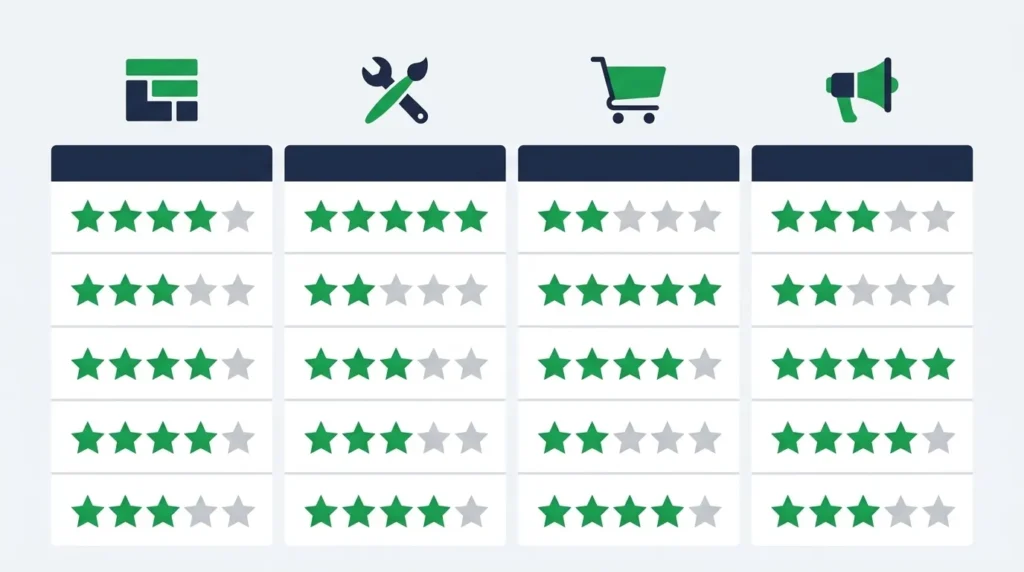
Website Builder Comparison Table
| Factor | Wix | Squarespace | Shopify | WordPress.com | Webflow | GoDaddy |
|---|---|---|---|---|---|---|
| Ease of use | High | High | Medium | Medium | Low | Very high |
| Design flexibility | Very high | Medium | Medium | Medium | Very high | Low |
| eCommerce | Good | Good | Excellent | Good | Limited | Basic |
| SEO tools | Good | Good | Good | Excellent | Very good | Basic |
| Blogging | Good | Very good | Basic | Excellent | Good | Basic |
| Page speed | Medium | Medium | Medium | Medium | Good | Medium |
| Free plan | Yes | No | No | Yes | Yes | Trial only |
| Starting price | $17/mo | $16/mo | $39/mo | $4/mo | $14/mo | $9.99/mo |
| Best for | General SMB | Creative portfolio | Online store | Content/blog | Design agency | Quick launch |
| Pakistani payment support | Via apps | Via apps | Via apps | Via plugins | Via code | Via apps |
Website Builder SEO Capabilities — What You Need to Know
Every website builder markets itself as SEO-friendly. The reality varies significantly — and the gap between builder SEO capability and what self-hosted WordPress with professional SEO configuration achieves is meaningful for businesses where organic search traffic is a primary growth channel.
What All Major Builders Provide
Every platform covered in this guide provides the baseline SEO requirements that determine whether a page can rank at all: editable meta titles and descriptions, custom URL slugs, SSL certificates, XML sitemap generation, and image alt text fields. These are table stakes — their presence does not differentiate platforms, their absence would be a dealbreaker.
Where Builders Differ in SEO Capability
Canonical tag management: Critical for eCommerce sites with product variants, filtered category pages, and paginated archives — all of which generate duplicate or near-duplicate URLs that require canonical tag implementation to prevent ranking dilution. Shopify and Webflow provide canonical tag control. Wix and Squarespace handle canonicals automatically with less granular control. WordPress.com with an SEO plugin provides full control.
Structured data and schema markup: Rich results — star ratings, FAQ dropdowns, product prices in search listings — require correctly implemented schema markup. WordPress with Rank Math or Yoast SEO provides the most comprehensive schema implementation options. Other builders provide limited schema support, primarily for product and review data.
Page speed optimization: Builder platforms generate heavier pages than optimized self-hosted WordPress installations in most benchmark comparisons. This matters for Core Web Vitals — a direct Google ranking factor. Webflow generates the cleanest code and typically produces the best performance among builder platforms. WordPress.com with a lightweight theme and caching plugin often outperforms Wix and Squarespace on speed benchmarks.
301 redirect management: When you change a page URL, all existing backlinks to the old URL need to redirect to the new URL to preserve link equity. WordPress provides full redirect management via plugins like Redirection. Wix and Squarespace provide 301 redirect tools but with less flexibility than WordPress. GoDaddy’s redirect capabilities are limited.
The SEO Reality for Builder Websites
For low-to-moderate competition keywords in specific local markets — “web design agency Lahore,” “accountant Karachi,” “photography services Islamabad” — websites built on major builders can rank competitively. The SEO configuration options are sufficient for these use cases.
For competitive national or international keywords where technical SEO excellence, page speed, and advanced schema implementation differentiate ranking performance — self-hosted WordPress with professional SEO configuration consistently outperforms builder alternatives. For businesses in those competitive situations, a professionally designed and SEO-configured WordPress site is the appropriate investment.
Our guide on why website maintenance is important covers the ongoing maintenance requirements that keep a website performing — builder or custom — including the SEO health monitoring that prevents gradual performance degradation.
Website Builder for eCommerce in Pakistan
For Pakistani businesses building an online store, the website builder decision carries additional considerations specific to Pakistan’s payment infrastructure, market conditions, and competitive landscape.
Payment Gateway Compatibility
The most critical eCommerce consideration for Pakistani businesses is payment gateway support. Local payment methods — JazzCash, EasyPaisa, bank transfer, and cash on delivery — are expected by Pakistani online shoppers and their absence significantly reduces conversion rates for domestic sales.
Wix and Squarespace support payment gateways through their app ecosystems — third-party integrations handle local payment methods, but setup complexity and transaction fees vary. Shopify supports local Pakistani gateways through its third-party gateway integration, but charges transaction fees on every order processed through non-Shopify Payments providers. WooCommerce (self-hosted WordPress) provides direct integration with all major Pakistani payment gateways through dedicated free or low-cost plugins, with no platform-level transaction fees beyond what the gateway itself charges.
For Pakistani eCommerce stores processing meaningful transaction volume, WooCommerce’s elimination of platform-level transaction fees typically produces lower total cost of ownership than Shopify despite higher upfront build cost.
Mobile Commerce for Pakistani Shoppers
The majority of Pakistani online shoppers browse and purchase on mobile devices. Every eCommerce website builder you consider should be evaluated on its mobile shopping experience — not its desktop design. Run each platform’s eCommerce templates on a real smartphone and assess the product browsing, add-to-cart, and checkout flows specifically on a mobile connection.
For the complete eCommerce website design requirements that apply regardless of which platform you choose, our guide on ecommerce website design covers every dimension of online store design — from product page layout through checkout optimization and mobile commerce performance.
Free Website Builder vs Paid Plans — Is Free Worth It?
Most major website builders offer a free plan — and most free plans are insufficient for a serious business website. Understanding specifically what free plans provide and what they withhold clarifies the decision.
What Free Plans Typically Include
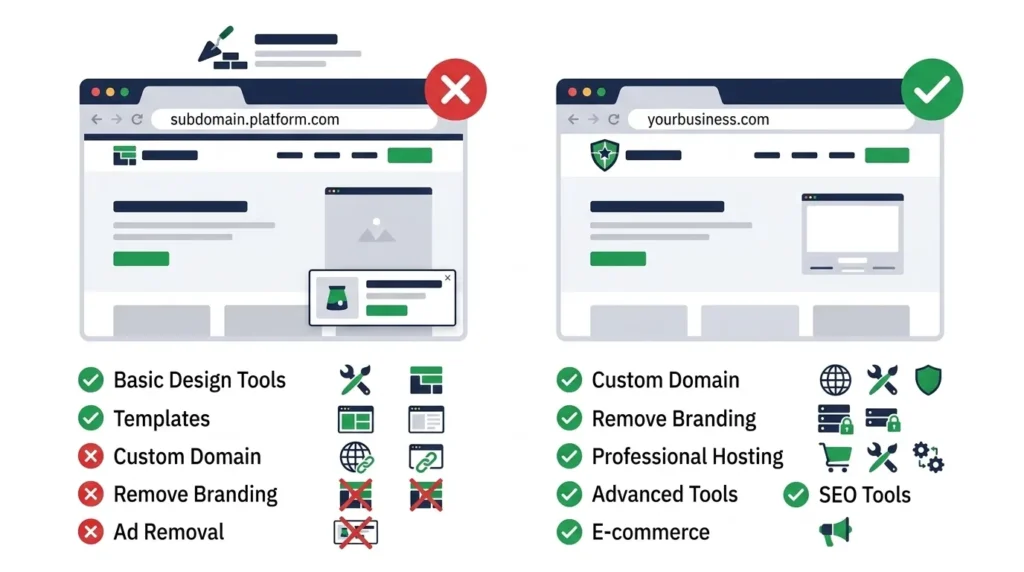
A functional website on a platform subdomain (yourbusiness.wixsite.com rather than yourbusiness.com), access to templates and the visual builder, basic page creation and content management, and SSL certificate on the platform subdomain.
What Free Plans Typically Exclude
A custom domain name — your website appears at a platform subdomain with the builder’s branding, not your own domain name. This is the most significant limitation: a business website on a platform subdomain communicates amateurism to visitors and prevents accumulation of domain authority from any SEO activity.
Removal of platform advertising — free plans on Wix display Wix branding and advertisements on your website, which damages professional credibility.
eCommerce capability — free plans universally exclude the ability to accept payments and sell products online.
Priority customer support and storage limits suitable for business use.
The Practical Recommendation
Use a free plan exclusively for testing and evaluation before committing to a platform. Once you have confirmed which platform’s interface and template options fit your needs, upgrade to a paid plan before publishing any content you want to build authority on — publishing on a platform subdomain means any SEO equity accumulated (backlinks, indexation, engagement signals) belongs to the platform’s subdomain, not your own domain. When you eventually move to a custom domain, that equity does not transfer.
The minimum investment for a functional, credible business website on any builder platform is approximately $15 to $25 per month for the plan, plus $10 to $20 per year for a domain name. This is a reasonable minimum for most small business use cases.
How Fast Are Website Builders? Speed and Core Web Vitals
Page speed is a direct Google ranking factor and a significant influence on user experience and conversion rate. Website builders vary meaningfully in the page speed their sites achieve — and builder-generated sites are consistently benchmarked as slower than optimized self-hosted WordPress installations.
Why Builder Sites Are Often Slower
Website builders generate code that includes the platform’s full rendering engine, editor functionality, and feature set — even for pages that use none of it. A Wix page loads the Wix platform infrastructure regardless of how simple the page content is. This overhead adds to initial load time in ways that custom-coded or properly optimized WordPress sites avoid.
Additionally, builder sites load fonts, CSS frameworks, and JavaScript libraries from the builder’s CDN rather than from optimized local asset configurations — meaning load performance is influenced by the builder’s infrastructure decisions, not your own.
Speed Benchmarks by Platform
Independent performance testing across major builders typically produces these findings (tested on standard template sites without additional optimization):
Webflow generates the cleanest code and typically produces the best performance among builder platforms — LCP scores in the 2.0 to 2.5 second range on well-configured sites.
WordPress.com with a lightweight theme and caching achieves LCP scores competitive with custom WordPress installations — 1.5 to 2.5 seconds depending on configuration.
Squarespace mid-range performance — LCP typically 2.5 to 3.5 seconds on template sites.
Wix has improved significantly with its infrastructure upgrades but typically falls in the 2.5 to 4 second range for LCP on standard template sites — with significant variance based on template complexity and app load.
GoDaddy and Shopify typically perform similarly to Wix on standard template configurations.
The Practical Implication
For websites targeting competitive keywords where Core Web Vitals scores meaningfully influence ranking outcomes, builder platform speed limitations are a genuine competitive disadvantage compared to properly optimized custom websites. For websites targeting low-to-moderate competition local keywords, the speed difference is unlikely to be the deciding ranking factor.
Test any platform you are considering by finding a live site built on that platform in your industry and running it through Google PageSpeed Insights — this gives you real-world performance data on actual builder sites rather than platform claims.
When a Website Builder Is Not Enough
A website builder is an excellent tool for its intended use case. There are circumstances where it is the wrong tool — and understanding those circumstances prevents the mistake of investing significant time in a builder that cannot serve your business requirements.
Situations Where a Builder Falls Short
Your website needs to scale beyond the builder’s technical constraints. A business that starts with ten products on Wix and grows to 5,000 products needs inventory management, bulk product import, custom product types, and complex filtering — capabilities that builder eCommerce platforms do not handle at that scale.
Your SEO requirements exceed builder capabilities. A business competing for highly competitive national or international keywords needs the full technical SEO configurability of self-hosted WordPress — not the constrained SEO tools of a hosted builder.
Your business requires integrations the builder does not support. Enterprise CRM integration, custom ERP connections, complex workflow automation, and bespoke API integrations typically require custom development that builder platforms cannot accommodate.
Your brand differentiation depends on distinctive design that templates cannot provide. Premium service businesses, established brands, and companies where design is a direct component of the value proposition need custom design work rather than template customization.
Your performance requirements exceed what builders deliver. High-traffic sites, websites where every 100ms of load time affects revenue, and sites competing in markets where technical performance is a ranking differentiator need the optimization control that custom builds provide.
The Migration Path
Many businesses start with a website builder — which is entirely appropriate — and migrate to a custom WordPress site as the business grows and requirements exceed builder capabilities. This is a normal progression, not a failure. The important considerations for managing that migration without losing SEO equity are covered in our website redesign guide — particularly the 301 redirect planning that ensures any authority accumulated on the builder site transfers to the new custom domain structure.
When your business is ready to move beyond a website builder to a professionally designed, custom-built WordPress or WooCommerce site, SiteNova Agency provides complete web design services — from design and development through SEO configuration, payment gateway integration, and ongoing maintenance — for Pakistani businesses across all industries.
Frequently Asked Questions About Website Builders
Q: What is the best website builder for beginners?
GoDaddy Website Builder provides the fastest path from zero to a live website for users with no design or technical experience. Wix is the best combination of ease of use and design quality for beginners who want more control over their site’s appearance. Squarespace is best for beginners who prioritize professional visual quality over design flexibility. All three offer free trials — test each before committing.
Q: Can I build a professional-looking website with a website builder?
Yes — the best templates from Wix, Squarespace, and Webflow produce visually professional results that are indistinguishable from custom designs for most business types. The limitation is differentiation — template-based designs may look professional but look similar to other businesses using the same template. For businesses where visual distinctiveness is a competitive factor, custom design is required.
Q: Which website builder is best for eCommerce? Shopify is the best dedicated eCommerce website builder for most markets. For Pakistani businesses specifically, WooCommerce (self-hosted WordPress) is often preferable because it eliminates platform-level transaction fees, provides direct integration with Pakistani payment gateways (JazzCash, EasyPaisa), and offers greater customization for complex product catalogs. The right choice depends on your transaction volume, technical resources, and specific functionality requirements.
Q: Are website builders good for SEO?
Website builders provide sufficient SEO tools for low-to-moderate competition local and niche keywords. For highly competitive national or international keywords, self-hosted WordPress with professional SEO configuration (Rank Math or Yoast, proper schema markup, Core Web Vitals optimization) consistently outperforms builder alternatives in technical SEO capability and page speed — both direct ranking factors. The importance of this distinction depends entirely on how competitive your target keywords are.
Q: How much does it cost to build a website with a website builder?
A professional business website built with a website builder typically costs $15 to $45 per month for the platform plan, plus $10 to $20 per year for a domain name — totaling $190 to $560 annually at the most common plan tiers. eCommerce plans cost more — $39 to $75 per month depending on platform and plan tier. Compare this against a professionally custom-built WordPress website (a one-time investment of PKR 150,000 to PKR 400,000 for a standard business site) to determine which approach delivers better total value for your specific situation and timeline.
Q: Can I switch website builders after I have already built my site?
Switching website builders requires rebuilding your site on the new platform — content, design, and settings do not transfer between builder platforms. This is one of the most significant hidden costs of starting with the wrong platform. Before committing to a builder, evaluate your likely requirements 12 to 24 months into the future — not just today — to reduce the probability of an expensive platform migration.
Q: Is a website builder or a professional web designer better for my business?
For businesses with straightforward website needs, limited budgets, and willingness to manage website updates themselves, a website builder is sufficient and significantly more cost-effective for initial launch. For businesses where the website is a primary revenue channel, competing in markets where technical performance and SEO differentiation matter, or requiring custom functionality that builders cannot provide, a professionally designed and built website produces better business outcomes and typically higher ROI over a 2 to 3 year horizon.
Conclusion
A website builder is the right starting point for many businesses — particularly those launching quickly, operating with limited budgets, or needing a simple online presence rather than a complex digital platform. The platforms covered in this guide each serve a specific use case well: Wix for design-conscious SMBs, Squarespace for creative portfolios, Shopify for eCommerce, WordPress.com for content-heavy sites, Webflow for professional designers, and GoDaddy for the fastest possible launch.
The key decision is not which builder to choose — it is whether a builder is the right tool for your specific business situation, competitive environment, and growth trajectory. Builders are excellent for their designed purpose and inappropriate when requirements exceed their capabilities.
For Pakistani businesses ready to move beyond builder limitations — or building their first serious business website with professional design, complete SEO configuration, and ongoing expert support — SiteNova Agency provides complete web design and development services tailored to Pakistani businesses across every industry. Contact our team through our services page to discuss your website requirements and get a project proposal.