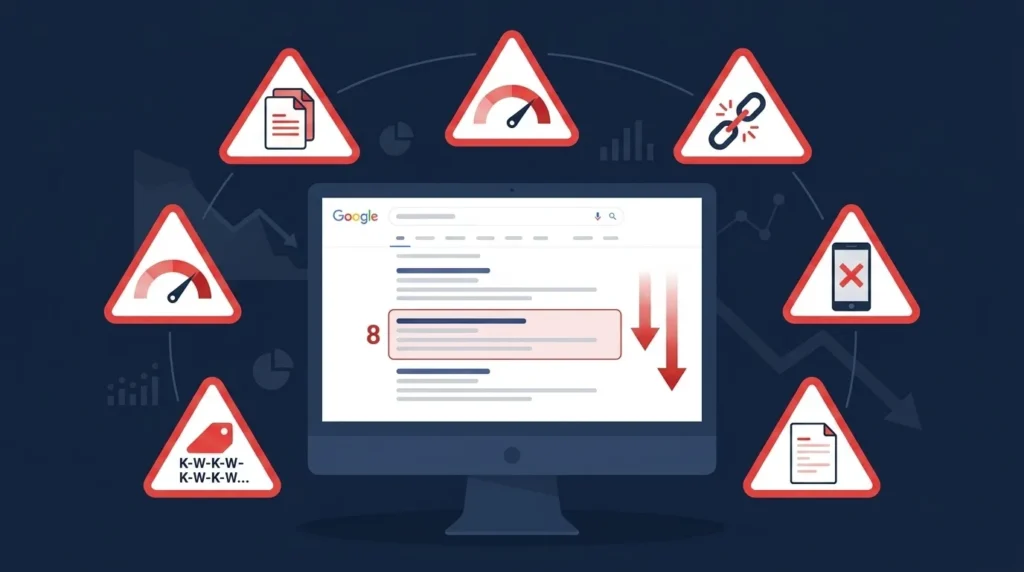
Most websites that struggle to rank on Google’s first page are not failing because of what they have not done. They are failing because of specific, identifiable mistakes they are actively making — mistakes that either directly suppress rankings or prevent the positive signals from accumulating that rankings require.
Common SEO mistakes fall into three categories. Some produce immediate, dramatic consequences — a robots.txt misconfiguration that blocks an entire website from Google, or an accidental noindex tag on a service page that removes it from search results overnight. Others are gradual, compounding problems — thin content accumulating across hundreds of pages until Google’s Helpful Content system downgrades the entire domain’s quality signal. And some are opportunity costs — not building backlinks, not targeting local keywords, not optimizing for Core Web Vitals — where the mistake is inaction rather than a harmful action.
Understanding which category each mistake falls into helps prioritize the fixes. The dramatic immediate-consequence mistakes go to the top of the priority list. The gradual compounding ones require systematic correction over time. The opportunity-cost mistakes need a strategic plan, not emergency intervention.
This guide covers the eighteen most damaging common SEO mistakes observed across Pakistani business websites — with specific explanations of why each one hurts rankings, how to identify it, and exactly how to fix it.
Before diving in, it helps to have the foundational SEO knowledge that makes these mistakes recognizable when you encounter them. Our guides on what is SEO in digital marketing, white hat vs black hat SEO, and how to do on page SEO provide the context that makes every finding in this guide immediately actionable.
Table of Contents
- Why Understanding Common SEO Mistakes Matters
- Mistake 1 — Targeting the Wrong Keywords
- Mistake 2 — Ignoring Search Intent
- Mistake 3 — Keyword Stuffing
- Mistake 4 — Publishing Thin or Low-Quality Content
- Mistake 5 — Duplicate Content Without Canonical Tags
- Mistake 6 — Keyword Cannibalization
- Mistake 7 — Neglecting Technical SEO Foundations
- Mistake 8 — Ignoring Page Speed and Core Web Vitals
- Mistake 9 — Poor Mobile Optimization
- Mistake 10 — Broken Internal Links and Orphan Pages
- Mistake 11 — Missing or Poorly Written Meta Tags
- Mistake 12 — Ignoring Image Optimization
- Mistake 13 — Building Low-Quality Backlinks
- Mistake 14 — Neglecting Content Freshness
- Mistake 15 — Skipping Schema Markup
- Mistake 16 — Not Tracking Rankings or Analytics
- Mistake 17 — Ignoring Local SEO Signals
- Mistake 18 — Expecting Instant SEO Results
- Frequently Asked Questions
- Conclusion
Mistake 1 — Targeting the Wrong Keywords
The most fundamental SEO mistake — and the one that makes every subsequent effort less effective — is targeting keywords that are either too competitive for your current domain authority, have insufficient search volume to drive meaningful traffic, or do not match what your potential customers actually search for.
A startup digital marketing agency in Lahore targeting “digital marketing” as a primary keyword is competing against Hubspot, Neil Patel, Moz, and thousands of established domains with domain authorities above 80. No amount of content quality or on-page optimization will rank a new website for that keyword in any realistic timeframe.
Meanwhile, “digital marketing agency Lahore” — a keyword with meaningful local search volume and significantly lower competition — is genuinely achievable for a Pakistani agency with 6 to 12 months of consistent SEO effort. The traffic is smaller in absolute numbers but the visitors are far more qualified — they are specifically looking for what you offer, in your city.
How to Identify Keyword Targeting Mistakes
Pull your current keyword rankings from Google Search Console. For every keyword your site ranks for, check two things: is the search volume meaningful (above 50 to 100 monthly searches for local keywords, above 200 for national), and is the current position improving or declining month over month?
For keywords you are not ranking for but targeting, use Ahrefs or SEMrush to check keyword difficulty relative to your domain rating. If your domain rating is below 20 and you are targeting keywords with difficulty above 40, your content is unlikely to rank competitively regardless of its quality.
The Fix
Conduct proper keyword research before creating any content. Identify the full keyword landscape for your business — primary keywords, long-tail variations, question-based terms, and local modifiers. Assign difficulty levels to each and build a targeting strategy that prioritizes achievable keywords first while creating a path toward more competitive terms as domain authority grows.
For the complete keyword research methodology, our guide on how to do keyword research for SEO covers every step from seed keywords to final keyword map.
Mistake 2 — Ignoring Search Intent
Targeting the right keyword is half the equation. Creating the right type of content for that keyword’s search intent is the other half — and mismatching content type to intent is one of the most common reasons well-optimized pages fail to rank.
Search intent — the underlying goal a user has when typing a query — tells Google what type of content should rank for each keyword. When someone searches “how to do on page SEO,” they want a step-by-step guide — not a service page offering to do on-page SEO for them. When someone searches “SEO agency Lahore,” they want to find and hire an agency — not read a blog post explaining what SEO agencies do.
Businesses make this mistake constantly. They write blog posts for transactional keywords and service pages for informational keywords — and then wonder why well-written, thoroughly optimized content fails to rank above position 15.
How to Identify Intent Mismatch
Search your target keyword in Google and analyze the top five results. What type of content is ranking — blog posts, service pages, product pages, comparison articles, videos? This analysis tells you exactly what Google believes users want for that query. If your content type differs from what is ranking, you have an intent mismatch regardless of how well the content is written.
The Fix
Before creating any piece of content, search the target keyword and note the dominant content type and format in the top five results. Create content that matches that format while providing more depth, better structure, and more specific value than the existing results. If you have existing pages with intent mismatches, either restructure the content to match intent or change the keyword targeting strategy for that page.
Mistake 3 — Keyword Stuffing
Keyword stuffing — forcing your target keyword into content at unnatural frequency — is one of the oldest SEO mistakes and still one of the most common on Pakistani business websites. It is the belief that more keywords equal higher rankings, which was partially true in the early 2000s but has been actively penalized by Google since the Panda algorithm update in 2011.
Modern keyword stuffing takes several forms. Repeating the exact keyword phrase every second paragraph when natural variation would serve better. Forcing keywords into headings where they do not belong logically. Adding keyword-dense paragraphs at the bottom of pages that read as though they were written for crawlers rather than humans. Stuffing location keywords into footers with no context: “SEO agency Lahore | SEO Karachi | SEO Islamabad | SEO Pakistan” as a list of anchor-text keyword repetitions.
Google’s Natural Language Processing systems now evaluate content quality at a semantic level — detecting not just keyword frequency but whether the keyword usage makes linguistic sense in context. Content that reads unnaturally because of keyword repetition is flagged as low quality regardless of its other attributes.
How to Identify Keyword Stuffing
Read your own content aloud. If you notice yourself reading the same phrase repeatedly within a short passage, or if sentences feel awkward because a keyword was forced in rather than flowing naturally, keyword stuffing is likely present.
Use a readability tool — Hemingway Editor or Grammarly — to assess whether your content reads naturally. Unnaturally stiff, repetitive prose is a strong indicator.
The Fix
Write for the human reader first. Use your primary keyword naturally in the title, the first paragraph, two to three subheadings, and throughout the body content wherever it fits without forcing. Use synonyms, semantic variations, and related terms throughout — “search engine optimization,” “SEO strategy,” “organic search performance” — rather than repeating the exact phrase. A well-written article about SEO will naturally mention SEO frequently because the topic requires it — not because the writer inserted it artificially.
Mistake 4 — Publishing Thin or Low-Quality Content
Thin content — pages with insufficient depth, specificity, or original value to satisfy the search intent of users who arrive at them — is the most damaging common SEO mistake for overall domain health. A website with even 20 to 30% thin pages across its total content receives a site-wide quality signal reduction from Google’s Helpful Content system that suppresses rankings across all pages, including high-quality ones.
Thin content manifests in several ways. Very short blog posts of 200 to 300 words that mention a topic without genuinely covering it. Service pages with three generic bullet points where competitors have comprehensive, specific descriptions of their process and deliverables. Location pages with identical content, differing only in the city name. Product descriptions copied directly from manufacturer sources, duplicated across every retailer carrying the same product.
The problem is not just the individual thin pages — it is what they signal about the entire website’s content quality commitment. Google evaluates the overall helpfulness of a website’s content as a whole, not just page by page.
How to Identify Thin Content
Export all pages from a Screaming Frog crawl with word counts. Flag pages under 300 words for review — not all will be thin (contact pages and simple landing pages can be short appropriately), but the flagged pages need manual evaluation. In Google Analytics, check the engagement time and bounce rate for organically landing pages. Pages where organic visitors spend under 30 seconds and immediately leave are signaling thin content.
The Fix
For pages that should be comprehensive but are not, expand them substantially — add specific information, worked examples, relevant data, FAQs, and supporting detail until the page genuinely answers every question a user might have on the topic. For pages that are thin because they serve a genuinely limited purpose, consider applying a noindex tag to remove them from Google’s quality assessment rather than letting them dilute your site’s overall signal.
Our guide on what is SEO content writing covers in detail what makes content genuinely substantive and how to write for the comprehensive coverage Google rewards.
Mistake 5 — Duplicate Content Without Canonical Tags
Duplicate content — the same or near-identical content appearing at multiple URLs — confuses Google about which version to index and rank. When Google finds the same content at two different URLs, it must decide which one to show in search results. It frequently chooses incorrectly, or it splits the ranking authority between both versions — reducing the competitive strength of either.
Duplicate content on Pakistani business websites most commonly arises from: WWW and non-WWW versions of pages both being accessible without a canonical or redirect specifying the preferred version; HTTP and HTTPS versions both loading without a consistent redirect; pagination creating URL combinations that repeat content from page one; and printer-friendly or filtered versions of pages generating additional URLs.
How to Identify Duplicate Content
Use Siteliner (free for sites under 250 pages) to scan your website for internal duplicate content. In Google Search Console, check the Coverage report for pages marked as “Duplicate, submitted URL not selected as canonical” — Google has found duplicate versions and chosen a different canonical than yours.
Search Google for a unique sentence from your most important pages — wrapped in quotation marks. If multiple URLs appear in results with that exact text, duplication is confirmed.
The Fix
Implement canonical tags correctly — every page should have a <link rel="canonical"> tag pointing to its own URL (a self-referential canonical). For pages with genuine duplicate versions, the canonical on the duplicate should point to the preferred version. Implement 301 redirects for the WWW/non-WWW and HTTP/HTTPS issues so only one version is accessible rather than relying solely on canonical hints.
Mistake 6 — Keyword Cannibalization
Keyword cannibalization is the mistake of having multiple pages on your own website targeting the same primary keyword — causing them to compete against each other in Google’s rankings rather than presenting a single, authoritative page for that query.
The consequence is measurable: instead of one strong page ranking in position 3 for “SEO services Lahore,” you have three mediocre pages ranking in positions 8, 12, and 16 — collectively receiving far less traffic than the single strong page would. Google splits its ranking consideration across all three pages, elevating none of them to the position where clicks are meaningful.
This mistake is particularly common on agency and service business websites where similar services are described on multiple pages, or on blogs where multiple posts address similar questions from slightly different angles.
How to Identify Keyword Cannibalization
Search Google for your target keyword and add site:yourdomain.com — for example, site:sitenovaagency.com SEO services Lahore. If multiple pages from your site appear in results for the same query, cannibalization is occurring.
In Google Search Console, check if multiple pages from your site receive impressions for the same primary keyword — the Performance report’s query-level data sorted by page reveals this pattern.
The Fix
Either consolidate competing pages into one comprehensive, authoritative page (301 redirecting the weaker versions to the stronger one), or clearly differentiate the keyword targeting so each page targets a distinct intent variation. “SEO services Lahore” and “SEO audit Lahore” can coexist as separate pages because they target different user intents — but two pages both targeting “SEO agency Lahore” with similar content will cannibalize each other.
Mistake 7 — Neglecting Technical SEO Foundations
Technical SEO mistakes are the most immediately damaging category because they operate at the infrastructure level — affecting every page simultaneously rather than one at a time. A single robots.txt error can remove an entire website from Google’s index overnight. A misconfigured noindex tag on a category page eliminates rankings for every product visible only through that category.
The most common technical SEO mistakes observed across Pakistani business websites include robots.txt files accidentally blocking important directories, staging environment settings carried over to production sites, XML sitemaps containing 404 or redirected URLs that waste crawl budget, redirect chains of three or more hops that bleed authority with each additional hop, and missing canonical tags on paginated or filtered pages creating duplicate content at scale.
How to Identify Technical SEO Mistakes
Run a complete technical audit using the process described in our technical SEO checklist — the most systematic approach to identifying every category of technical issue. At minimum, check Google Search Console’s Coverage report weekly for new crawl errors, and run a Screaming Frog crawl monthly to identify redirect chains, missing canonical tags, and broken internal links before they compound.
The Fix
Address technical issues in severity order — crawl blocks and indexation errors first, then redirect chains, then canonical tag issues, then sitemap errors. Each fix should be verified after implementation using Google Search Console’s URL Inspection tool and, where relevant, re-crawled to confirm the issue is resolved. Never make multiple simultaneous technical changes without documenting each one — when something goes wrong, you need to know which change caused it.
Mistake 8 — Ignoring Page Speed and Core Web Vitals
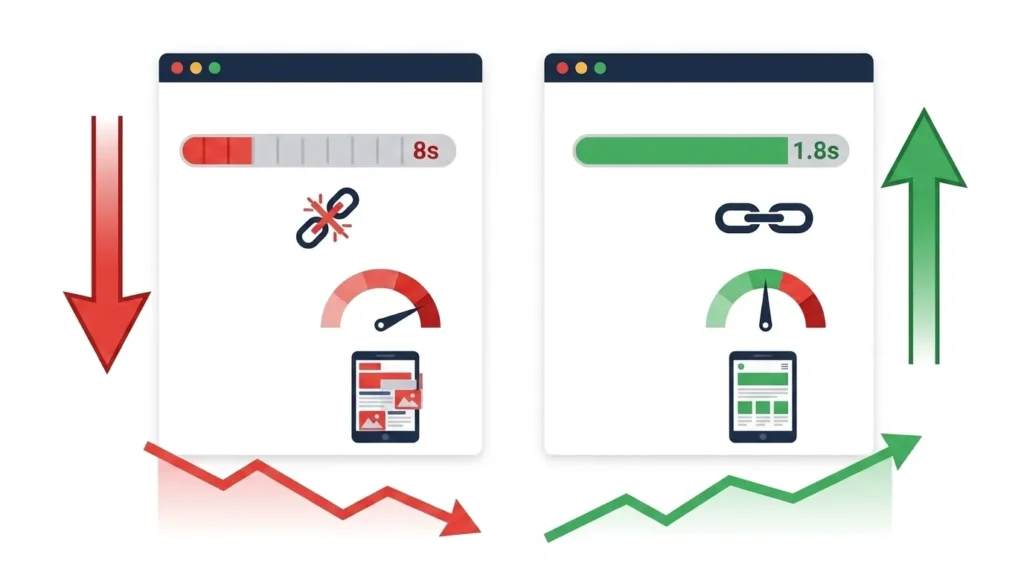
Page speed has been a Google ranking factor since 2010, and Core Web Vitals became official ranking signals in 2021. Despite this, the majority of Pakistani business websites have Core Web Vitals scores that fall below Google’s recommended thresholds — producing both direct ranking penalties and measurable conversion rate losses from users who leave before slow pages finish loading.
The most common causes of Core Web Vitals failures on Pakistani websites are unoptimized product and blog images (the single most consistent finding), excessive third-party scripts (chat widgets, retargeting pixels, analytics tools loaded synchronously), inadequate hosting infrastructure (shared hosting plan with insufficient resources for the site’s traffic level), and poorly configured or absent caching.
A page with an LCP above 4 seconds is not just slightly slower than a passing page — it is delivering an experience that Google actively penalizes in rankings and that research consistently shows causes the majority of mobile users to abandon before content is visible.
How to Identify Page Speed Issues
Run your homepage, primary service or product pages, and highest-traffic blog posts through Google PageSpeed Insights at pagespeed.web.dev. Record mobile and desktop scores and identify which Core Web Vitals are failing. The “Opportunities” and “Diagnostics” sections provide specific, prioritized recommendations for each page tested.
The Fix
Image optimization produces the largest speed improvement for most Pakistani websites — compress all images using ShortPixel or Imagify, convert to WebP format, and implement lazy loading for below-fold images. Enable caching through WP Rocket or a server-level caching configuration. Defer non-critical JavaScript scripts. Upgrade hosting if server response time consistently exceeds 600 milliseconds. For a comprehensive implementation guide, our technical SEO checklist covers every Core Web Vitals optimization action in sequence.
Mistake 9 — Poor Mobile Optimization
Google has used mobile-first indexing since 2019 — meaning it evaluates the mobile version of your website as its primary basis for ranking decisions. A website that delivers a poor mobile experience is not penalized for mobile users only — it ranks lower for everyone, including desktop users, because Google’s ranking evaluation is based on mobile performance.
Poor mobile optimization on Pakistani business websites takes predictable forms: fixed-width layouts that require horizontal scrolling on smartphones, font sizes below 16px that require pinching to read, tap targets under 48 pixels that cause misclicks, navigation menus that do not function correctly on touch devices, and images without responsive sizing that overflow the viewport or load at full desktop resolution on mobile connections.
A particularly damaging version of this mistake is having less content on the mobile version of a page than on the desktop version — hiding sections, removing content, or abbreviating text on mobile to simplify the layout. Since Google indexes the mobile version, hidden content effectively does not exist for ranking purposes.
How to Identify Mobile Optimization Issues
Google Search Console’s Mobile Usability report shows specific mobile issues across your entire website — sorted by page with issue descriptions and example URLs. Google’s Mobile-Friendly Test provides page-by-page diagnosis. Check your own website on a real smartphone — not a browser developer tools simulation — to experience the actual mobile user experience.
The Fix
Implement responsive web design — a single HTML document with CSS media queries that adapts the layout to any screen size. Ensure all content visible on desktop is also present and accessible on mobile. Set minimum font size to 16px for body text. Size all interactive elements to 48 × 48 pixel minimum. Test navigation, forms, and checkout flows on real mobile devices before launch and after every significant update. Our complete guide on what is responsive web design covers every technical requirement for mobile optimization in detail.
Mistake 10 — Broken Internal Links and Orphan Pages
Internal linking is one of the most undervalued on-page SEO factors — and broken internal links and orphan pages are among the most common findings in website audits. Broken internal links — links on your website that point to pages returning 404 errors — waste the link equity being passed through that link and deliver a poor user experience to visitors who click them. Orphan pages — pages with no internal links pointing to them — receive no authority from the rest of the site and are crawled infrequently by Google.
Both problems accumulate naturally over time as websites grow: pages are deleted without redirects, URLs are changed without updating internal links, and new pages are published without being linked from relevant existing content.
How to Identify Broken Links and Orphan Pages
Screaming Frog identifies all broken internal links in its crawl report — export the list of URLs returning 4xx status codes and the source pages linking to them. For orphan pages, compare the list of all pages on your site (from your XML sitemap) against the list of all internally linked pages from a crawl — pages in the sitemap but not linked internally are orphans.
The Fix
For each broken internal link: either update the link to point to the correct current URL, implement a 301 redirect from the broken URL to its replacement, or remove the link if the destination page no longer exists and has no relevant replacement. For orphan pages: add internal links from topically related existing pages. Every page that should be indexed and ranked needs at least one internal link pointing to it from a relevant source.
Mistake 11 — Missing or Poorly Written Meta Tags
Meta tags — title tags and meta descriptions — are two of the most directly controllable on-page SEO elements, and two of the most frequently neglected on Pakistani business websites. Missing title tags allow Google to generate its own version from page content — which is almost always less optimized and less compelling than a deliberately written tag. Duplicate title tags across multiple pages send contradictory signals about which page is authoritative for the target keyword.
Over-length title tags — exceeding 60 characters — are truncated in search results, cutting off the brand name, the primary keyword, or both. Under-optimized title tags that do not include the target keyword miss the most direct topical signal available in on-page SEO.
Meta descriptions do not directly influence rankings but they control the text Google displays below your title in search results — directly influencing whether users click your result over competitors. A generic or missing meta description is a missed conversion opportunity at the SERP level.
How to Identify Meta Tag Issues
Run a Screaming Frog crawl and export all title tags and meta descriptions. Filter for: missing titles, duplicate titles, titles over 60 characters, missing meta descriptions, duplicate meta descriptions, and meta descriptions over 160 characters. Each finding represents a specific page requiring correction.
The Fix
Write a unique title tag for every page — including the primary keyword near the beginning, within 55 to 60 characters, with the brand name at the end. Write a unique meta description for every page — including the primary keyword naturally, a clear benefit statement, and a soft call to action, within 140 to 155 characters. For the complete title tag and meta description optimization process, our on page SEO checklist covers every specification with examples.
Mistake 12 — Ignoring Image Optimization
Images are the most consistently neglected optimization opportunity on Pakistani business websites — and the most consequential for page speed, a direct ranking factor. A blog post published with a 3MB hero image that takes six seconds to load on mobile has undermined its own ranking potential before a single visitor reads a word.
Image optimization mistakes cluster in three areas. File size — images uploaded at original camera or design export resolution without compression. Format — JPEG and PNG images served where WebP would provide the same quality at 25 to 35% smaller file size. Alt text — images published with missing, generic, or keyword-stuffed alt text that fails both accessibility requirements and image search relevance signals.
Missing image alt text is an accessibility failure under WCAG 2.1 guidelines and an SEO signal missed — Google cannot see images without alt text and cannot include them in image search results or use them as content relevance signals for the surrounding text.
How to Identify Image Optimization Issues
Screaming Frog’s image report exports all images with their file sizes and alt text status. Filter for images above 150KB as compression candidates. Filter for images with missing or empty alt text as accessibility and SEO gaps. Run Google PageSpeed Insights on your most image-heavy pages — it identifies oversized images and format improvement opportunities with estimated size savings.
The Fix
Install ShortPixel or Imagify on WordPress — both compress images on upload and convert to WebP automatically, removing the manual workflow requirement. Set maximum upload dimensions in your image optimization plugin (1200px wide is sufficient for most blog content; 1600px for full-width images). Write descriptive alt text for every image — describing what the image shows in plain language, with a natural keyword inclusion where the image topic warrants it.
Mistake 13 — Building Low-Quality Backlinks
Not all backlinks help rankings. Backlinks from spammy directories, link farms, irrelevant foreign-language sites, or websites known to sell links can actively harm your rankings — triggering algorithmic spam detection or, in severe cases, a manual penalty that requires a formal reconsideration request to Google.
The temptation of cheap, fast backlink packages — “500 backlinks for $50” services widely advertised to Pakistani businesses — is understandable. Backlinks are a ranking signal, so more backlinks should mean better rankings, by simple logic. But the quality of linking domains matters enormously. One backlink from a relevant, high-authority industry publication is worth more than five hundred backlinks from a link farm that Google’s SpamBrain system has already identified and neutralized.
Even beyond direct harm, low-quality link building wastes resources that could be invested in ethical link building — guest posting on relevant sites, earning citations in industry publications, creating linkable content assets — that builds genuine, durable authority.
How to Identify Problematic Backlinks
Export your backlink profile from Ahrefs Webmaster Tools or Google Search Console’s Links report. Identify domains with very low Domain Rating (below 5), domains in completely irrelevant industries or languages, domains with no real content (just link directory pages), and domains whose anchor text to your site uses exact-match commercial keywords across multiple links.
The Fix
For identified toxic backlinks, first attempt to have them removed by contacting the linking site. For sites that cannot be contacted or do not respond, create a disavow file listing the domains to disavow and submit it through Google Search Console’s Disavow Tool. Going forward, invest in white hat link building exclusively. Our guide on white hat vs black hat SEO explains the full risk profile of different link building approaches and why ethical link building produces superior long-term results.
Mistake 14 — Neglecting Content Freshness
Content published and never revisited gradually loses ranking position as competitors publish fresher, more comprehensive alternatives. Google’s freshness signals — including the dateModified attribute in schema markup and the actual recency of substantive content updates — influence ranking for queries where current information matters.
A blog post published in 2023 that ranks well for a competitive keyword is vulnerable to a 2025 competitor post on the same topic that covers everything the 2023 post covers plus the developments of the intervening two years. If you do not update your existing content, your competitors’ newer content will eventually displace it.
Neglecting freshness is particularly damaging for content about evolving topics — SEO strategies, platform features, pricing information, legal requirements, industry statistics — where outdated information both ranks poorly and actively damages user trust when discovered.
How to Identify Stale Content
In Google Search Console, filter your top-performing pages by impressions and check which pages have shown declining impressions over the past six months. Pages with downward impression trends may be losing ground to fresher competitor content. Manually review your most important pages for outdated statistics, references to features that have changed, pricing that is no longer current, and any claims that developments in your industry have superseded.
The Fix
Implement a quarterly content review as part of your standard SEO maintenance. For each piece of content reviewed: update statistics to current sources, add examples and case studies from the past twelve months, expand sections where competitor content now provides more depth, and update the dateModified in your Article schema. After updating, resubmit the page URL in Google Search Console for recrawling to signal the freshness update. Our guide on content marketing for SEO covers content freshness maintenance as part of a complete content strategy.
Mistake 15 — Skipping Schema Markup
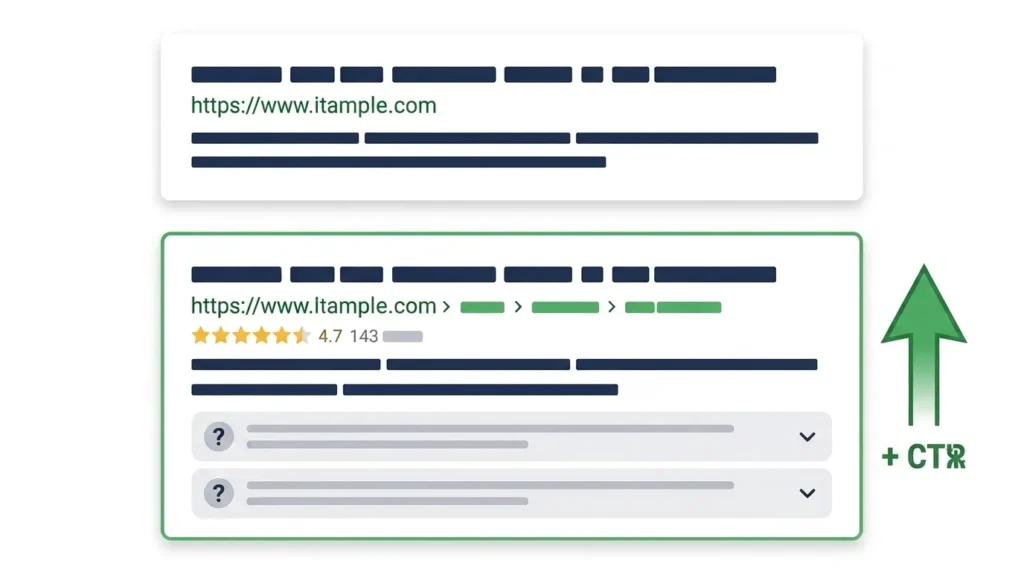
Schema markup — structured data that explicitly tells Google what your content means — is implemented on a small minority of Pakistani business websites despite being one of the most accessible technical SEO improvements available. Its absence is a missed opportunity rather than a direct penalty, but the opportunity cost is significant: pages with correct schema markup are eligible for rich results (star ratings, FAQ dropdowns, how-to steps, product prices) that dramatically increase SERP visibility and click-through rates.
In 2026, schema markup is also a direct factor in AI Overview citation probability — Google’s AI systems preferentially cite content with clear structured data signals because it can be used with higher confidence than content requiring semantic inference alone.
How to Identify Missing Schema
Use Google’s Rich Results Test at search.google.com/test/rich-results to test your homepage, blog posts, service pages, and FAQ pages. Pages with no schema markup detected have no rich result eligibility. Pages with schema errors have partially implemented markup that Google cannot use.
The Fix
Implement schema markup using Rank Math’s schema module (the simplest approach for WordPress users) or through manual JSON-LD code in the page head. Priority schema types for most Pakistani business websites:
Organization schema on the homepage — establishing your brand as a recognized entity with consistent NAP information.
Article schema on every blog post — with author credentials, publication date, and modification date.
FAQPage schema on any page with a FAQ section — enabling FAQ dropdown rich results in Google search.
LocalBusiness schema on service and location pages — reinforcing local SEO signals and enabling local rich results.
BreadcrumbList schema on all pages — showing the site hierarchy path in search results instead of a raw URL.
After implementation, verify every schema type with the Rich Results Test and monitor the Google Search Console Enhancements report for any errors Google identifies after crawling.
Mistake 16 — Not Tracking Rankings or Analytics
Running an SEO program without tracking results is the equivalent of running a business without reviewing financial statements — you cannot tell whether your efforts are working, which activities are producing results, or where to focus next.
This mistake is surprisingly common among Pakistani businesses that invest in SEO. They publish content, build links, and make technical improvements — but without Google Search Console configured, without Google Analytics tracking conversions, and without a rank tracking system, they have no data to show whether any of it is moving rankings, increasing traffic, or generating leads.
Without measurement, two equally damaging situations become invisible: the business investing in SEO activities that are not working (wasting budget with no course correction), and the business whose SEO is working but declining (losing ground to competitors without noticing until the damage is significant).
Setting Up Proper Tracking
Google Search Console must be verified and configured for your domain before any SEO work begins — it is the only authoritative source of data about how Google crawls, indexes, and ranks your website.
Google Analytics 4 must be installed and conversion goals configured — contact form submissions, phone link clicks, purchase completions — so that organic traffic is connected to actual business outcomes, not just session counts.
Rank tracking for your primary target keywords — weekly position monitoring using Search Console or a dedicated rank tracker — shows whether rankings are moving in the right direction and alerts you to drops that require investigation before they compound.
How to Use Tracking Data Effectively
Review Search Console weekly for new crawl errors, indexation changes, and Core Web Vitals alerts. Review keyword ranking trends monthly — identify keywords where rankings are improving (invest more in those content areas) and keywords where rankings are declining (investigate and address the cause). Review organic traffic in GA4 monthly, specifically looking at landing page performance — which pages attract organic visitors and which convert them to inquiries or customers.
For businesses that have conducted a recent audit, connecting tracking data to audit findings confirms which fixes are producing ranking improvements — turning the audit from a one-time diagnostic into an ongoing performance management system. Our free SEO audit guide covers the complete monitoring setup in its post-audit phase.
Mistake 17 — Ignoring Local SEO Signals
For businesses serving customers in specific Pakistani cities — digital marketing agencies, clinics, law firms, restaurants, retailers, architects, accountants — local SEO signals are the most direct path to customers who are ready to buy. Yet local SEO is consistently the most underinvested area of SEO for Pakistani businesses, even those for whom it represents the highest-return opportunity.
The most damaging local SEO mistakes: not claiming or completing a Google Business Profile (leaving the local pack entirely), having inconsistent NAP information across the website, social profiles, and directory listings (weakening Google’s confidence in the business’s location), not actively acquiring Google reviews (ranking below competitors who do), and not creating city-specific location pages on the website (missing the content signals that support local pack rankings).
A business in Lahore with an incomplete Google Business Profile, inconsistent NAP information, and no customer reviews is competing for local visibility in the same search results as a competitor with a complete profile, 50 verified reviews, and consistent citations across every relevant directory — and losing that competition before the first SEO strategy is implemented.
The Fix
Complete and verify your Google Business Profile immediately if not already done — it is free and produces the fastest local visibility improvement available. Audit NAP consistency across your website, social profiles, and every directory where your business appears. Implement a systematic review acquisition process — asking every satisfied client to leave a Google review through a direct link. Create unique, substantive location pages for every city you serve. For the complete local SEO implementation guide, our post on why local SEO is important covers every signal and action in detail, and our Google Business Profile for local SEO guide covers the profile optimization process comprehensively.
Mistake 18 — Expecting Instant SEO Results
The final common SEO mistake is not a technical error — it is a strategic misunderstanding that leads businesses to abandon effective SEO programs before they produce results, or to pursue quick-result tactics that carry penalty risk.
Organic SEO produces compounding returns over time, not immediate results. A new piece of content targeting a moderate-competition keyword typically takes 3 to 6 months to reach page one. Domain authority — the cumulative backlink and trust signals that determine your site’s overall ranking potential — builds over 12 to 24 months of consistent effort. Technical SEO improvements produce faster results than content or link building, but even crawl fixes take days to weeks for Google to process and reflect in rankings.
Businesses that expect first-page rankings within weeks of starting SEO either switch to paid advertising in frustration (a valid short-term channel, but not a substitute for organic authority) or are sold on black hat tactics that promise speed — and deliver temporary rankings followed by penalties that set the business back further than if they had started with sustainable practices.
Setting Realistic Expectations
For a new website with no existing domain authority: 6 to 12 months of consistent SEO before meaningful organic traffic. For an established website with existing authority addressing specific fixable problems: 2 to 4 months before significant ranking improvements from technical and on-page fixes. For content targeting moderate-competition keywords on an established domain: 3 to 6 months to reach page one.
These timelines are not pessimistic — they reflect how Google’s systems actually work. Authority accumulates gradually. Content quality compounds over time. The businesses that accept these timelines and invest consistently across 12 to 24 months outperform businesses that expect immediate results by a dramatic margin — both in ranking position and in the sustainability of those rankings against algorithm updates and competitive changes.
Frequently Asked Questions About Common SEO Mistakes
Q: What is the most damaging common SEO mistake?
The single most immediately damaging mistake is a technical issue that prevents Google from crawling or indexing your website — an accidental robots.txt block, a noindex tag on important pages, or an SSL certificate failure. These mistakes can remove an entire website from Google’s index overnight. After technical crawlability issues, publishing large volumes of thin or low-quality content is the most damaging because it triggers a site-wide quality signal reduction through Google’s Helpful Content system that affects all pages simultaneously.
Q: How do I know if I am making SEO mistakes on my website?
The most direct indicators are: declining organic traffic trends in Google Analytics, declining keyword rankings in Google Search Console, a low site health score in Ahrefs Webmaster Tools, Core Web Vitals failures in the Search Console Core Web Vitals report, and a high bounce rate with very low engagement time from organic traffic in Analytics. Our complete free SEO audit guide covers exactly how to diagnose every category of SEO mistake using free tools.
Q: Can keyword stuffing get my website penalized?
Yes. Keyword stuffing is a direct violation of Google’s spam policies and can result in either an algorithmic demotion (your rankings drop automatically as Google’s quality systems classify your content as low quality) or a manual penalty (a Google reviewer identifies the violation and applies a manual action that removes affected pages from search results). Recovery from a manual penalty requires removing the keyword stuffing, requesting reconsideration, and waiting for Google’s manual review team to approve the reconsideration — a process that typically takes 4 to 8 weeks.
Q: How long does it take to recover from SEO mistakes? Recovery time depends on the type of mistake. Technical fixes — removing a noindex tag, correcting a robots.txt error, implementing missing redirects — produce ranking recovery within 2 to 4 weeks as Google recrawls and reindexes affected pages. Content quality improvements take longer — 3 to 6 months for the Helpful Content system’s quality assessment to reflect improvements. Backlink profile cleanup after toxic link building takes 3 to 6 months after disavow file submission. Manual penalty recovery takes 4 to 8 weeks after an approved reconsideration request.
Q: Is duplicate content a serious SEO mistake?
Duplicate content is a significant issue because it prevents Google from confidently indexing and ranking the correct version of your pages, dilutes ranking authority across multiple URLs, and — in cases of content copied from other websites — can result in a Google penalty for scraping. Internal duplicate content (multiple URLs on your own site with the same content) is addressed with canonical tags and redirects. External duplication (content copied from other sites) requires rewriting the content to be original before rankings can recover.
Q: How do I fix common SEO mistakes without hurting my current rankings?
Fix technical issues first — they carry the least risk of disrupting existing rankings and often produce ranking improvements. For content changes, update and expand existing pages rather than deleting and republishing — this preserves the page’s history while improving its quality. For URL structure changes, always implement 301 redirects from old URLs to new ones. For backlink cleanup, build the disavow file conservatively — only disavow links you are certain are harmful, not links that simply look unusual. After any significant change, monitor rankings and Search Console data daily for two weeks to detect any unintended consequences quickly.
Conclusion
Common SEO mistakes are not obscure technical errors that only specialists would recognize — they are identifiable, fixable patterns that appear consistently across thousands of websites, including most Pakistani business websites. The businesses that audit their own practices against this list, identify which mistakes they are making, and systematically correct them will see ranking improvements that reflect both the removal of active harm and the accumulation of positive signals that were previously being undermined.
No website is making all eighteen mistakes simultaneously — but most are making several. Start with the technical and crawlability issues (Mistakes 7, 8, and 9), move to on-page fundamentals (Mistakes 11, 12, and 13), then address content quality (Mistakes 4, 5, and 6), and build a sustainable link profile and measurement system (Mistakes 13 and 16) over time. The compounding effect of eliminating multiple mistakes simultaneously is greater than the sum of their individual fixes.
At SiteNova Agency, we audit client websites against every mistake category in this guide as the first step in every SEO engagement — because fixing what is broken is always more efficient than building on a flawed foundation. If you want a professional assessment of which common SEO mistakes are hurting your specific website, visit our SEO Services page to discuss a professional SEO audit and strategy for your business.