
A free SEO audit is a systematic evaluation of your website that identifies every technical, on-page, content, and off-page issue preventing your site from ranking as high as it should in Google search results. It examines your website the way Google’s crawlers do — analyzing structure, content quality, link signals, page speed, mobile usability, and dozens of other factors that collectively determine where your pages appear when potential customers search for what you offer.
The word “free” refers to the tools and methods available to any business owner to conduct a thorough audit without paying for expensive software subscriptions or agency retainers — using Google’s own free tools alongside accessible third-party platforms that provide meaningful diagnostic data at no cost.
An SEO audit is not a one-time event. It is a diagnostic process that should happen regularly — quarterly at minimum — because your website changes, Google’s algorithm updates, competitors improve their own SEO, and technical issues accumulate silently between reviews.
For Pakistani businesses investing in digital growth, a free SEO audit is the most logical starting point before committing budget to any SEO strategy. You cannot fix what you have not measured, and you cannot prioritize improvements without knowing which problems are actually hurting your rankings most.
This guide is part of our SEO education series at SiteNova Agency. For the foundational SEO knowledge that makes audit findings actionable, read our guides on what is SEO in digital marketing, technical SEO checklist, and on page SEO checklist — each covers the specific elements this audit guide will help you evaluate.
Table of Contents
- What Is a Free SEO Audit?
- Why Every Website Needs a Regular SEO Audit
- What a Complete SEO Audit Covers
- Technical SEO Audit — Finding Infrastructure Problems
- On-Page SEO Audit — Evaluating Every Page Element
- Content Audit — Identifying Gaps and Weak Pages
- Backlink Audit — Assessing Your Off-Page Authority
- Local SEO Audit — For Businesses Targeting Specific Cities
- Competitor SEO Analysis — Understanding the Gap
- Free SEO Audit Tools — What to Use and How
- How to Prioritize SEO Audit Findings
- How to Fix the Most Common SEO Audit Issues
- How Often Should You Run an SEO Audit?
- Free SEO Audit vs Professional SEO Audit
- Getting a Free SEO Audit from SiteNova Agency
- Frequently Asked Questions
- Conclusion
Why Every Website Needs a Regular SEO Audit
Most websites lose organic rankings gradually — not through a single dramatic event, but through the slow accumulation of unaddressed technical issues, outdated content, declining backlink profiles, and algorithm updates that shift ranking requirements without warning.
A business that ranked comfortably on page one twelve months ago may find itself on page two or three today, with no clear understanding of what changed. The answer is almost always visible in an SEO audit — a combination of factors that individually seemed minor but collectively produced a meaningful ranking decline.
Regular SEO audits catch these problems before they compound. A broken redirect identified in a monthly audit is a ten-minute fix. The same redirect left unaddressed for twelve months has caused Google to stop passing authority through that URL, potentially affecting the rankings of every page that depended on it.
Beyond problem detection, audits reveal opportunities. A content gap identified in a quarterly audit — a keyword cluster your website is not targeting that your competitors rank for — is a content creation opportunity that did not exist until the audit made it visible.
For businesses in Lahore, Karachi, Islamabad, and other Pakistani cities competing for local search visibility, regular audits are especially important because local SEO signals — Google Business Profile consistency, local citation accuracy, NAP uniformity — change frequently and require consistent monitoring to maintain.
What a Complete SEO Audit Covers
A comprehensive SEO audit evaluates five distinct areas, each affecting rankings through different mechanisms. Understanding what each area covers clarifies which findings require immediate action and which are lower-priority improvements.
| Audit Area | What It Evaluates | Primary Tools |
|---|---|---|
| Technical SEO | Crawlability, indexation, speed, mobile, security | Google Search Console, PageSpeed Insights, Screaming Frog |
| On-Page SEO | Title tags, meta descriptions, headings, content, internal links | Screaming Frog, Rank Math, manual review |
| Content | Thin pages, duplicate content, keyword targeting, gaps | Search Console, Ahrefs, manual review |
| Backlinks | Link profile quality, toxic links, opportunities | Google Search Console, Ahrefs, SEMrush |
| Local SEO | Google Business Profile, citations, NAP consistency | Google Business Profile, BrightLocal |
Each area is covered in its own section below with specific checks, tools, and common findings.
Technical SEO Audit — Finding Infrastructure Problems
Technical SEO issues are the most urgent findings in any audit because they affect every page simultaneously. A crawl error that blocks Google from accessing your services pages does not hurt one ranking — it destroys all rankings for every blocked page. Technical problems sit beneath all other SEO work and must be resolved before content or link building improvements can deliver their full effect.
Crawlability Check
Google must be able to crawl your pages before it can index or rank them. The first technical audit check is confirming that nothing blocks Googlebot from accessing your important pages.
Open your robots.txt file — accessible at yourdomain.com/robots.txt — and verify that no Disallow rule accidentally blocks important pages or directories. A robots.txt file with Disallow: / blocks your entire website from crawling — one of the most damaging single-line errors in SEO.
In Google Search Console, navigate to the Coverage report and review any pages marked as “Excluded.” Pages excluded due to robots.txt blocking, noindex tags, or crawl errors require immediate investigation.
Common finding: WordPress websites with development-mode settings left active — the “Discourage search engines from indexing this site” option in WordPress Settings > Reading — block every page on the site from Google indexing. This setting is one of the most common causes of a website completely disappearing from search results following a theme change or migration.
Indexation Audit
Crawlability and indexability are related but different. A page can be crawled but not indexed if it has a noindex meta tag, a noindex HTTP header, or content quality signals that cause Google to exclude it from its index.
Check indexation by searching Google for site:yourdomain.com. The number of results returned is Google’s current indexed page count for your domain. Compare this against your actual page count from a Screaming Frog crawl. A significant gap — 500 pages crawled but only 200 indexed — indicates indexation issues requiring investigation.
Page Speed and Core Web Vitals
Run your homepage, most important service or product page, and a blog post through Google PageSpeed Insights at pagespeed.web.dev. Record the mobile and desktop scores and the specific Core Web Vitals metrics — LCP, INP, and CLS.
Pages failing Core Web Vitals thresholds (LCP above 2.5 seconds, INP above 200ms, CLS above 0.1) are at a direct ranking disadvantage compared to passing pages competing for the same keywords.
For Pakistani business websites, mobile Core Web Vitals performance is particularly important — the majority of Pakistani internet users access websites on mobile devices, often on 4G connections where page weight has a significant impact on load time.
Mobile Usability
Google Search Console’s Mobile Usability report shows specific mobile display issues across your entire website — text too small, tap targets too close, content wider than screen. Any issues appearing in this report require immediate remediation.
For a full understanding of what mobile optimization requires and how responsive design decisions affect both user experience and rankings, our guide on what is responsive web design covers every technical requirement in detail.
SSL and Security
Every page on your website must load via HTTPS. Check for:
Mixed content warnings — pages loading via HTTPS but referencing HTTP resources (images, scripts, stylesheets) that trigger browser security warnings.
SSL certificate expiry — an expired certificate produces immediate “Not Secure” warnings in all browsers, destroying trust and blocking most visitors from accessing your site.
Security headers — HTTP Strict Transport Security (HSTS), Content Security Policy, and X-Frame-Options headers reduce your attack surface and signal security awareness to both browsers and search engines.
XML Sitemap and Robots.txt Audit
Your XML sitemap should contain only canonical, indexable HTTPS URLs — no redirected pages, no noindexed pages, no 404 errors. Submit your sitemap in Google Search Console and check the Sitemaps report for any errors Google reports after processing it.
For the complete technical audit checklist with every check in the correct sequence, our technical SEO checklist covers every item with implementation guidance.

On-Page SEO Audit — Evaluating Every Page Element
On-page SEO issues affect individual pages rather than the entire site — but when they appear systematically across hundreds of pages, their cumulative impact on organic visibility is substantial.
Title Tag Audit
Export all page titles from a Screaming Frog crawl and check for:
Missing title tags — pages with no title tag at all, a critical on-page omission that forces Google to generate its own title from page content.
Duplicate title tags — multiple pages sharing the same title tag, which confuses Google about which page is authoritative for the target keyword and dilutes ranking signals.
Over-length title tags — titles exceeding 60 characters are truncated in search results, cutting off potentially important information and brand names.
Keyword-poor title tags — title tags that do not include the page’s primary target keyword, missing the most direct signal Google uses to understand page topic.
Meta Description Audit
Check for missing, duplicate, or over-length meta descriptions. While meta descriptions are not a direct ranking factor, they influence click-through rate from search results — which does influence rankings indirectly. Pages with no meta description allow Google to auto-generate one, frequently selecting text that is less compelling than a deliberately written description.
Heading Structure Audit
Every page should have exactly one H1 tag. Multiple H1 tags on a single page dilute the primary heading signal. No H1 at all means the page’s most important structural element is absent.
Check that H1 tags include target keywords and that H2 and H3 tags create a logical content hierarchy rather than being used for visual formatting purposes.
Internal Linking Audit
Screaming Frog’s internal links report shows the internal link count pointing to every page on your site. Pages with zero or very few internal links — orphan pages — receive no authority from the rest of your site and are crawled infrequently.
Identify your most important pages (primary service pages, key blog posts, location pages) and verify they receive internal links from relevant content throughout the site. For the complete internal linking strategy that supports both SEO and user navigation, our on page SEO checklist covers anchor text, link placement, and authority distribution in detail.
Image Alt Text Audit
Export all images from a Screaming Frog crawl. Flag images with missing alt text — every missing alt tag is a missed relevance signal and an accessibility failure. Flag images with generic alt text (“image1.jpg,” “photo”) that provides no descriptive value.
Content Audit — Identifying Gaps and Weak Pages
Content quality issues are among the most damaging — and most overlooked — findings in an SEO audit. Google’s Helpful Content system, fully integrated into the core algorithm as of 2024, evaluates not just individual pages but the overall quality of content across your entire website. A site with a significant proportion of thin, outdated, or low-quality pages receives a site-wide quality signal reduction that suppresses rankings across all pages — including high-quality ones.
Identifying Thin Content
Thin content is content that provides insufficient value to satisfy the search intent of users who arrive at the page. It is characterized by very short word count (typically under 300 words for informational pages), superficial topic coverage, lack of specific information or examples, and high exit rates from organic traffic.
Export all pages from your site with their word counts (Screaming Frog provides word count in its content report). Flag pages under 300 words for review. Not all short pages are thin — a contact page or a simple landing page can be appropriately short. But blog posts, service pages, and informational pages with very low word counts warrant content quality review.
In Google Analytics, check bounce rate and average engagement time for organically landing pages. Pages with very high bounce rates (above 85%) and very low engagement time (under 30 seconds) from organic traffic are signaling content quality problems — users arrive, find the content unhelpful, and leave immediately.
Duplicate Content Audit
Duplicate content — identical or near-identical content appearing at multiple URLs — occurs in several ways on Pakistani business websites:
WWW and non-WWW versions of the same page accessible at both URLs without a canonical tag or redirect specifying the preferred version.
HTTP and HTTPS versions both accessible (covered in technical audit, but worth verifying in content audit as well).
Pagination without canonical tags — paginated category or blog pages where page 2 and page 3 duplicate the content structure of page 1 without proper pagination handling.
Boilerplate content repeated across multiple pages — location pages that share the same paragraph with only the city name changed, or product descriptions copied from manufacturer sources.
Use Siteliner (free for sites under 250 pages) to identify internal duplicate content patterns across your website.
Keyword Cannibalization Check
Keyword cannibalization occurs when multiple pages on your site target the same primary keyword — competing against each other in search results and diluting the ranking potential of both.
Search Google for your target keyword and add site:yourdomain.com — for example, site:sitenovaagency.com digital marketing. If multiple pages from your site appear in results for the same query, you have a cannibalization issue. The fix is either consolidating content into one authoritative page or clearly differentiating the keyword targeting so each page targets a distinct intent variation.
Content Gap Analysis
Content gaps are keywords your competitors rank for that your website does not cover. Every gap represents a potential organic traffic source your site is missing.
Use Ahrefs’ free Webmaster Tools or the free version of Ubersuggest to identify keywords driving traffic to your competitors that your site does not rank for. Prioritize gaps with meaningful search volume and a realistic difficulty level for your current domain authority.
For the strategic framework that turns content gap findings into a systematic content creation program, our guide on content marketing for SEO covers the complete approach.
Backlink Audit — Assessing Your Off-Page Authority
Your backlink profile — the collection of external websites linking to your domain — is one of Google’s strongest ranking signals. A backlink audit evaluates both the quality and the risk profile of your existing links.
Assessing Backlink Profile Quality
Use Google Search Console’s Links report (free) or Ahrefs Webmaster Tools (free for your own domain) to export your backlink profile. Evaluate:
Total referring domains: The number of unique websites linking to you. A higher count of quality, relevant referring domains correlates strongly with ranking ability for competitive keywords.
Domain quality distribution: Are your links coming from relevant, authoritative websites in your industry? Or from low-quality directories, comment spam, and irrelevant foreign-language sites?
Anchor text distribution: Is your anchor text naturally varied — a mix of brand name, generic terms, URL, and keyword-rich text? Unnaturally uniform anchor text (all exact-match keyword anchors) is a manipulation signal that can trigger algorithmic penalties.
Link velocity: Has your link acquisition been consistent over time, or did you acquire a large number of links in a short period? Unnatural spikes in link acquisition attract Google’s spam detection systems.
Identifying Toxic Backlinks
Toxic backlinks — links from penalized websites, link farms, or irrelevant spam domains — can actively hurt your rankings rather than help them, particularly if they were acquired through paid link schemes or black hat SEO practices.
Signs of a toxic backlink profile: links from adult content websites, gambling sites, or clearly irrelevant foreign-language directories; links using exact-match keyword anchor text at high frequency; links from websites with very low domain authority and no real content.
For links you identify as genuinely harmful, Google’s Disavow Tool allows you to tell Google to ignore specific links when assessing your site. Use this tool with caution — disavowing legitimate links reduces your ranking authority. Only disavow links that are clearly spammy and that you cannot have removed by contacting the linking site directly.
Link Building Opportunities from the Audit
A backlink audit also reveals opportunities. Competitor backlink analysis — comparing which sites link to your competitors but not to you — surfaces outreach targets for guest posting, partnership links, or PR coverage.
Sites that have linked to outdated or broken pages on your domain (identified through 404 error checks in Screaming Frog) are warm outreach targets — contact them with a relevant replacement URL since they have already demonstrated willingness to link to your domain.
For the complete ethical link building framework that turns audit findings into sustainable authority growth, our guide on white hat vs black hat SEO covers every approach with full risk analysis.
Local SEO Audit — For Businesses Targeting Specific Cities
For Pakistani businesses serving customers in specific cities — agencies, clinics, restaurants, retailers, professional services — local SEO signals require their own dedicated audit section. Local rankings depend on factors that general SEO audits frequently overlook.
Google Business Profile Audit
Log into your Google Business Profile and check every field for completeness and accuracy:
Business name exactly matches your real-world business name — no keyword additions.
Address is complete and matches exactly what appears on your website contact page — character for character, including the same abbreviations for Street, Road, Phase, Block.
Phone number is current and matches every other listing where your business appears.
Business category is as specific as possible — “Digital Marketing Agency” rather than “Marketing Agency.”
Business hours are accurate and updated for Pakistani public holidays, Ramadan timing, and Eid closures.
Photos are current, high quality, and include exterior, interior, and team images.
Posts are published regularly — at minimum weekly — to signal active profile management.
Q&A section is proactively populated with common customer questions and accurate answers.
For the complete Google Business Profile optimization guide, our dedicated post on Google Business Profile for local SEO covers every field and optimization action with Pakistan-specific guidance.
NAP Consistency Audit
NAP — Name, Address, Phone — must be identical across every online platform where your business appears. Even minor inconsistencies — “Street” in one listing and “St.” in another, or a landline number in one listing and a mobile number in another — weaken Google’s confidence in your business information and reduce local pack ranking potential.
Search for your business name on Google, check your social media profiles, your website footer, your Google Business Profile, and any local directory listings (PakBiz, Hamariweb, Yellow Pages Pakistan). Identify every inconsistency and correct them to match one canonical NAP version.
Review Audit
Count your current Google reviews — total number and average rating. Identify your closest local competitors and note their review counts. If competitors significantly outrank you in reviews, a systematic review acquisition campaign is a high-priority local SEO improvement.
Check your review responses — have all reviews (positive and negative) received responses? Unanswered reviews, particularly negative ones, signal disengagement to both potential customers and Google’s local ranking algorithm.
Competitor SEO Analysis — Understanding the Gap
A free SEO audit is only fully actionable when you understand your position relative to competitors. Knowing your own weaknesses in isolation does not tell you which improvements will actually improve your competitive position.
Identifying Your Real SEO Competitors
Your search competitors — the websites that rank for your target keywords — may differ from your business competitors. Search your primary keywords on Google and note which websites consistently appear on page one. These are your SEO competitors regardless of whether they compete with you for customers directly.
Comparing Key Metrics
Use Ahrefs free tools or SEMrush’s free tier to compare:
Domain Rating / Domain Authority: A rough proxy for your overall backlink profile strength versus competitors. A gap here suggests link building is a priority.
Organic keyword count: How many keywords does each competitor rank for compared to your site? A large gap indicates content coverage advantages you need to close.
Top pages: Which pages on competitor websites drive the most organic traffic? These are the content formats and topics performing best in your market — direct signals for your own content strategy.
Backlink count by referring domain: How many unique websites link to competitors versus your domain? This gap is the most direct indicator of the authority-building work required.
Finding Competitor Content Gaps to Exploit
Competitor analysis frequently reveals topics and keywords they have overlooked — content opportunities where you can establish authority quickly because neither the competitor nor the market leader has published comprehensive content.
Use Ahrefs’ Content Gap tool or SEMrush’s Keyword Gap feature to identify keywords where two or more competitors rank but your site does not. Prioritize gaps with meaningful search volume and moderate keyword difficulty as the highest-return content opportunities from your audit.
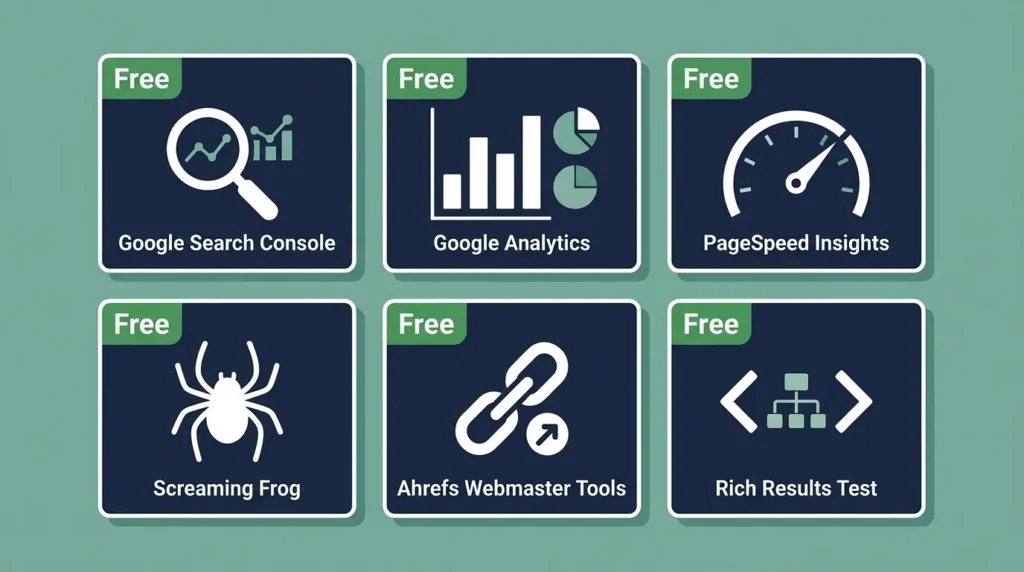
Free SEO Audit Tools — What to Use and How
Running a thorough free SEO audit does not require a paid subscription. These tools provide comprehensive audit coverage at no cost.
Google Search Console (Free — Essential)
Google’s own platform for website owners — provides crawl data, indexation status, search performance (keywords, clicks, impressions, CTR, average position), Core Web Vitals field data, mobile usability issues, manual actions, and security alerts. This is the single most authoritative source of data about how Google sees and ranks your website.
If you have not already, verify your website in Google Search Console at search.google.com/search-console — it is free, and the data it provides is available nowhere else.
Google Analytics 4 (Free — Essential)
Tracks user behavior on your website — sessions, page views, bounce rate, engagement time, conversion completions, and traffic source breakdown. Connect GA4 to Google Search Console for combined organic performance reporting.
The most useful GA4 reports for an SEO audit: organic traffic by landing page (identifying which pages attract organic visitors), engagement rate by page (identifying content quality issues), and conversion rate by traffic source (quantifying SEO’s revenue contribution).
Google PageSpeed Insights (Free — Technical)
Tests any URL for Core Web Vitals performance and provides specific, prioritized optimization recommendations. Tests both mobile and desktop performance. Use it to audit your homepage, primary service or product pages, and your highest-traffic blog posts.
Screaming Frog SEO Spider (Free up to 500 URLs)
The most comprehensive free crawl tool available. Crawl your entire website and export data on title tags, meta descriptions, heading tags, response codes, canonical tags, image alt text, internal links, external links, word count, and dozens of other SEO elements. For websites under 500 pages, the free version provides everything needed for a complete on-page technical audit.
Download at screamingfrog.co.uk/seo-spider — install on a Windows or Mac computer and run it against your domain.
Ahrefs Webmaster Tools (Free for Your Own Domain)
The free version of Ahrefs’ Webmaster Tools provides a site audit, backlink profile data, organic keyword rankings, and broken link identification for domains you verify ownership of. The site audit covers over 100 technical and on-page SEO checks with clear issue classification and fix guidance.
Register at ahrefs.com/webmaster-tools — verify your domain through Google Search Console and access your complete site health report within minutes of the first crawl completing.
Google Rich Results Test (Free — Schema)
Tests any URL for valid structured data and rich result eligibility. After implementing schema markup, use this tool to verify it is correctly formatted and eligible to display in Google’s enhanced search results.
Test at search.google.com/test/rich-results.
Siteliner (Free up to 250 Pages)
Specifically identifies duplicate content, broken links, and page authority distribution within your own website. Particularly useful for identifying pages where significant content is duplicated internally — a common issue on eCommerce sites and websites with multiple location pages.
How to Prioritize SEO Audit Findings
A thorough SEO audit of a medium-sized website typically produces between 50 and 200 individual findings. Without a prioritization framework, the volume of issues is paralyzing — and businesses frequently make the mistake of fixing minor cosmetic issues while leaving high-impact technical problems unresolved.
Prioritize findings using two dimensions: severity and impact.
Priority Classification
Priority 1 — Critical (Fix within 24 to 48 hours)
Issues that are actively preventing rankings or causing significant user harm:
- Entire website blocked by robots.txt
- Noindex tags on important pages
- SSL certificate expired — site showing security warnings
- Manual penalty action in Google Search Console
- Homepage returning error code (4xx or 5xx)
- Google Analytics or Search Console tracking broken — blind to data
Priority 2 — High (Fix within 1 to 2 weeks)
Issues that are significantly reducing ranking potential across multiple pages:
- Core Web Vitals failing on primary pages
- Duplicate title tags across important pages
- Mobile usability errors on key pages
- Redirect chains of three or more hops
- Large volume of 404 errors from external backlinks without redirects
- XML sitemap containing non-canonical or error URLs
Priority 3 — Medium (Fix within 1 month)
Issues that reduce individual page performance or represent missed opportunities:
- Missing meta descriptions on important pages
- Images without alt text across high-traffic pages
- Thin content pages receiving organic traffic
- Internal orphan pages with no inbound links
- Schema markup missing from key page types
Priority 4 — Low (Address in quarterly content/SEO review)
Improvements that incrementally strengthen long-term performance:
- Content freshness updates on dated but still-ranking posts
- Additional internal links between related content
- Schema markup expansion to additional page types
- Minor image optimization remaining after initial audit
- NAP consistency in lower-priority directory listings
How to Fix the Most Common SEO Audit Issues
Understanding what issues exist is the first half of an audit. Knowing how to fix them is what turns audit data into ranking improvement.
Fixing Crawl Errors
4xx errors (page not found): Create a 301 redirect from the old URL to the most relevant existing page. If the page was deleted intentionally and has no relevant replacement, leave it as a 404 — do not redirect to the homepage as a catch-all.
5xx errors (server errors): Investigate hosting server health. 500 errors typically indicate server-side script failures; 503 errors indicate server overload or maintenance mode.
Blocked by robots.txt: Edit your robots.txt file to remove the blocking rule for any important page or directory. Always test changes in Google Search Console’s robots.txt tester before saving.
Fixing Duplicate Content
Implement canonical tags — <link rel="canonical" href="https://yourdomain.com/preferred-url/"> — on any page that has near-duplicate versions. The canonical tag tells Google which version is the authoritative one to index and rank.
For WWW vs non-WWW duplication: implement a server-level 301 redirect so one version permanently redirects to the other. Canonical tags alone are insufficient for this issue.
Fixing Thin Content
The correct fix for a thin content page depends on its purpose. If the page should be comprehensive but is not, expand it — add more substantive information, examples, FAQs, and supporting detail until it genuinely answers the user’s query better than competing pages.
If the page is thin because its purpose is genuinely limited (a simple contact page, a basic thank-you page), apply a noindex tag and remove it from your sitemap — preventing it from diluting your site’s overall content quality signal.
Fixing Missing Alt Text
Add descriptive alt text to every image missing it. Alt text should describe what the image shows — not stuff keywords. “SiteNova Agency team reviewing an SEO audit report in a Lahore office” is appropriate. “SEO SEO audit SEO Pakistan” is keyword stuffing that can trigger a penalty.
Fixing Slow Page Speed
Image optimization is the highest-impact single action for most Pakistani business websites. Compress all images using ShortPixel or Imagify (both have WordPress plugins), convert to WebP format, and implement lazy loading for below-fold images.
For persistent speed issues after image optimization, the most common remaining causes are: unoptimized hosting (upgrade or switch providers), excessive plugins (deactivate and delete everything unused), or render-blocking JavaScript (configure your caching plugin to defer non-critical scripts).
How Often Should You Run an SEO Audit?
The frequency of SEO audits should match the pace at which your website changes and the competitive intensity of your market.
| Audit Type | Recommended Frequency | What Triggers It |
|---|---|---|
| Full technical crawl | Monthly | Calendar schedule |
| Google Search Console review | Weekly | Alerts and ranking monitoring |
| Content audit | Quarterly | Content publication volume |
| Backlink audit | Quarterly | Link building activity |
| Competitor analysis | Quarterly | Market monitoring |
| Local SEO audit | Monthly | Google Business Profile updates |
| Post-launch audit | Within 2 weeks of any major site change | Site updates, redesigns, migrations |
The post-launch audit after any significant website change is the most commonly skipped and the most important. Every website redesign, platform migration, major content restructuring, or theme change introduces potential technical issues — broken redirects, accidental noindex tags, missing canonical tags — that require immediate verification.
For businesses that have recently completed a website redesign, the website redesign guide covers the complete post-launch monitoring process that protects SEO equity through the transition period.
Free SEO Audit vs Professional SEO Audit
A free SEO audit using the tools described in this guide provides genuine, actionable diagnostic value. But it has limitations that professional audits address — and understanding the difference helps businesses decide when self-service is appropriate and when professional expertise adds meaningful value.
| Factor | Free SEO Audit | Professional SEO Audit |
|---|---|---|
| Cost | Free | PKR 30,000 – 150,000+ |
| Tools used | Free tier tools | Professional paid platforms |
| Data depth | Good for surface issues | Comprehensive — historical data, advanced analysis |
| Interpretation | Requires SEO knowledge | Expert analysis and context |
| Prioritization | Based on generic guidelines | Tailored to your specific situation |
| Competitor analysis | Limited | In-depth, multi-competitor |
| Action plan | Self-generated | Detailed, sequenced recommendations |
| Implementation support | None | Often included or available |
| Time to complete | 4 to 8 hours | 2 to 5 days |
| Best for | Regular monitoring, initial diagnosis | Before major investment, after ranking drops, pre-redesign |
A professional SEO audit makes most sense when you are about to invest significantly in SEO, have experienced a significant unexplained ranking drop, are planning a website redesign or platform migration, or need a competitive analysis that quantifies the gap between your site and market leaders in your specific Pakistani market.
The free audit guides you to the obvious issues. A professional audit finds the non-obvious ones — the subtle interaction between technical factors, the backlink profile risk you would not notice without historical data, the content quality pattern suppressing your entire domain’s rankings.
Getting a Free SEO Audit from SiteNova Agency
SiteNova Agency offers a professional website SEO audit for Pakistani businesses — reviewing technical health, on-page optimization, content quality, backlink profile, and local SEO signals — with a detailed findings report and prioritized action plan.
Our audit process covers every dimension described in this guide, using professional-grade tools including Ahrefs, SEMrush, Screaming Frog, and Google Search Console data analysis, combined with manual expert review of your most important pages.
What you receive from a SiteNova Agency SEO audit:
A complete site health report covering technical, on-page, content, and backlink findings — categorized by priority with specific URLs identified for each issue.
Competitor comparison showing where your site stands relative to your top three organic search competitors in your target Pakistani market or industry.
A prioritized action plan — specific recommendations in the sequence that will produce the fastest ranking improvement, with implementation guidance for each fix.
A content gap analysis showing keyword opportunities your competitors rank for that your site is not targeting.
Local SEO review for businesses targeting Pakistani cities — Google Business Profile, NAP consistency, and local citation audit.
To request your website’s SEO audit, contact SiteNova Agency through our SEO Services page. Our team will review your website and deliver findings within five business days.
Frequently Asked Questions About Free SEO Audits
Q: What is a free SEO audit and what does it cover?
A free SEO audit is a systematic evaluation of your website using no-cost tools — primarily Google Search Console, Google Analytics, Google PageSpeed Insights, Screaming Frog (free up to 500 URLs), and Ahrefs Webmaster Tools — to identify technical issues, on-page optimization gaps, content quality problems, and backlink profile weaknesses that are reducing your search rankings. A comprehensive free audit covers crawlability, indexation, page speed, mobile usability, meta tags, heading structure, content quality, duplicate content, keyword cannibalization, and basic backlink health.
Q: How do I do a free SEO audit on my website?
Start with Google Search Console — check the Coverage report for crawl and indexation errors, the Core Web Vitals report for performance failures, and the Mobile Usability report for device-specific issues. Then run a Screaming Frog crawl of your site and export title tags, meta descriptions, heading tags, and response codes to identify missing, duplicate, or over-length on-page elements. Run your primary pages through Google PageSpeed Insights for Core Web Vitals data. Use Ahrefs Webmaster Tools for backlink profile review. Compare results against your competitors using Ahrefs’ Content Gap tool.
Q: How long does an SEO audit take?
A self-conducted free audit of a small website (under 50 pages) takes 3 to 4 hours if you work through each area systematically. A medium site (50 to 200 pages) takes 6 to 8 hours for a thorough review. A professional audit of the same sites takes 2 to 5 days because the analysis goes deeper — historical data comparison, multi-competitor analysis, and expert interpretation of interconnected issues that self-service tools surface but cannot contextualize.
Q: What is the most important thing to check in an SEO audit?
Crawlability is the first and most critical check — if Google cannot crawl your pages, nothing else matters. After confirming crawlability, check indexation (are important pages actually in Google’s index?), then Core Web Vitals (is page speed causing ranking penalties?), then title tags and meta descriptions (are pages sending clear topic signals?), then content quality (are any pages thin or duplicate?), then backlinks (is the link profile healthy or potentially harmful?).
Q: How often should I do an SEO audit?
A full technical crawl using Screaming Frog should be run monthly. Google Search Console should be reviewed weekly — it alerts you to manual actions, security issues, and significant indexation changes. A comprehensive content and backlink audit should happen quarterly. Always run a full audit within two weeks of any significant website change — redesign, platform migration, theme update, or major content restructuring.
Q: Can a free SEO audit show me why my rankings dropped?
Often yes — the most common causes of ranking drops are visible in free audit data. A sudden drop following a website change is often caused by technical issues (broken redirects, accidental noindex tags, robots.txt blocking) that Screaming Frog and Search Console identify clearly. A gradual drop over months is more commonly caused by content quality issues (Helpful Content system impact), increasing competitor authority (visible in backlink comparison), or algorithm updates that shifted ranking requirements for specific query types. For complex unexplained drops, a professional audit with historical data access typically identifies root causes that free tools cannot diagnose with confidence.
Q: What should I do after completing an SEO audit?
Classify all findings by priority (critical, high, medium, low) using the framework in this guide. Fix all critical issues within 48 hours. Create a scheduled plan for high and medium priority items. Submit updated pages and sitemaps to Google Search Console after fixes are implemented. Re-audit affected areas within 4 to 6 weeks to confirm issues are resolved and monitor for ranking recovery. Set up regular audit schedules to prevent the same issues from recurring undetected.
Conclusion
A free SEO audit is the most rational first step before any investment in SEO — because it tells you exactly where to focus effort for maximum impact. Without audit data, SEO improvements are chosen by intuition. With audit data, they are chosen by evidence — the specific technical issues, content weaknesses, and authority gaps that are measurably holding your rankings below where they should be.
The tools exist, the process is documented in this guide, and the findings from even a basic audit using Google’s own free platforms will reveal improvements that produce real ranking movement when addressed. The only remaining step is to run it.
For Pakistani businesses that want professional audit expertise rather than a self-service process, SiteNova Agency conducts full website SEO audits with detailed findings reports and implementation support. Visit our SEO Services page to discuss your website and what a professional audit would reveal.
Published by SiteNova Agency — Digital Marketing Agency in Lahore, Pakistan | sitenovaagency.com